
Now a quick note on money figures. Shopify changes its prices and offers several times a year, and the figures below were checked on October 15, 2026. Check the linked Shopify page before you pay anything. We recheck these figures every month.
Quick picks
What do free trial, promotional price and the other words mean?
So Shopify's screens and help pages use a few words that a first-time seller may not know. Here is what each one means.
- Free trial is the first stretch where you can build a store and pay nothing. Shopify's free trial lasts 3 days.
- Promotional price is a lower price Shopify charges for a set time. Here, the promotional price is $1 a month for 3 months.
- Standard price is the regular monthly price a plan costs after the promotional price ends.
- Billing cycle is how often Shopify charges you for a plan. Monthly billing charges once a month. Yearly billing charges for a whole year at once.
- Renews is the word Shopify uses on the card screen for the day the standard price starts.
- Deactivate means closing your Shopify account for a store. Shopify's cancel button deactivates a store.
- Pause means keeping the store but turning checkout off, at a lower monthly fee. Shopify's Pause and Build plan pauses a store.
How many days is Shopify's free trial?
So the free trial is 3 days. Shopify's pricing page says the signup starts with a free 3-day trial and no credit card is required, checked October 15, 2026. The 3-day length is a Shopify rule, and it applies to whichever plan you try: Basic, Grow or Advanced.
Something to note is when the clock starts. Shopify's free trial help page says the trial begins when you first sign up, not when you start working on your store.
- Shopify doesn't extend the trial. The help page says extending the free trial isn't possible. The help page also says Shopify doesn't extend or reset promotional pricing.
- The length can differ. The help page says trial length and pricing can change and might vary by store location. All the figures on this page are for a US store.
- Stores built through an AI tool or a vibe code partner get a different trial. The help page says that trial is currently 4 months. A normal signup on shopify.com doesn't get that.
What does "Extend your trial for $1" on Shopify's pricing page mean?
Basically, "Extend your trial for $1" is Shopify's name for the $1 offer. On the pricing page, the line sits between "3 days free" and "Earn up to $10,000 in credits," with arrows between the three. The wording doesn't give you more free days, because the help page says the free trial can't be extended. "Extend your trial for $1" means the $1 months.
What do the Shopify signup screens look like, in order?
So here is the signup as it appeared in a screen recording of a US signup from September 2026. The screens come from the video embedded further down. Your dates will differ, because the dates follow the day you sign up.
Step 1. What is the first screen?
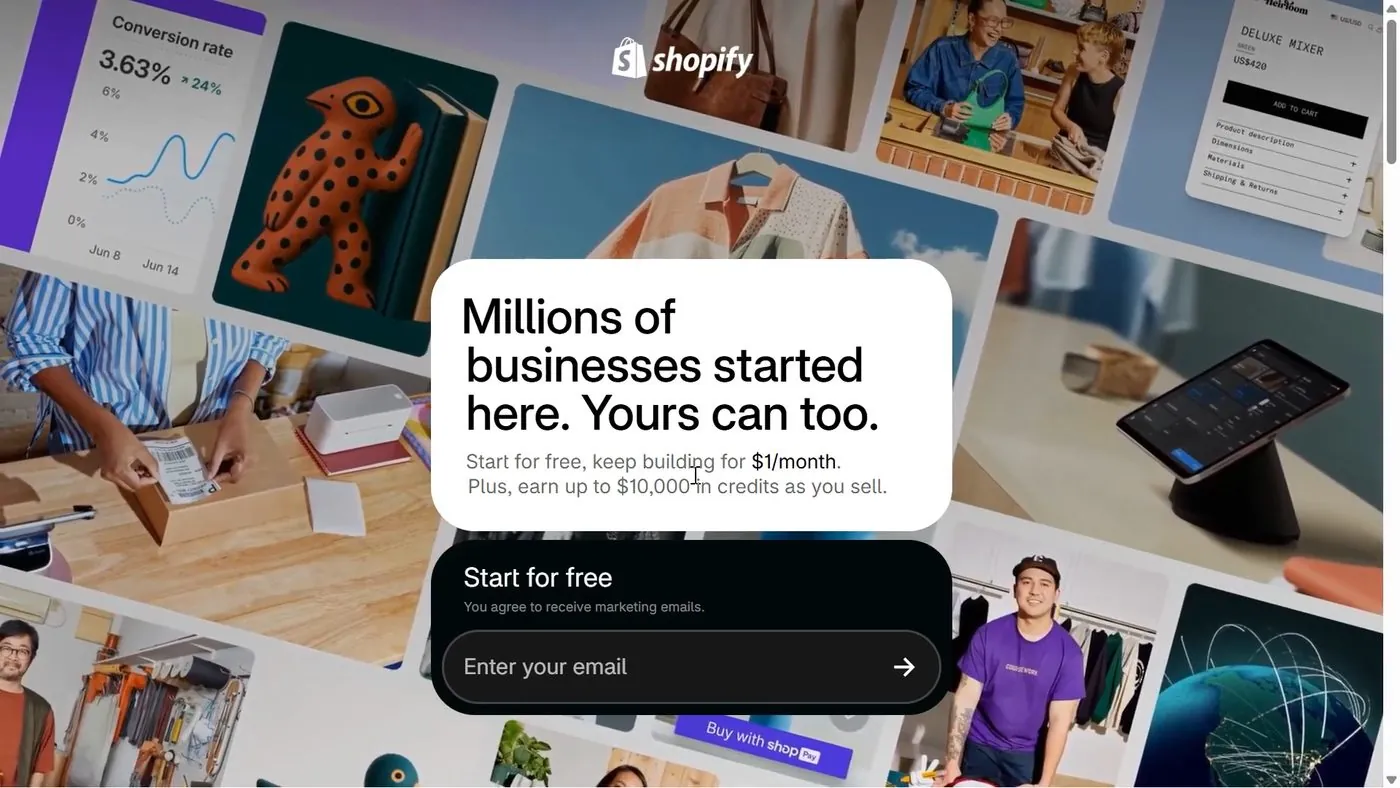
The first screen is Shopify's home page. The page says "Start for free, keep building for $1/month," and has a box for your email address with an arrow button.
Step 2. What does the password screen say?
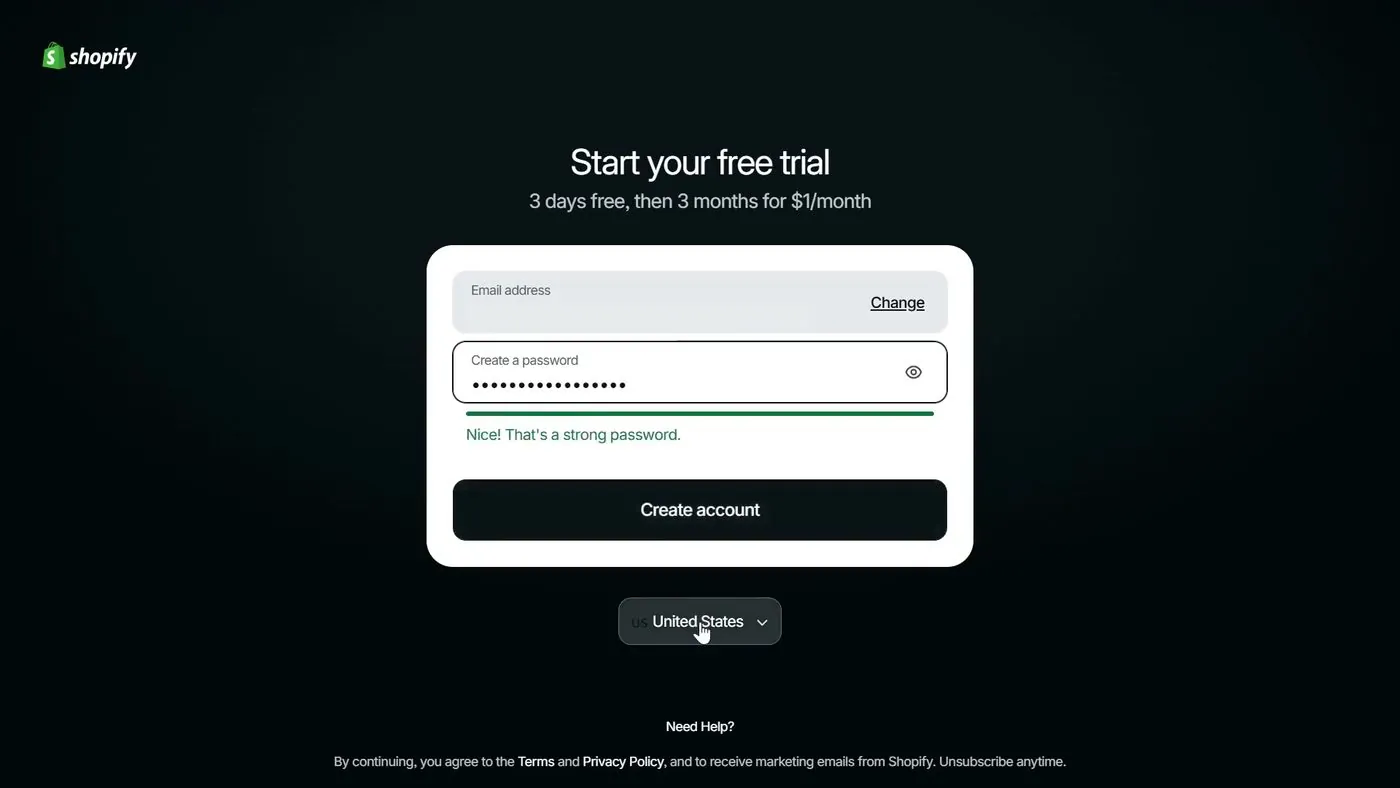
After you enter an email address, the next screen is titled "Start your free trial." Under the title, the screen says "3 days free, then 3 months for $1/month."
You type a password and press the black Create account button. A country menu sits below the box, and the menu showed United States. At the bottom, Shopify says that by continuing you agree to its Terms and Privacy Policy and to receive marketing emails from Shopify. Shopify adds "Unsubscribe anytime."
Does Shopify ask for a credit card when I sign up?
So the answer is both yes and no. Shopify's pricing page says "no credit card required." The claim is true, because the card screen can be skipped. But right after you press Create account, the screen you see is a card form.
Step 3. What is on the card screen, and where is the Skip button?
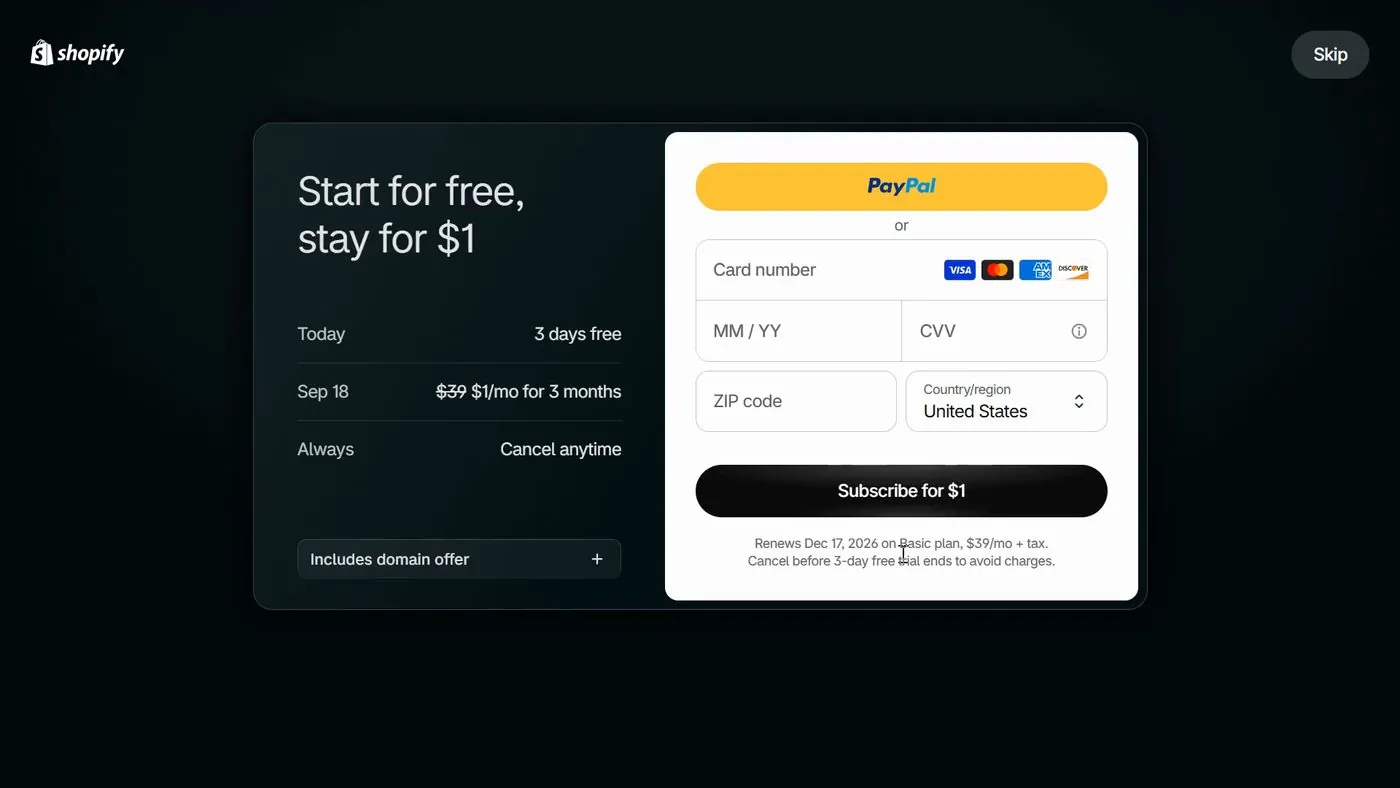
The screen is titled "Start for free, stay for $1." The left side has three rows, and the right side has the payment form.
- Today: "3 days free."
- Sep 18: "$39" crossed out, then "$1/mo for 3 months." Sep 18 was 3 days after that signup, so your own date will be different.
- Always: "Cancel anytime."
- A closed box called "Includes domain offer," with a plus sign. The screen doesn't show what the domain offer includes.
- The payment form has a yellow PayPal button, then boxes for card number, expiry date, security code and ZIP code, and a country menu.
- A black button reading "Subscribe for $1."
- A Skip button sits in the top right corner of the screen.
Basically, Skip lets you into the Shopify admin without picking a plan or entering a card. Subscribe for $1 is the button that picks a plan with your payment details.
What does the fine print under the Subscribe for $1 button say?
So the fine print is the most important line on the screen, and here it is word for word. Under the button, the card screen says: "Renews Dec 17, 2026 on Basic plan, $39/mo + tax. Cancel before 3-day free trial ends to avoid charges."
Now the date in that line came from one signup in September 2026. Yours will follow your own signup day. The wording is what matters, and the wording says three things.
- The plan the form is set up for is Basic.
- The standard price starts at $39 a month plus tax.
- If you enter a card, you cancel before the 3-day trial ends to avoid charges.

Step 4. What comes after the card screen?
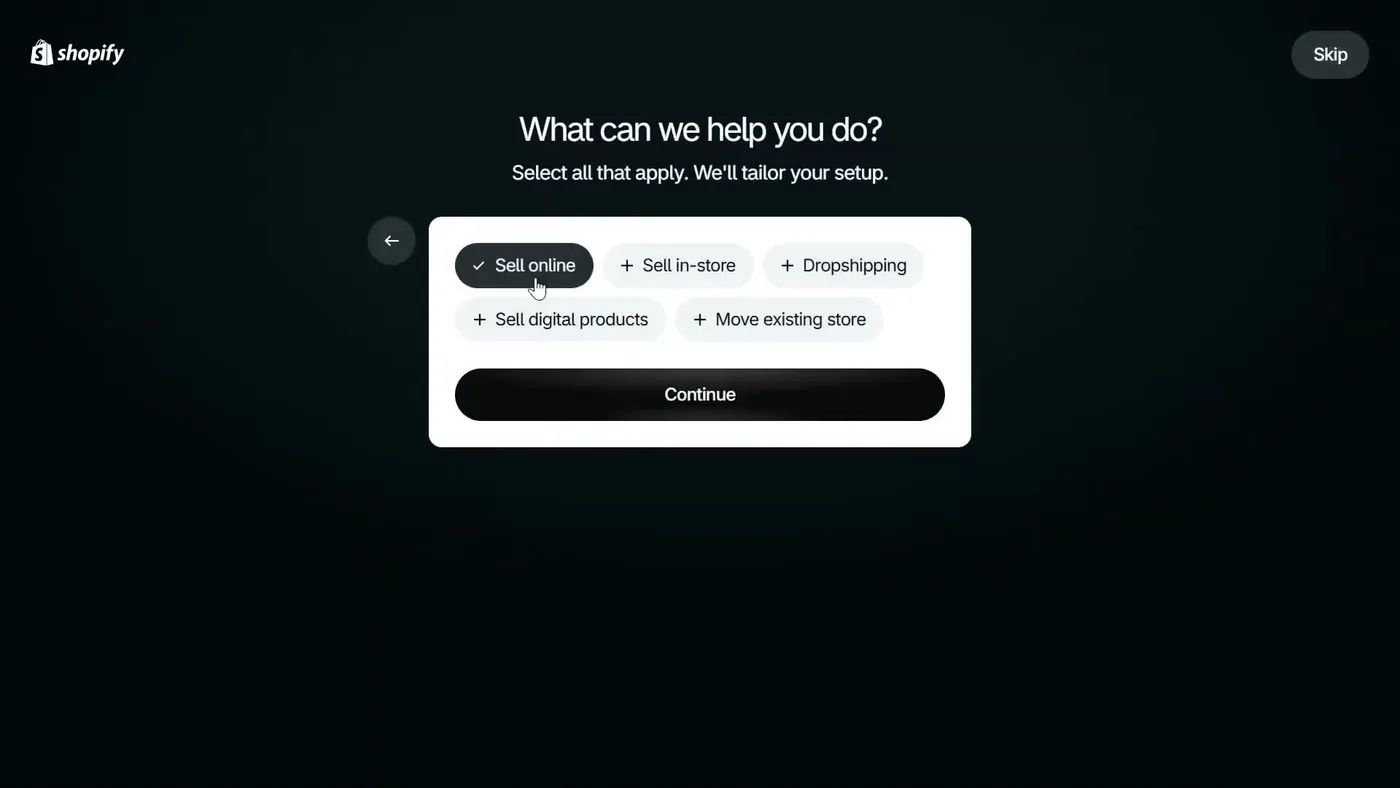
The next screen asks "What can we help you do?" and says "Select all that apply. We'll tailor your setup." The choices are Sell online, Sell in-store, Dropshipping, Sell digital products and Move existing store. The screen has a Continue button and its own Skip button.
Step 5. What does the Shopify admin look like during the trial?
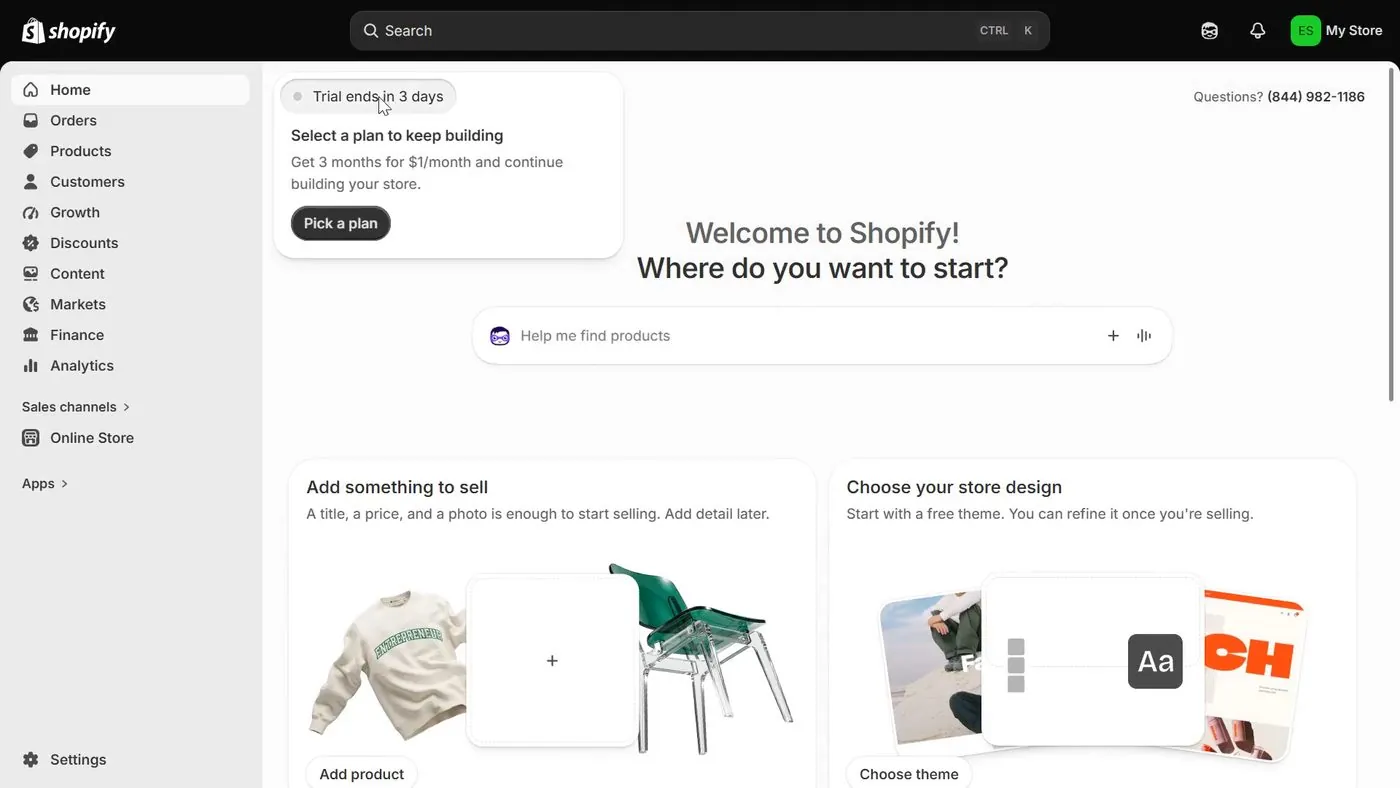
Then you land on the Shopify admin, which is the control screen for your store. The admin says "Welcome to Shopify! Where do you want to start?" Near the top of the page, a note says "Trial ends in 3 days."
At the bottom of the left menu, a black box repeats "Trial ends in 3 days" and says "Subscribe for $1." The box holds a white Select a plan button.
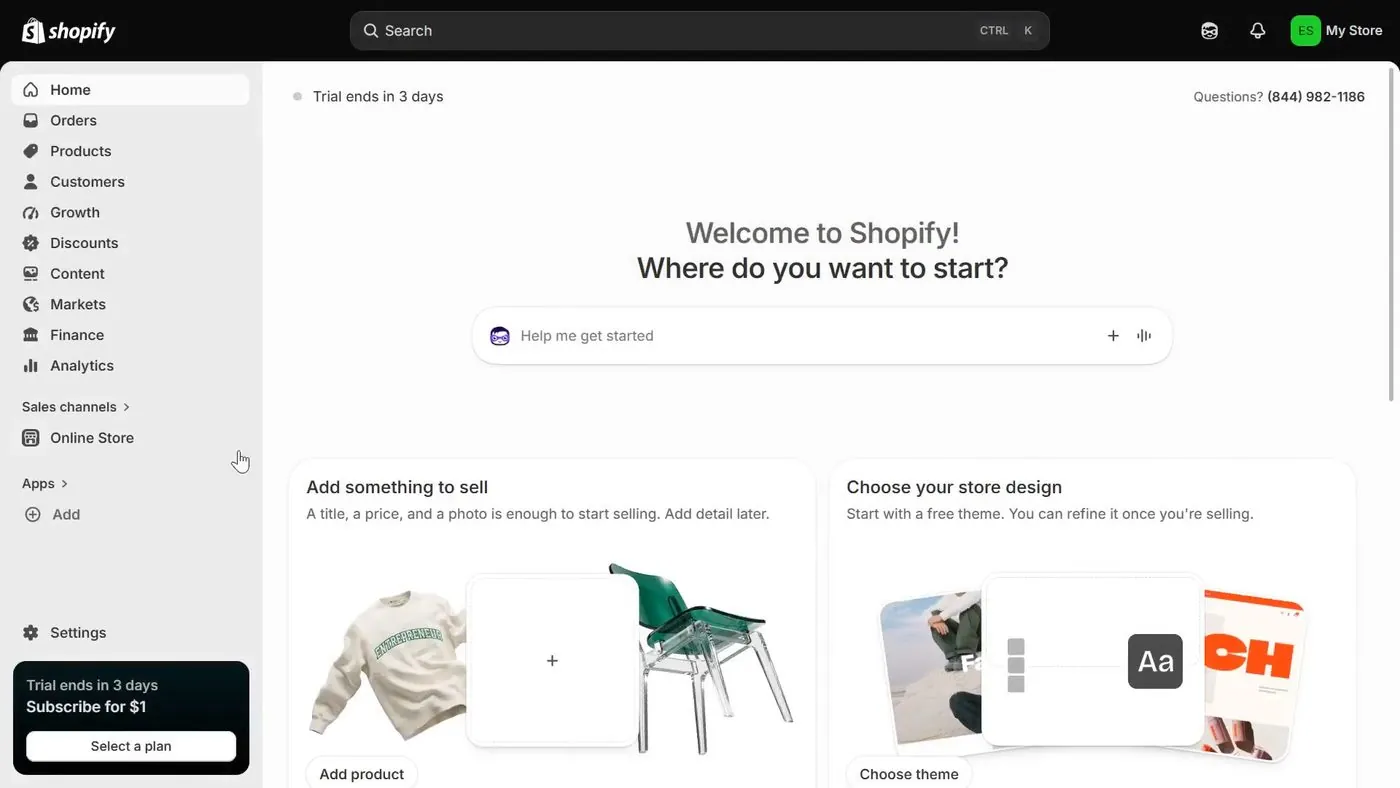
Something to note is that Shopify's help page says a store on a free trial starts in private mode, or with checkout switched off. So customers can't buy until you pick a paid plan or turn private mode off.
What happens at the end of the 3 days?
So there are two cases, and which one you are in depends on one thing. Did you pick a plan or enter a card during the trial?
- You never picked a plan or entered a card. Nothing happens to your money. Shopify's help page says that if you don't select a monthly plan by the end of the trial, your store is paused until you choose a paid plan. Your products and settings are kept.
- You picked a plan or pressed Subscribe for $1. Shopify's help page says charges start after the free trial ends. Nothing cancels itself. To stop the paid plan, you press Cancel trial before the 3 days run out. The steps are below.
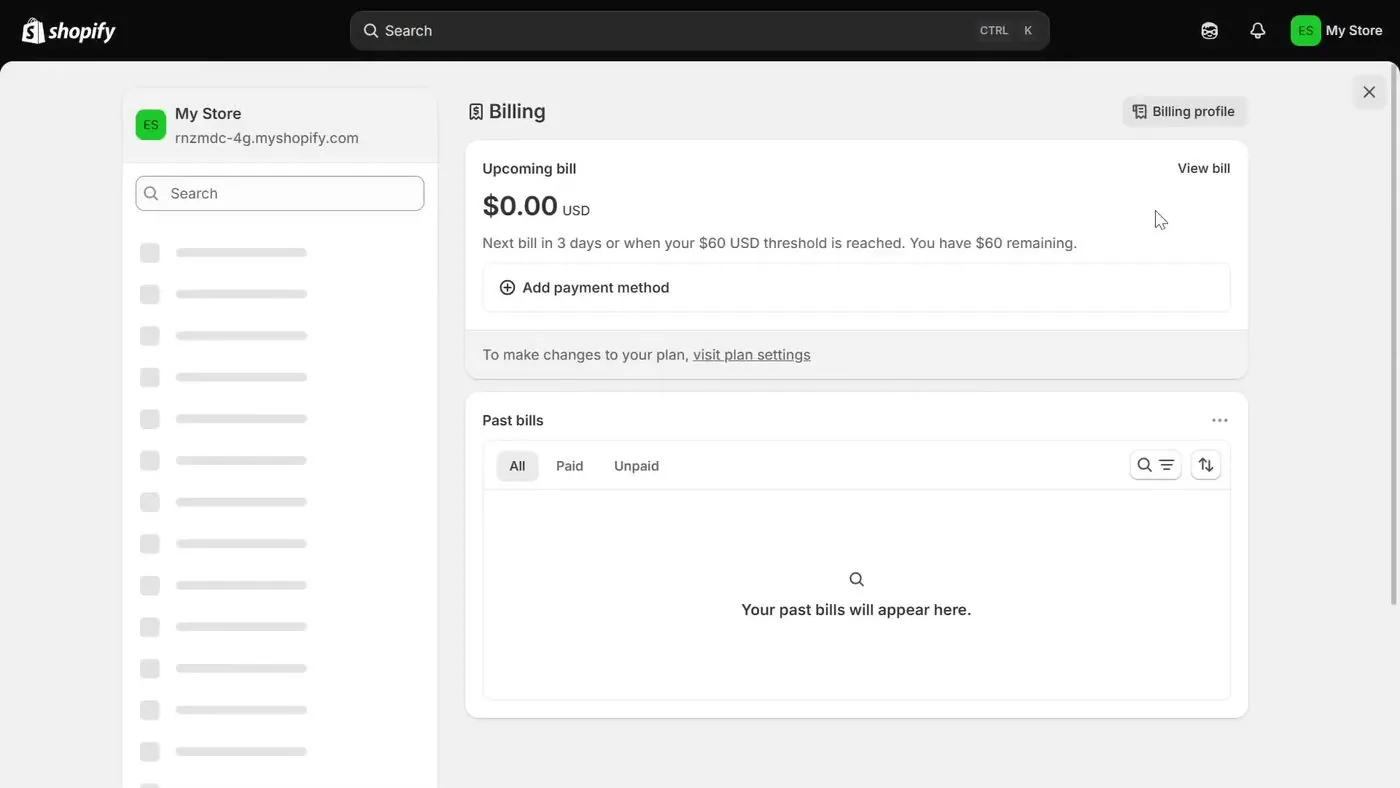
Now on the Billing screen, the admin shows what Shopify has on file. After the card screen was skipped, the recording shows Settings, then Billing, with "Upcoming bill" at $0.00 USD and a button called "Add payment method." So no card was saved.
Which plans get the $1 price, and what does the plan picker show?
So the $1 price covers three plans: Basic, Grow and Advanced. Shopify's free trial help page lists those three as the plans you can try, and the pricing page says "most plans" start at $1.
Step 6. What is the Subscribe for $1 pop-up?
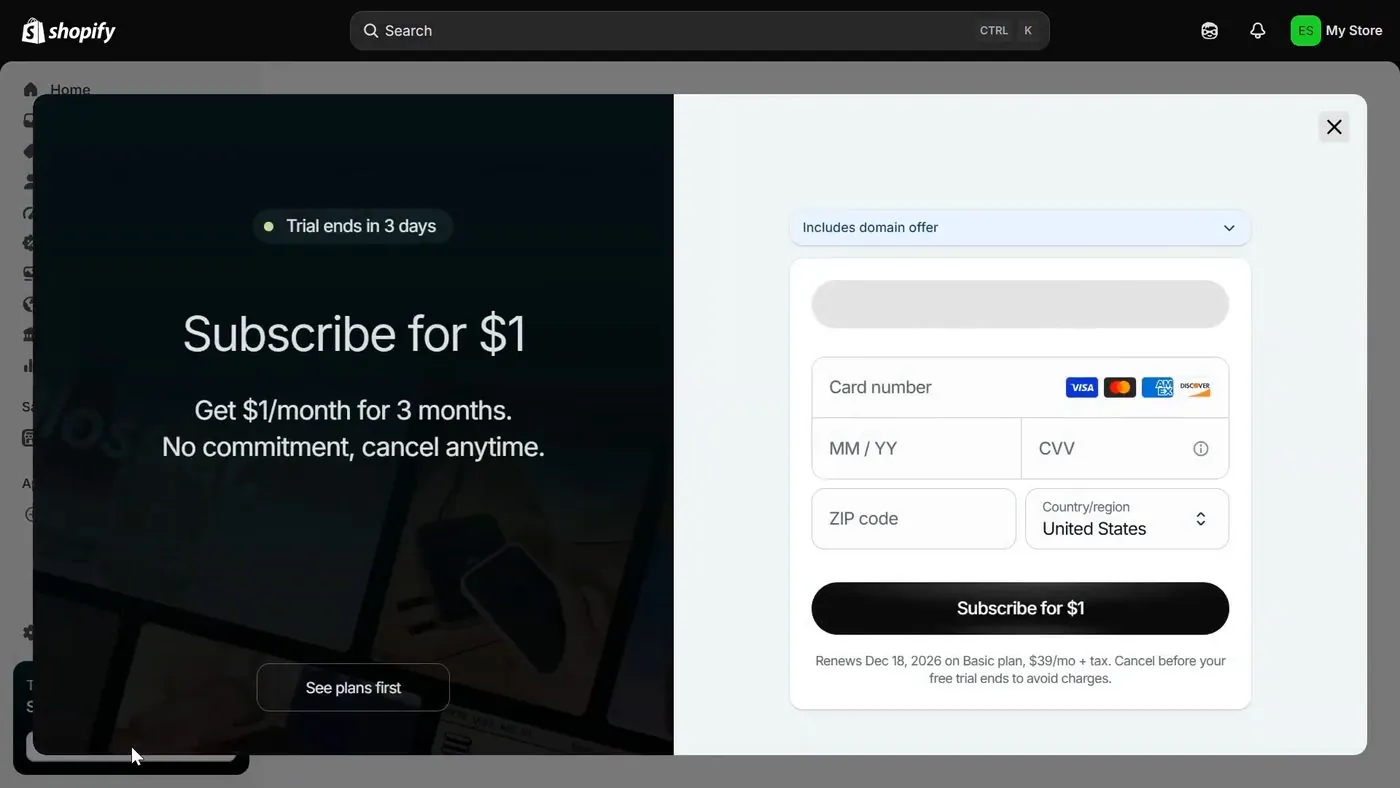
If you press Select a plan, a pop-up opens. The pop-up says "Subscribe for $1" and under that "Get $1/month for 3 months. No commitment, cancel anytime." A button called See plans first sits below.
The right side has the card form again, with the "Includes domain offer" box above it. The fine print under the Subscribe for $1 button reads: "Renews Dec 18, 2026 on Basic plan, $39/mo + tax. Cancel before your free trial ends to avoid charges." The pop-up has a close X in the top right corner.
Step 7. What does the "Plans starting at $1" screen show?
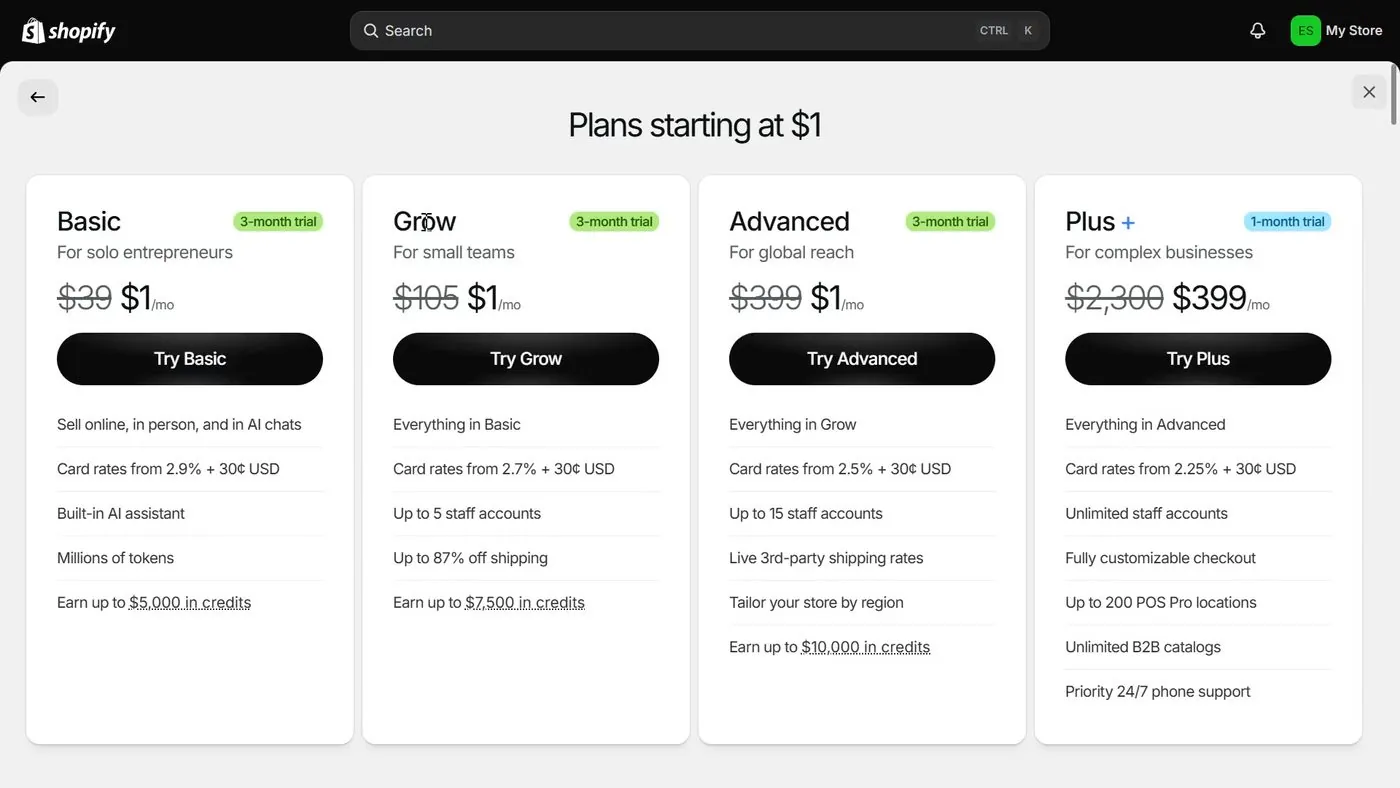
Press See plans first, and Shopify shows four plan cards under the title "Plans starting at $1." Each card has a button that starts with "Try."
| Plan card | Label on the card | Price on the card | Card rate line on the card |
|---|---|---|---|
| Basic, "For solo entrepreneurs" | 3-month trial | $39 crossed out, then $1/mo | Card rates from 2.9% + 30¢ USD |
| Grow, "For small teams" | 3-month trial | $105 crossed out, then $1/mo | Card rates from 2.7% + 30¢ USD |
| Advanced, "For global reach" | 3-month trial | $399 crossed out, then $1/mo | Card rates from 2.5% + 30¢ USD |
| Shopify Plus, "For complex businesses" | 1-month trial | $2,300 crossed out, then $399/mo | Card rates from 2.25% + 30¢ USD |
The plan picker showed these figures in September 2026. The figures match Shopify's pricing page, checked October 15, 2026, where Basic is $39 a month, Grow is $105 and Advanced is $399 on monthly billing. The pricing page lists Plus as "from $2,300/mo" with a button reading "Try for $399." Shopify sometimes shows different visitors different prices for Grow and Advanced, so check Shopify's pricing page for yours.
So the Plus card is not a $1 deal. Plus is $399 for one month, according to the screen, and then the Plus price. And Shopify's plan changes help page says that if you switch to a plan the promotion doesn't cover, such as Plus, the promotional price doesn't apply to the new plan.
What if I close the pop-up without picking a plan?
Then the admin keeps nudging you. On the admin home, a card says "Select a plan to keep building." Under that, the card says "Get 3 months for $1/month and continue building your store." The button is called Pick a plan. Nothing is charged unless you pick a plan.
Who is eligible for the $1 price?
So Shopify's help page says promotional pricing is only for "eligible merchants on eligible plans." Shopify doesn't publish a list of who is left out.
Shopify Community, the forum where sellers and Shopify staff post, has replies on who qualifies. One reply dated July 21, 2026 says you need to create a new store because the promotion isn't accepted on an old store. The reply is an owner report from one seller who isn't a Shopify employee, and Shopify's pages don't confirm it.
What do I pay after the 3 months at $1?
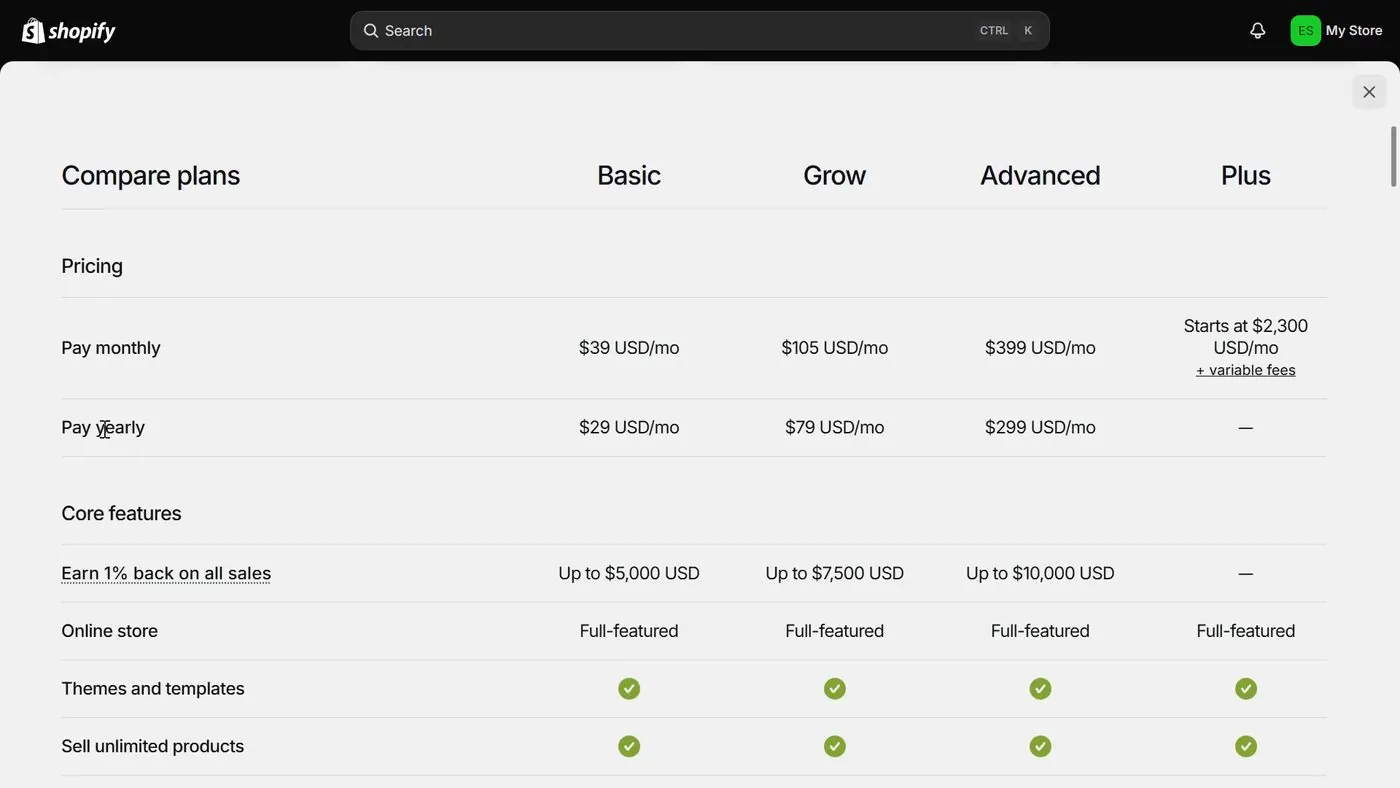
So after the 3 months, the standard price starts. The card screen says "$39/mo + tax" for Basic. Shopify's pricing page lists the standard prices below, all checked October 15, 2026.
| Plan | $1 months | Standard price, paid monthly | Standard price, paid yearly (per month) |
|---|---|---|---|
| Basic | $1 a month for 3 months | $39 | $29 |
| Grow | $1 a month for 3 months | $105 | $89 |
| Advanced | $1 a month for 3 months | $399 | $359 |
The prices are in US dollars for a US store, before tax, and are from Shopify's pricing page. The screen says "+ tax," and Shopify doesn't say how much. The amount depends on where you live. This page is general information, so ask your state's tax office or an accountant about the tax you'll owe. And Shopify sometimes shows different visitors different prices for Grow and Advanced, so check Shopify's pricing page for yours.
What does the first year cost on each plan with monthly billing?
Here is the math so you can redo it. The math uses the monthly standard prices from the table above, checked October 15, 2026, and leaves out tax, apps and a domain name. Months 1 to 3 cost $1 each. Months 4 to 12 are 9 months at the standard monthly price.
| Plan | Months 1 to 3 | Months 4 to 12 | First 12 months | Same 12 months with no $1 offer |
|---|---|---|---|---|
| Basic | 3 x $1 = $3 | 9 x $39 = $351 | $354 | 12 x $39 = $468 |
| Grow | 3 x $1 = $3 | 9 x $105 = $945 | $948 | 12 x $105 = $1,260 |
| Advanced | 3 x $1 = $3 | 9 x $399 = $3,591 | $3,594 | 12 x $399 = $4,788 |
So on Basic, the $1 offer saves $114 in the first year, which is 3 x ($39 minus $1). And if you try Basic for the 3 months and then cancel, Basic's cost is $3 plus tax.
Keep in mind that apps cost extra. Shopify's free trial help page says app subscription or usage charges from apps you install during the trial go on your first invoice after the trial ends. A domain name bought through Shopify is a separate cost, too.
What do card fees add once I make sales?
Now the monthly plan price isn't the only cost once customers pay. Shopify takes a card fee on each online sale. Shopify's pricing page lists 2.9% + 30¢ for Basic, checked October 15, 2026. The full bill is on the real monthly cost page.
These are examples of the card fee math, not a guess at your sales. The assumptions are Basic, a US store, online card sales at 2.9% + 30¢ and an average order of $50. The card fee is 2.9% of sales plus 30¢ for each order.
| Sales in a month | Orders | Card fees | Total in a $1 month | Total after the $1 months |
|---|---|---|---|---|
| $1,000 | 20 | $29 + $6 = $35 | $1 + $35 = $36 | $39 + $35 = $74 |
| $3,000 | 60 | $87 + $18 = $105 | $1 + $105 = $106 | $39 + $105 = $144 |
| $5,000 | 100 | $145 + $30 = $175 | $1 + $175 = $176 | $39 + $175 = $214 |
Does yearly billing cancel the $1 months?
So here, Shopify's help page and one seller disagree, and I'll give you both. Basically, yearly billing means you pay for 12 months at once, at a lower price per month.
What Shopify's help page says. Shopify's plan changes page, checked October 15, 2026, says the change from monthly to annual billing "takes effect after the promotional trial ends." During the promotional months, you keep paying the promotional price each month. Then, in Shopify's words, "the annual billing cycle starts and you're charged the full annual amount upfront."
So on Shopify's word, yearly billing doesn't remove the $1 months. Yearly billing means that when month 4 starts, Shopify charges the whole year at once.
What one owner reports. A poster in a Shopify Community thread wrote on July 20, 2026 that switching to annual billing during the promotion loses the $1 rate right away. The poster also wrote that the $1 applies to monthly billing only. The post is an owner report from one poster who isn't a Shopify employee. Shopify's pages don't confirm the claim, and the help page says the opposite.
Now here is what the yearly charge would be on Basic, Grow and Advanced, using the yearly prices from Shopify's pricing page, checked October 15, 2026.
| Plan | Yearly price per month | Charged at once when yearly billing starts | Same 12 months paid monthly | Yearly saves |
|---|---|---|---|---|
| Basic | $29 | 12 x $29 = $348 | 12 x $39 = $468 | $120 |
| Grow | $89 | 12 x $89 = $1,068 | 12 x $105 = $1,260 | $192 |
| Advanced | $359 | 12 x $359 = $4,308 | 12 x $399 = $4,788 | $480 |
So if a $348 charge shows up on a Basic store, yearly billing is the likely reason. Shopify's pricing page shows the yearly price first, which is why $29 looks like the headline number. The $39 on the card screen is the monthly price.
And Shopify's billing cycles page says a switch from yearly back to monthly takes effect at the end of your current billing cycle. So a yearly payment can't be undone halfway through the year.
When does the first $1 come out of my card?
So the screens and Shopify's help page point to the end of the trial. On the card screen, the Today row says "3 days free." The next row, dated 3 days later, says "$1/mo for 3 months." Shopify's help page says charges only start after the trial ends, if you pick a plan during the trial.
But one owner reports otherwise. A poster in a Shopify Community thread dated January 30, 2025 says the poster deleted everything and deactivated on day 2 of the trial and still got a $1 charge. The post is an owner report from one poster, and the thread has no answer from Shopify staff.
Something to note is that the Subscribe for $1 screen doesn't say whether $1 is taken when you press the button or only on the date in the second row. Shopify's pages don't say either way.
How do I cancel the Shopify free trial before I'm charged?
So the first question is which case you are in. The answer decides whether you need to do anything.
Case 1. I never picked a plan or entered a card
You don't need to do anything. Shopify's free trial help page says that if you cancel during the trial without selecting a pricing plan, no action is required and your account is frozen. After the 3 days, your store pauses until you choose a paid plan. The help page says your store data, products and settings are preserved.
Case 2. I pressed Subscribe for $1 or picked a plan
Then you cancel yourself, before the 3 days end. Shopify's deactivate store help page, checked October 15, 2026, gives these steps on a computer. Only the store owner can do the steps, because Shopify Support can't deactivate a store for you.
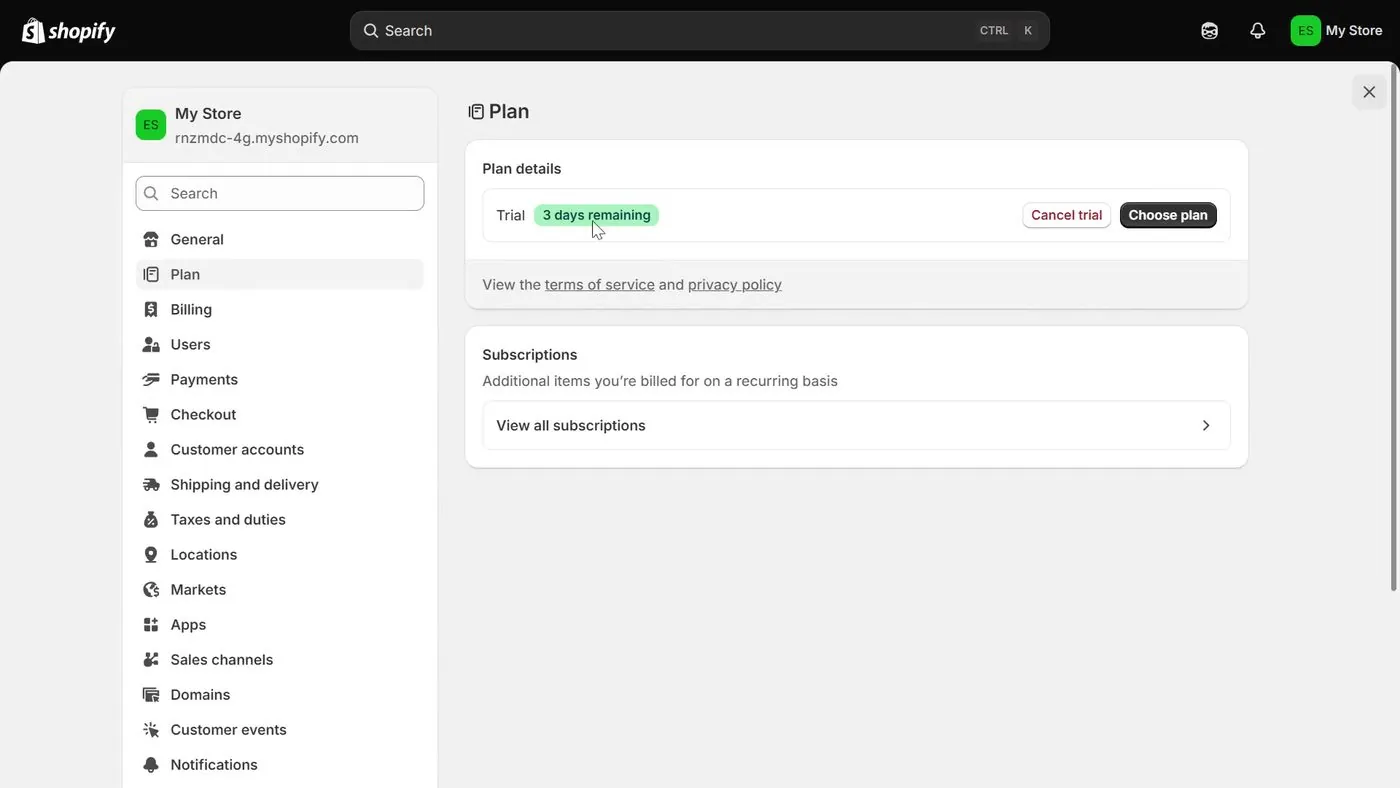
- In your Shopify admin, click Settings at the bottom of the left menu, then click Plan.
- In the Plan details box, click the Cancel trial button, which has red lettering. The button sits next to the black Choose plan button. On a paid plan, the same button reads Cancel plan.
- Shopify may show other options, such as downgrading, switching to the Pause and Build plan or starting a new store. Read the options.
- Check the list of Shopify-managed domains and the pending charges. Then choose Cancel my plan and uninstall all apps and click Continue.
- Select a reason for the cancellation. You can add a comment. Click Continue.
- You can tick Save payment details to reopen your store faster. Leave the box empty if you don't want Shopify to keep your card details.
- Type your password and click Cancel trial.
The same page says Shopify then emails you to confirm the store is deactivated. The mobile app has the same path: Settings, Plan, Cancel trial.
What happens to my store after I cancel?
- Your store information is kept for 2 years. Shopify's help page says that if you reactivate within 2 years, you can reopen the store without rebuilding it.
- The address isn't reusable. You can't use the same myshopify.com address for a different new store.
- Apps are removed and pending charges are billed. Shopify uninstalls all apps and charges any pending app usage, transaction fees and shipping label charges.
- A Shopify domain can still renew. The help page says domain renewals aren't canceled when you cancel the store. Transfer the domain or turn off auto-renew first. For a domain bought elsewhere, turn off auto-renew at the company you bought it from.
- Shopify asks for two-step sign-in. Canceling needs you to pass any two-step sign-in check, and the help page has recovery steps if you lost your phone.
Can I pause the store instead of canceling?
Shopify's pause store help page describes the Pause and Build plan. The Pause and Build plan lowers the monthly fee and turns checkout off. The plan is for stores past the trial and on a paid plan. The page doesn't list a price, so check the page before choosing it.
What if I cancel during the $1 months, not the trial?
Shopify's help page says you aren't entitled to a refund for charges during the promotional period, and any outstanding balance is charged after cancellation. And the subscription ends at the end of your current billing cycle. So the $1 you already paid isn't refunded.
What if I'm charged anyway, can I get a refund?
So Shopify's refund policy for subscriptions, checked October 15, 2026, calls plans "generally non-refundable." Shopify Support reviews eligible requests case by case. The help page gives these windows, counted from the invoice date.
- A monthly subscription: within 7 days.
- The first invoice after a trial: within 30 days.
- An annual subscription: within 30 days.
But the page adds that meeting these windows doesn't guarantee a refund. And Shopify's Terms of Service say "Shopify does not provide refunds." If you see a billing error, Shopify's billing page says to talk to Shopify Support right away. Charges from a third-party app are the app maker's to refund, not Shopify's.
One more thing to know is what an unpaid invoice does. Shopify's billing page says that if an invoice is still unpaid 28 days after the first failed attempt, your store is frozen.
Now a reply from a Shopify staff member in a January 2022 Community thread shows why picking a plan and forgetting is the trap. The poster had entered a card and chosen a plan during the trial, and the reply said the store rolled onto the paid plan. The thread is old, so check Shopify's current pages.
Which parts are Shopify's rules, which are owner reports, and which are my opinion?
| Statement | What kind it is | Who says it |
|---|---|---|
| The free trial is 3 days with no credit card required. | Platform rule | Shopify's pricing page |
| Basic, Grow and Advanced are $1 a month for 3 months on monthly billing. | Platform rule | Shopify's pricing page and plan picker |
| Yearly billing starts after the promotional months and charges the full year at once. | Platform rule | Shopify's plan changes help page |
| Yearly billing loses the $1 rate right away. | Owner report, not confirmed | One poster on Shopify Community, July 20, 2026 |
| A $1 charge appeared after deactivating on day 2. | Owner report, not confirmed | One poster on Shopify Community, January 30, 2025 |
| The $1 offer needs a new store. | Owner report, not confirmed | One reply on Shopify Community, July 21, 2026 |
| Money paid during the $1 months isn't refunded if you cancel. | Platform rule | Shopify's free trial help page |
| If you never pick a plan, the store pauses and Shopify has nothing to charge. | Platform rule | Shopify's free trial help page |
| Pressing Skip first is the safer way to look around the admin. | Opinion | Me |
When is the $1 offer the wrong choice?
- If you need more than 3 free days to decide, the free part won't stretch. Shopify doesn't extend trials. Your next step is the $1 months, which on Basic cost $3 plus tax in total.
- If you want to start on Shopify Plus, the $1 price doesn't apply. The September 2026 plan picker shows Plus at $399 for one month, and Shopify's pricing page, checked October 15, 2026, has a Plus button reading "Try for $399."
- If you can't commit to pressing Cancel trial in time, skip the card screen and don't pick a plan. Shopify's help page says the store simply pauses.
- If you're comparing builders first, read Shopify vs Wix before you sign up.
Which video shows these screens?
So the recording below shows a real US signup from September 2026, and every screen photo above comes from it.
A screen recording with no talking head that goes through a US Shopify signup and the trial admin.
- The signup: The recording shows the home page, the password screen and the "Start for free, stay for $1" card screen with its Skip button and fine print.
- The admin during the trial: The recording shows the "Trial ends in 3 days" note and the Subscribe for $1 pop-up.
- The plans: The recording shows the "Plans starting at $1" cards and the Compare plans table with monthly and yearly prices.
- Settings: The recording shows Settings, Plan with the Cancel trial button, and Settings, Billing with no payment method saved.
- What it doesn't show: The recording doesn't click Cancel trial or Try Basic, so the screens after those buttons aren't in it.
Buddy's take
So ultimately, the $1 offer is real, and you can build a store for 3 days without entering a card by pressing Skip.
But keep in mind that once you pick a plan, nothing cancels for you. You press Cancel trial under Settings, then Plan, before the 3 days end.
For me personally, I'd skip the card screen first and look around the admin before picking a plan, if it fits your budget.
Have a question about “Is Shopify's $1 for 3 months offer real, and how do you avoid being charged?”?
Ask it here. Every question comes to me first. I answer as many as I can, and each answered question goes on this page with my answer so other people starting a store can see it too. I don't ask for your email, so check back on this page for the answer.
More shopify guides
How to start a Shopify store, step by step, if you've never sold online
Every screen from signup to launch, in the order you'll see it, with what each one asks for and what you can skip.
Is Shopify worth it in 2026? What it costs, what sellers complain about, and who it fits
A straight answer for someone who has never sold online, with the fee math shown so you can redo it.
Shopify plans explained: Basic vs Grow vs Advanced, and which one a beginner should pick
Start on Basic. Here is what Grow and Advanced add, what each costs, and the sales level where paying more actually saves money.
- Shopify, pricing page and free trial signup page, checked October 15, 2026.
- Shopify Help Center, checked October 15, 2026: Trying Shopify with a free trial, billing plan changes, billing cycles, deactivating and reactivating your store, pausing your store, refund policy for subscriptions and billing extensions.
- Shopify Terms of Service, checked October 15, 2026.
- Shopify Community threads, read October 15, 2026, and treated as owner reports: Shopify Free Trial, 3 Months for $1 each month, Got Charged 1$ from free trial and How do I cancel a free trial subscription without getting charged.
- Screen photos: Shopify sign-up step by step: what each screen decides about your money (US, $1 trial) by Shopify Ecom Store Pro, uploaded September 15, 2026.
- Shopify Plus and PayPal, named only.
Online Store Buddy is an independent site. We're not affiliated with or endorsed by Shopify, Etsy, Amazon, WooCommerce, Wix or Squarespace. Those names are trademarks of their owners.