
Prices on this subject change several times a year. So check Amazon's selling plans and pricing page before you pay. And we recheck these prices every month, so the date next to each price tells you when it was last confirmed. Everything below is an Amazon rule or an Amazon price, unless I say it's my opinion. Amazon's own pages disagree on three points, and I show you each one side by side in the section on where Amazon's pages disagree.
Quick picks
What does each Amazon selling plan cost?
So Amazon has two selling plans for US sellers. These figures come from Amazon's pricing page and Amazon's fee schedule, checked October 16, 2026, for the US store.
| Amazon selling plan (checked October 16, 2026) | Plan fee | Referral fee on each sale |
|---|---|---|
| Professional | $39.99 a month, charged when you have active listings | Yes, same as Individual |
| Individual | No monthly fee, but $0.99 for each item sold | Yes, same as Professional |
Basically, a referral fee is the cut Amazon takes from each sale, as a percent of the total price with a minimum amount. The referral fee is on top of the plan fee, and it's the same on both plans. Amazon's fee schedule shows the same referral fee in its Individual example and in its Professional example. The only extra line on Individual is the $0.99 per item fee. Amazon Seller University's video says it plainly: "You'll also pay referral and closing fees per item with both plans."
Something to note is the word "sold." Amazon's $0.99 is charged when an item sells, so a month with no sales costs an Individual seller nothing in plan fees. A month with no sales still costs a Professional seller $39.99 if there's at least one buyable listing on the billing date. A buyable listing is a product listing that shoppers can actually buy from you. That's from Amazon's monthly subscription fee page, checked October 16, 2026. The same page says Amazon still charges the fee while the account is suspended or in vacation mode, which is Amazon's setting for pausing your selling while you're away.
And if you merge your US seller account with Amazon seller accounts in other countries, the Professional fee can be different, according to the same page. Everything on this page is about the US store only.
If you already sell on Amazon and you're looking at leaving, keep in mind the plan you pick doesn't change the referral fee or Amazon's fulfillment options. So switching plans won't fix fee hikes. For that question, I compare Shopify and Amazon FBA in my guide to Shopify vs Amazon FBA.
And if you're comparing this with Shopify, the Shopify equivalent of this page is my guide to Shopify's plans.
How many items a month make the Professional plan cheaper?
Basically, a break-even point is the number of sales where two options cost the same. Below that number, the plan with no monthly fee costs less. Above that number, the plan with the monthly fee costs less. The inputs are Amazon's prices. The arithmetic is mine.
- Take the monthly price. Professional is $39.99 a month.
- Divide by the per item price. Individual is $0.99 per item, so $39.99 ÷ $0.99 = 40.39 items.
- Read the answer. At 40 items, Individual costs 40 × $0.99 = $39.60, which is 39 cents less than Professional's $39.99. At 41 items, Individual costs 41 × $0.99 = $40.59, which is 60 cents more than Professional.
Amazon rounds this to 40 and doesn't show the math. Amazon's how to sell guide describes Individual as "for new sellers with lower sales volumes (under 40 items per month)." And Amazon's seller FAQ says Individual "may be best" if you plan to sell fewer than 40 items a month. Both were checked October 16, 2026.
| Items sold in a month (checked October 16, 2026) | Individual cost (items × $0.99) | Professional cost | Cheaper plan |
|---|---|---|---|
| 10 | $9.90 | $39.99 | Individual, by $30.09 |
| 20 | $19.80 | $39.99 | Individual, by $20.19 |
| 30 | $29.70 | $39.99 | Individual, by $10.29 |
| 40 | $39.60 | $39.99 | Individual, by $0.39 |
| 41 | $40.59 | $39.99 | Professional, by $0.60 |
| 60 | $59.40 | $39.99 | Professional, by $19.41 |
| 100 | $99.00 | $39.99 | Professional, by $59.01 |
What would I pay at $1,000, $3,000 and $5,000 a month?
So here's the math at three monthly sales amounts, and you guys can redo it with your own numbers. Only the plan fee and the referral fee are included.
The assumptions: Every sale is one item, so the number of items equals the number of orders. I show two example item prices, $25 and $50, because Amazon doesn't publish an average. Both are assumptions, not statistics. The referral fee is Amazon's Home and Kitchen rate, 15% with a $0.30 minimum, from Amazon's pricing page, checked October 16, 2026. On a $25 item, the referral fee is above the $0.30 minimum, since 15% × $25 = $3.75. There are no returns, no Fulfillment by Amazon fees, no shipping costs and no ad costs. Prices are the ones I checked October 16, 2026.
The formula: The items sold equal the monthly sales divided by the item price. Individual's plan fee is the items times $0.99. Professional's plan fee is $39.99. The referral fee is 15% of monthly sales on either plan. For $3,000 a month in $25 items, that's 120 items, so Individual's plan fee is 120 × $0.99 = $118.80. The referral fee is 0.15 × $3,000 = $450. The total is $118.80 + $450 = $568.80, against $39.99 + $450 = $489.99 on Professional.
| Monthly sales and item price (checked October 16, 2026) | Items sold | Referral fee (15%, same on both) | Individual plan fee and total | Professional plan fee and total | Cheaper plan |
|---|---|---|---|---|---|
| $1,000, $25 items | 40 | $150.00 | 40 × $0.99 = $39.60, total $189.60 | $39.99, total $189.99 | Individual, by $0.39 |
| $3,000, $25 items | 120 | $450.00 | 120 × $0.99 = $118.80, total $568.80 | $39.99, total $489.99 | Professional, by $78.81 |
| $5,000, $25 items | 200 | $750.00 | 200 × $0.99 = $198.00, total $948.00 | $39.99, total $789.99 | Professional, by $158.01 |
| $1,000, $50 items | 20 | $150.00 | 20 × $0.99 = $19.80, total $169.80 | $39.99, total $189.99 | Individual, by $20.19 |
| $3,000, $50 items | 60 | $450.00 | 60 × $0.99 = $59.40, total $509.40 | $39.99, total $489.99 | Professional, by $19.41 |
| $5,000, $50 items | 100 | $750.00 | 100 × $0.99 = $99.00, total $849.00 | $39.99, total $789.99 | Professional, by $59.01 |
So the item price changes the answer. A seller with $25 items hits the break-even point at about $1,000 a month in sales. A seller with $50 items hits the break-even point at about $2,000 a month. The referral fee is the bigger bill on both plans. In these six examples, the plan choice moves the total by anywhere from 39 cents to $158.01 a month.
Now keep in mind that referral fees depend on the category. Amazon's pricing page lists Home and Kitchen at 15% with a $0.30 minimum, Computers at 8%, and Clothing at 5%, 10% or 17% depending on the price. I cover the full list in my guide to Amazon seller fees.
And books, DVDs, music, software, computer and video games, video game consoles and video game accessories also pay a $1.80 closing fee on either plan. That's from Amazon's fee schedule, checked October 16, 2026. So an Individual seller of those items pays $0.99 + $1.80 + the referral fee on each item.
Does Fulfillment by Amazon work on both plans?
Basically, Fulfillment by Amazon, or FBA, means you send your products to Amazon's warehouses, and Amazon stores, packs and ships each order. FBA works on both plans. Amazon's FBA page says, "You can use FBA with either an Individual or a Professional selling plan." Amazon Seller University's video says the same, and both were checked October 16, 2026.
Now something to note is what Amazon's pages don't say about FBA fees. Amazon's pages list FBA with either plan. They don't print a separate FBA fee table for each plan, and they don't say the FBA rates are identical either. So I'll say only what's printed: FBA is available on both plans, and the only plan difference on the fee schedule is the $0.99 per item fee. For how FBA compares with shipping orders yourself, see my guide to FBA vs FBM.
What can each Amazon plan do and not do?
Basically, both plans let you sell on the same Amazon store, though Amazon says a few categories need Professional (more on that below). The Professional plan adds tools for bigger sellers. This table comes from Amazon's own selling plan comparison page, read October 16, 2026. Amazon's table shows "Yes" or "No" in each box.
| Feature (Amazon's comparison page, checked October 16, 2026) | Professional | Individual |
|---|---|---|
| $39.99 monthly fee | Yes | No |
| $0.99 per item fee when an item sells | No | Yes |
| Create new product pages in the Amazon catalog | Yes | Yes |
| Manage inventory using feeds, spreadsheets and reports (bulk listing) | Yes | No |
| Manage orders using order reports and order-related feeds | Yes | No |
| Use Amazon's Selling Partner API to upload feeds and receive reports | Yes | No |
| Amazon-set shipping rates for all products | No | Yes |
| Seller-set shipping rates for non-media products | Yes | No |
| Promotions, gift services and other special listing features | Yes | No |
| Eligibility for listing placement in "Becoming the Featured Offer" (the Buy Box) | Yes | Yes (see the disagreement below) |
| Amazon Business features (pricing and offers for business customers) | Yes | No |
| Tax Calculation Service (calculates US sales and use taxes on your orders) | Yes | No |
| User permissions (giving other people access to your account) | Yes | No |
| Claim certifications recognized by Amazon | Yes | No |
| Product Opportunity Explorer (Amazon's tool for finding new product ideas from what Amazon customers search for and buy) | Yes | No |
| Manage handling time, transit time, holiday settings and weekend operations | Yes | No |
| Call support from SPS (Amazon's comparison page doesn't spell out what SPS stands for) | Yes | No |
Amazon's page also says both plans can temporarily suspend the account, which Amazon calls vacation mode. Now a few of those rows need a plain explanation.
- Bulk listing. Individual sellers create listings one at a time, according to Amazon's Individual plan page. Amazon's pricing page shows bulk tools only under Professional. Professional sellers can add many products at once with a spreadsheet, according to Amazon Seller University's video. So if you'll only sell a handful of products, listing them one at a time works fine, in my opinion.
- Shipping rates. On Individual, Amazon sets the shipping rates you charge buyers on every product. On Professional, you set your own rates on non-media products. For books, music, video and DVD, Individual always uses Amazon's rates, and Professional gets custom rates only if you turn them on. For me personally, I think Amazon-set rates can make it harder to compete on delivery price, but Amazon's pages don't say that.
- Reports. Amazon's page on the Individual plan says Individual gets a "basic set of listing and order management tools," and you manage orders on the Manage Orders page.
- Sales tax tool. Amazon's page on the Tax Calculation Service says enrolling is optional and "requires a Professional selling plan." Basically, Amazon's comparison page describes the Tax Calculation Service as the ability to calculate US sales and use taxes on your orders. Whether Amazon collects sales tax for buyers on your sales is a separate question, and this guide doesn't cover that.
- Amazon Business. This is Amazon's program for selling to business buyers. Amazon's selling to businesses page describes the program. Amazon's comparison table shows the business pricing features need Professional.
- Brand tools. Amazon's brand tools need your brand enrolled in Amazon Brand Registry, according to a footnote on Amazon's pricing page. A+ Content lets you add videos, extra images, comparison charts and your brand's story to your product pages, according to Amazon. A Brand Store is your own storefront page on Amazon. Amazon Vine is a program that gets your products reviewed by reviewers Amazon invites. And Brand Analytics gives you performance data about your brand, according to Amazon. Brand Registry needs a logo with the brand name on your products or packaging and a pending or registered trademark, according to Amazon's how to sell guide. The comparison table doesn't list Brand Registry as a plan feature, and Amazon's pages don't say whether an Individual seller can enroll a brand. Amazon Ads' FAQ says Sponsored Brands needs a professional seller account plus Brand Registry.
- Restricted categories. A category is restricted when Amazon limits who can sell there. Amazon's seller FAQ says some categories are open to all sellers, some need a Professional plan, some need Amazon's approval, and some are closed to outside sellers. The FAQ doesn't list which categories need Professional. So check the category in Seller Central before you pick Individual. Categories that need approval need it on either plan.
Where do Amazon's own pages disagree about the plans?
Now something worth knowing is that Amazon's pages say different things on three points that matter for this choice. Since every one of these pages is Amazon's own, none of them settles the question on its own. Here's what each one says, what that means for you, and what I'd do.
Can an Individual seller win the Buy Box?
Basically, the Buy Box is the box near the top of a product page with the Buy Now and Add to Cart buttons. When several sellers offer the same product, Amazon picks one or more offers to show there, and Amazon calls each one a Featured Offer. Amazon's blog on the Featured Offer, dated April 10, 2026, calls it the Featured Offer "(formerly Buy Box)."
- Amazon's selling plan comparison page says both plans are eligible. The row for "Becoming the Featured Offer" shows "Yes" under Professional and "Yes" under Individual. Source, checked October 16, 2026.
- Amazon's upgrade pop-up lists it as a Professional benefit. Seller Sky's video from April 2025 shows the "Confirm selection" screen on Amazon's UK site. That screen lists "Eligibility for Featured Merchant status and listing placement in the Buy Box" as a benefit of upgrading. You can see that screen in the switching steps below.
What this means for you: Amazon's current US comparison page says both plans are eligible, and that page was written to compare the plans. The pop-up that says otherwise is older and from Amazon's UK site. And neither plan guarantees you the Buy Box. Amazon's blog says a competitive price, fast and free shipping, a good order experience and keeping items in stock all help your chances.
So this next part is only my suggestion, not an Amazon rule. If winning the Buy Box is the main reason you're selling on Amazon, I'd start on Professional to be safe, since you can switch to Individual later.
Can an Individual seller run Amazon ads?
Amazon's ads here means Sponsored Products and Sponsored Brands. Basically, Sponsored Products are pay-per-click ads that promote one of your products, and Amazon shows them in search results and on product pages. Sponsored Brands ads show your brand logo, a headline and several products or a video, according to Amazon's seller FAQ. Amazon's ads are an optional cost, according to a footnote on Amazon's pricing page. Amazon's pages split on which plan can run them, and three pages say Professional.
- Amazon Ads' FAQ says Professional. It says sellers need "an active Amazon professional seller account." Source, checked October 16, 2026.
- Amazon Ads' Sponsored Products page says Professional. It says the ads are "available for professional sellers, vendors" and others. Source, checked October 16, 2026.
- Amazon's seller FAQ says Professional. It says to create an ad, "start by creating a Professional Amazon selling account." Source, checked October 16, 2026. Amazon's pricing page also lists "Advertise with Amazon Ads" among Professional's features.
- One Amazon page says either plan works. The sell.amazon.com page on Sponsored Products says ads are available to sellers "with an active Individual or Professional selling plan." Checked October 16, 2026.
What this means for you: Amazon's comparison table doesn't have a row for ads, so the table doesn't settle it. So I wouldn't count on running ads on the Individual plan. If advertising is part of your plan, I'd pick Professional. And if you start on Individual, check inside your own account before you spend time on an ad plan.
When does a plan change take effect?
- Amazon's help page says the Professional fee starts at once. On switching to a Professional plan, Amazon says the subscription "begins immediately after upgrading." Checked October 16, 2026.
- Amazon Seller University's video says plan changes wait. It says, "Plan changes take effect during your next billing cycle." The video was uploaded May 12, 2026.
- Amazon's blog warns about prorated charges. It says to "plan the transition to coincide with your billing cycle to avoid unexpected prorated charges." The blog post is dated October 1, 2025.
What this means for you: I'd plan on being charged $39.99 when you upgrade, since Amazon's help page says the subscription starts right away. A prorated charge means Amazon bills only part of a month. Amazon doesn't print how proration works on these pages. So if you can, I'd follow Amazon's blog and time the upgrade to line up with your billing cycle.
Do I need a business or a tax ID for the Individual plan?
Basically, "individual" in the plan name doesn't mean no paperwork. Amazon's page on the Individual plan says Amazon requires a Federal Tax ID Number from every seller. The page adds, "even if you don't sell many items." That's an Amazon rule, not a legal statement. The same page says all sellers who exceed 50 transactions in a calendar year must give taxpayer information.
And Amazon's how to sell guide, checked October 16, 2026, lists what you'll need to register:
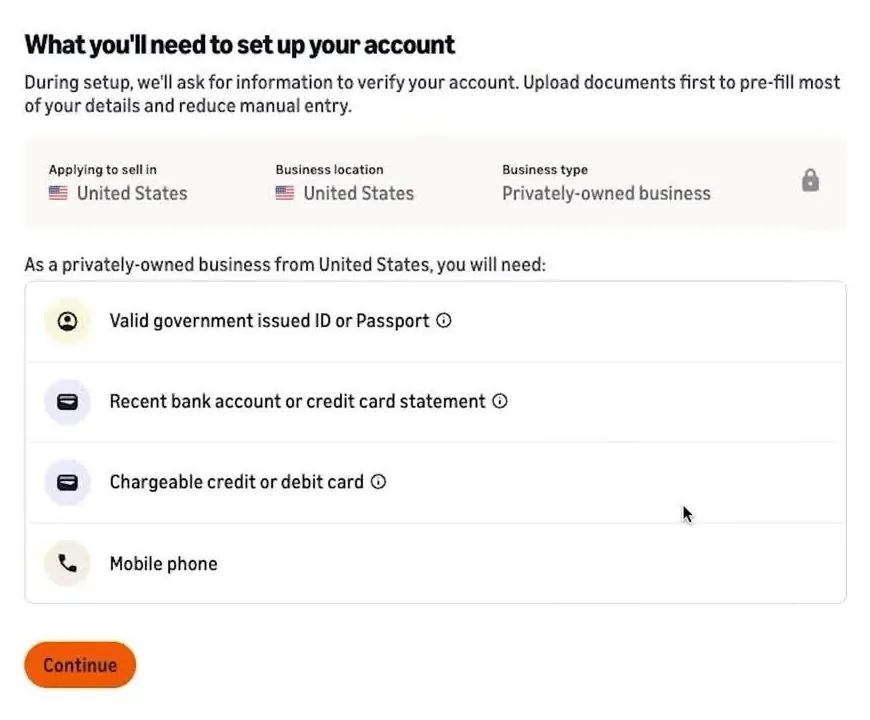
- A government-issued ID and an email address.
- A credit card that can be charged internationally.
- A bank account and routing number.
- A business license or registration.
- Proof of your home address from the last 180 days, such as a bank or credit card statement.
- Your tax information.
Amazon says the ID check "usually takes three business days or less."
Now the business type screen in Amazon's sign-up form is worth a closer look. In Travis Marziani's video from February 2026, the choices are state-owned business, privately owned business, publicly listed business and charity. The last choice is "individual," for "I don't have a registered business." He says a US seller with no LLC can pick individual. That's a report from one video, and Amazon's own pages ask for a business license or registration. For LLCs, EINs and taxes in general, see my guide on whether you need an LLC or EIN. And this is general information, so a state agency or an accountant can confirm what applies in your state.
Individual sellers get paid on a set schedule. Amazon's Individual plan page says Amazon settles your account every 7 days, which means it sends your sales money out once a week. Then the money can take up to five business days to reach your bank (checked October 16, 2026).
How do I choose a plan when I sign up?
So the plan you start with comes from which sign-up button you press on Amazon's seller site. The two buttons sit under the plan prices on Amazon's pricing page. They read "Sign up for Individual" and "Sign up for Professional."
- Open Amazon's seller site. The home page at sell.amazon.com has a large orange "Sign up*" button near the top. The asterisk points to a note at the bottom of the page: "A Professional selling account is $39.99/month + selling fees." So that main button is tied to the Professional plan.
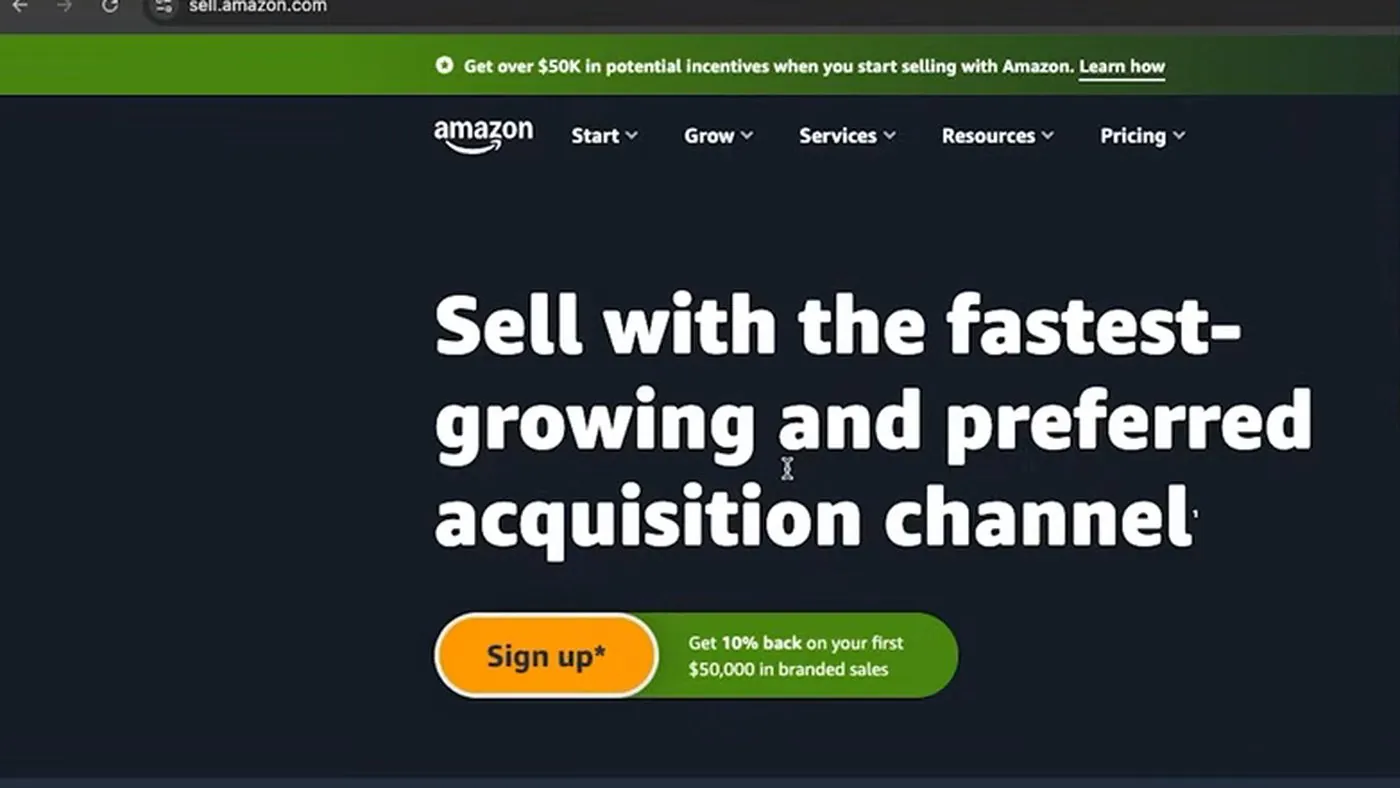
The top of Amazon's seller site at sell.amazon.com in 2025. The green banner's wording has changed since then. From Travis Marziani's video, uploaded February 2026, at 0:14.
- For the Individual plan, scroll to the bottom of the home page. A bar near the footer reads "Just have a few items to sell?" with a link, "Sign up to become an individual seller." The line under the bar says "A Professional selling account is $39.99/month + selling fees." Today's price is on Amazon's pricing page, checked October 16, 2026, and it matches.

The bottom of Amazon's US seller site in 2025, with the link for Individual sellers and the $39.99 a month note. From Travis Marziani's video, uploaded February 2026, at 0:18.
- Create your seller account and fill in the registration screens. You'll enter the items listed in the business and tax ID section above, including your business type and tax information.
Now the walkthrough videos on this page show the plan being chosen by the button, not on a separate plan screen inside the registration form. Amazon's pages don't show a separate plan screen in the registration form either.
Is the first month free, and can I get a refund?
Amazon's pricing page says nothing about a free first month or a prorated first month. But Amazon's how to sell guide, checked October 16, 2026, says something unusual. It says Professional sellers pay "a one-time registration fee, then your monthly subscription is waived until you list your first product."
That page doesn't state the amount of the one-time registration fee, and Amazon's other pricing pages don't print the amount either. Amazon's monthly fee page says the $39.99 is charged only if you have at least one buyable listing on the billing date. So the first monthly charge shouldn't come before your first listing is live.
And on refunds, Amazon's monthly subscription fee page says three things, checked October 16, 2026:
- An Amazon technical error: If Amazon charged you because of a technical error, you can get a refund.
- You never used Professional tools: You can get "a one-time refund of up to 3 months," and the request must start within 90 days of the payment date.
- Signing up by accident or having no sales: Amazon won't make an exception just because you signed up by accident, but the one-time refund above can still apply if you haven't used any Professional tools. And a month without sales isn't a reason for a refund.
What are Amazon's new seller incentives, and do they need the Professional plan?
So Amazon runs a program for new sellers with credits, discounts and bonuses. They apply only to new sellers who qualify, and Amazon's help page says "new sellers on Amazon's Professional selling plan can qualify." Individual sellers don't qualify under that page. Amazon's pricing page says new-to-Amazon sellers can get "over $50,000 in credits, bonuses, and exclusive benefits." The terms are on Amazon's new seller incentives help page, read October 16, 2026, with an overview at sell.amazon.com/grow.
Now these are discounts and credits on Amazon's fees. They depend on meeting the steps and dates below, and the credits expire. They aren't cash, and they aren't a promise. Here are the terms exactly as Amazon's help page lists them.
- The New Brand Bonus. It applies if your first buyable listing date is on or after March 12, 2026. Amazon puts a $52,500 credit in your account within one week of you becoming eligible. The credit works as a referral fee discount. It's 10% on your first $50,000 of eligible branded sales, meaning sales of your own registered brand, which is $5,000 in value. Then it's 5% on the next $950,000, which is $47,500. Earlier first-listing dates get the monthly credit version of the same percentages. The credit runs up to $52,500 or one year after eligibility, whichever comes first, and unused credit expires after a year. To qualify, you must keep a Professional plan in normal or vacation selling status. You must also complete Brand Registry before listing or within six months after your first buyable listing. And you must be the first owner of the brand in Brand Registry.
- Amazon Vine credits. Amazon Vine invites trusted Amazon reviewers to post reviews of new products, and the seller gives those reviewers free units, according to the incentives help page. The Vine credit is $200 if you complete Brand Registry and enroll in Vine within 90 days of becoming eligible for brand benefits. The Vine credit expires after one year.
- Fulfillment by Amazon credits. Your first FBA shipment must be received within 90 days of listing. Then you get one of two credits. One is a $100 shipping credit with Amazon Partnered Carrier. The other is a $200 fulfillment credit with Amazon Global Logistics. You get one or the other, not both. You also get free monthly storage, liquidations and returns processing on eligible new-to-FBA products. And you get a $400 FBA inbound placement credit that expires after one year and takes at least 10 days to show. There's also 25% off fulfillment on your first 100 units shipped with Multi-Channel Fulfillment. Multi-Channel Fulfillment lets you use your FBA inventory to fill orders from places other than Amazon, such as your own website. The 25% discount expires after one year. And there's no storage utilization surcharge for 365 days after your first FBA inventory arrives, and no low-inventory-level fee for 365 days. All of these are listed on the incentives help page.
- Advertising credits. You must use Sponsored Products and coupons within 90 days of listing your first buyable offer. Spend $50 to $199.99 to get a $50 credit. Spend $200 to $999.99 to get $200. Spend $1,000 or more to get $1,000. Credits show in Campaign Manager up to two weeks after you meet the steps and expire 30 days after they're applied. A $50 coupon credit lasts one year. Extra Sponsored Products terms apply.
Something to note is that Amazon's overview page doesn't define "new seller" in one line. The help page works from your first buyable listing date. And the help page doesn't print an end date for the program. So check the page before you sign up.
And in my opinion, most of the $50,000 headline is the brand bonus. That follows from the requirements above: the brand bonus helps only a seller who owns a trademarked brand and sells their own branded product. A seller who resells other brands, or who has no trademark, can't get that part. The ad and FBA credits are separate, and each has its own steps.
How do I switch between the Individual and Professional plans?
So Amazon says there's no fee to switch. Amazon's blog post, dated October 1, 2025, says, "There are no additional fees for switching between the Individual and Professional selling plans." And Amazon's pricing page says that after registration, "you can switch or cancel your selling plan at any time."
Now the menu names differ a little between Amazon's pages. The help pages say Settings, then Account Settings. Amazon's blog, FAQ and the video below say the gear icon, then Account Info. Both lead to the same Manage Your Services page. The screens below are Amazon's UK Seller Central, from a video, so the US menu names may differ slightly. The US layout of the Manage Your Services page is described the same way on Amazon's US help pages.
Switching from Individual to Professional
These steps come from Amazon's help page on switching to a Professional selling plan, checked October 16, 2026.
- Open Account Settings in Seller Central. Click Settings, then Account Settings. In Seller Sky's video, they click the gear icon at the top right, and a menu opens. The first item is Account Info.
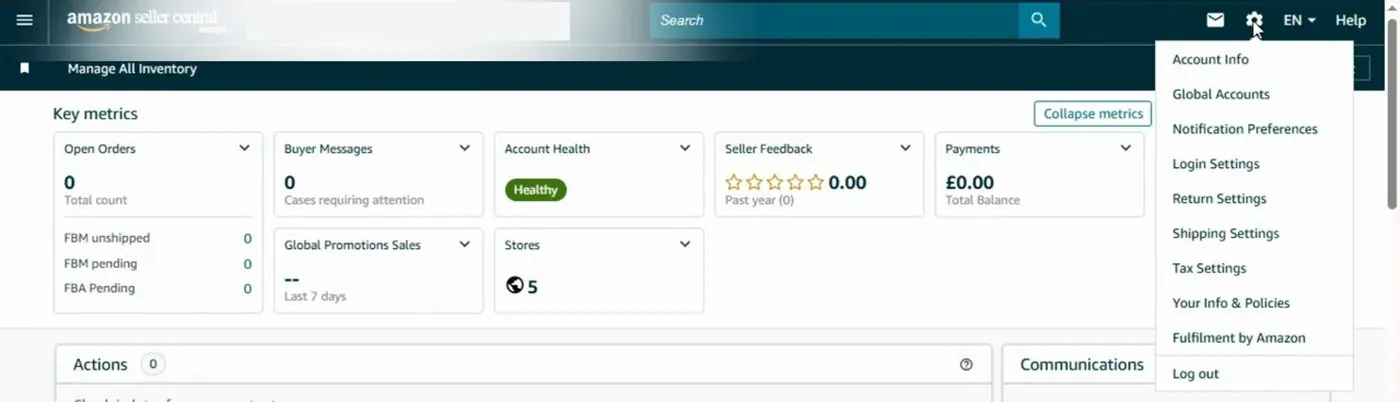
The gear icon menu in Amazon's UK Seller Central, with Account Info at the top. This is the UK site, so US menu names may differ slightly. From Seller Sky's video, April 2025, at 2:01.
- Scroll to Manage Your Services and click Sell On Amazon. The page is titled "Manage Your Services." The Sell On Amazon box has a "Compare selling plans" link. Under it are two columns, Professional and Individual, with one round radio button per store and per country. The Individual button is filled in for an Individual account. Two buttons sit below, "Discard changes" and "Apply changes." The Apply changes button stays grey until you pick a new plan.
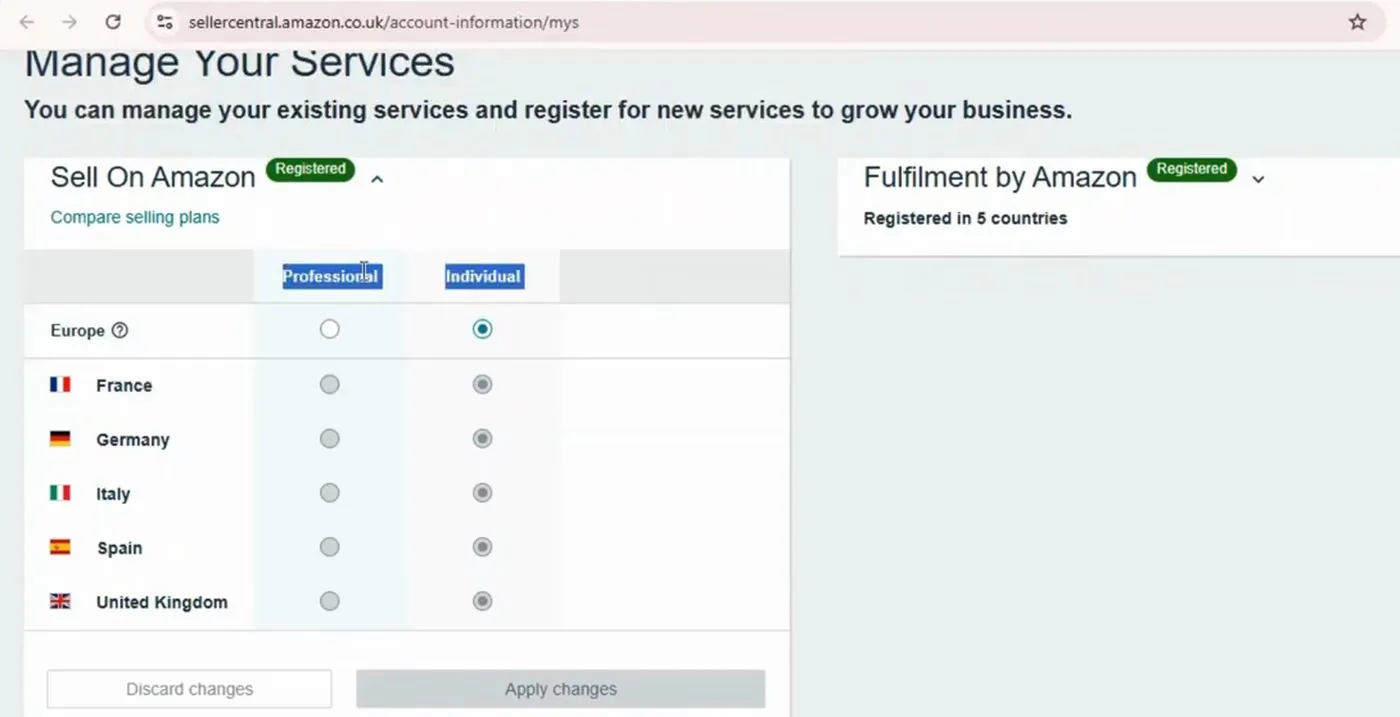
The Manage Your Services page in Amazon's UK Seller Central, with the Professional and Individual choices for the Europe stores. This is the UK site, so US menu names may differ slightly. From Seller Sky's video, April 2025, at 2:41.
- Select the radio button for Professional and click Apply changes. A box titled "Confirm selection" opens. In the video, it reads "Upgrade to Professional selling plan in: Europe," with a list of benefits. The two buttons are "Discard changes" and "Confirm." Amazon's US help page says to review the terms. Then you click "Proceed to Upgrade."
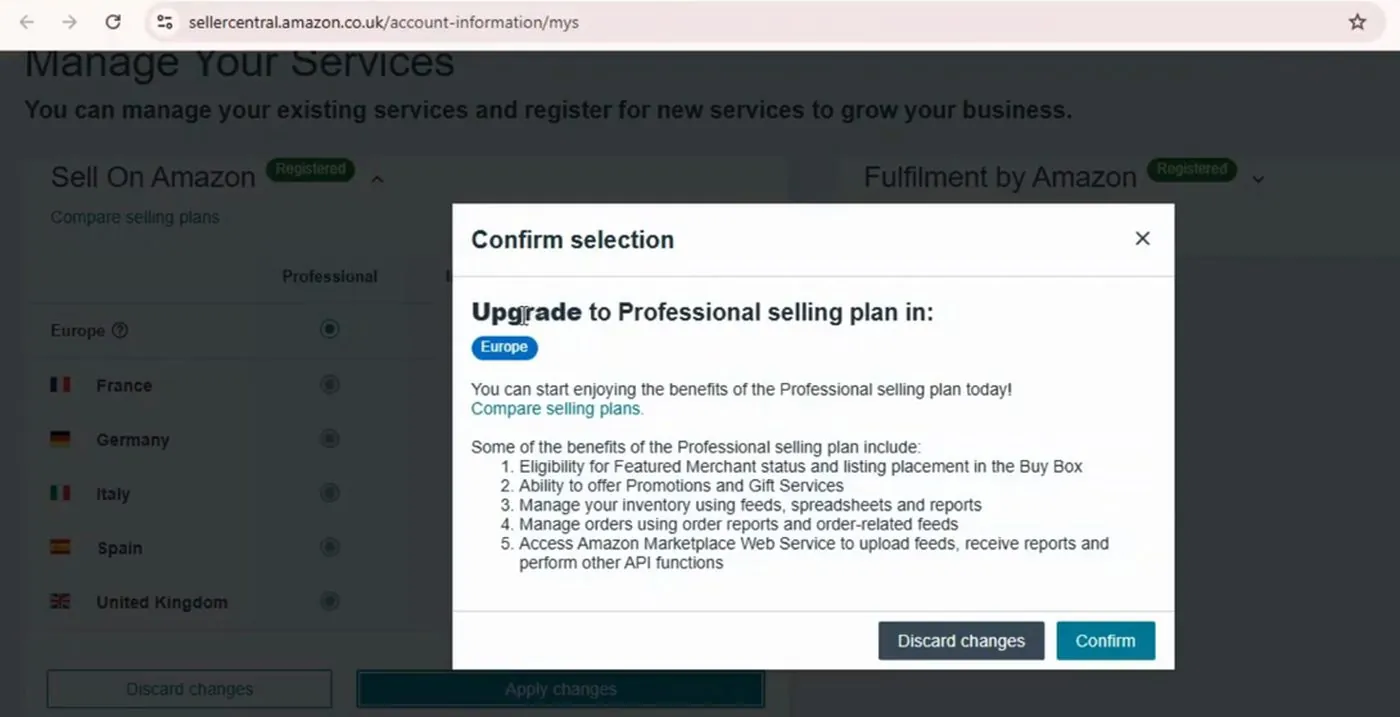
The Confirm selection box in Amazon's UK Seller Central in April 2025. This is the UK site, so the US wording may differ. From Seller Sky's video, at 3:01.
Now what happens after you confirm is worth knowing, from the same Amazon help page. Amazon reviews every upgrade request and says it will ask you for more documents. You get an email within 72 hours explaining how to send them. After Amazon receives the documents, the review can last up to three business days. And Amazon says it will suspend your existing listings while it reviews your request. The Professional subscription begins immediately after upgrading, and the first fee comes out of your seller balance, then your card if the balance is short.
Switching from Professional to Individual
These steps come from Amazon's help page on switching to the Individual plan, checked October 16, 2026.
- Open Account Settings, then Manage Your Services. Click Settings, then Account Settings. Under Manage Your Services, click a selling plan.
- Select Individual and click Apply changes. The Individual radio button is in the same Professional and Individual table shown above.
- Review the terms and click "Yes, Downgrade." Amazon emails you a confirmation with your new fee schedule. In the video, the page then shows "Individual," a green message, "Successfully submitted. Changes may take up to 15 minutes to be viewable," and the page refreshes by itself.
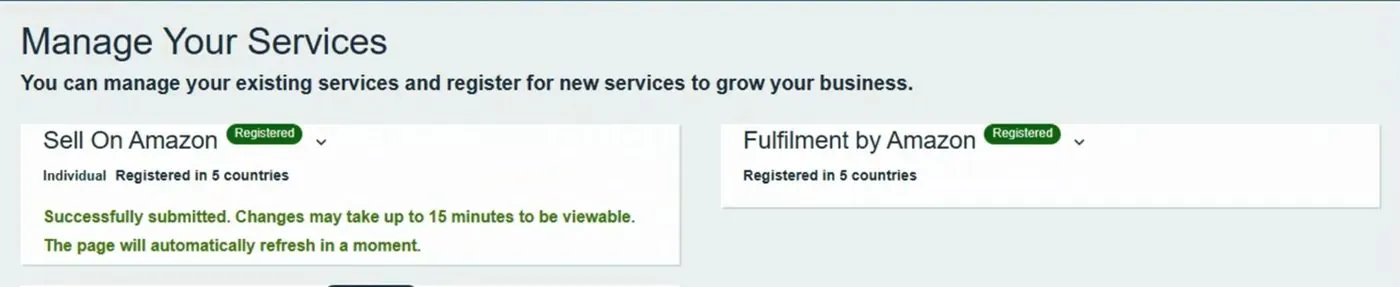
The message in Amazon's UK Seller Central after switching back to Individual. This is the UK site, so US menu names may differ slightly. From Seller Sky's video, April 2025, at 4:41.
Now Amazon's downgrade page lists several traps. Take each one seriously.
- Deactivating your listings doesn't change your plan. You keep paying the Professional fee until you switch. The only way to stop the fee without switching is to have no buyable listings on the billing date.
- The downgrade can change your payment cycle.
- With a global registration, downgrade "All Regions." Otherwise you keep paying the Professional fee where you still have active listings.
- Some accounts must be closed first. Amazon says a seller account that requires Professional, such as an Amazon Business seller account, must be closed first, or you won't see the downgrade option.
- The tax tool shuts off. If your Tax Calculation Service is on, downgrading cancels the enrollment and removes your tax settings. The Tax Document Library reports stop being available, so download them first. Amazon's tax service page has the details.
Which Amazon selling plan should a beginner pick?
So this part is my opinion, based on the prices and rules above. Amazon's own wording is that Individual suits new sellers under 40 items a month. Here's how I'd sort it.
- Start on Individual if you'll sell 40 items a month or fewer and you won't advertise. You pay nothing in plan fees in a month with no sales, and you can switch to Professional at any time. That suits a small test. Keep in mind that Amazon says it suspends your listings while it reviews an upgrade, which can last up to three business days.
- Start on Professional if you'll sell 41 or more items a month. From 41 items, Professional costs less every month.
- Start on Professional if you want ads, bulk listing, your own shipping rates or the new seller incentives. Individual can't list in bulk or set your own shipping rates. Most of Amazon's ad pages say Professional, and Amazon's incentive page says Professional.
- Start on Professional if you plan to own a trademarked brand and use the brand bonus. That bonus needs a Professional plan and Brand Registry.
And if the $39.99 a month worries you, Amazon's monthly fee page says the fee is charged only when at least one listing is buyable on the billing date. So the fee doesn't start until your first listing is live. But once a listing is live, the fee comes every month, including months with no sales.
When is Amazon, or each plan, the wrong choice?
- Individual is the wrong choice if you need bulk listing, ads or your own shipping rates. The Individual plan can't list in bulk or set your own shipping rates, and most of Amazon's pages say the Individual plan can't run ads either.
- Professional is the wrong choice if you'll sell only a few items a month. At 10 items a month, Professional costs $30.09 more than Individual (checked October 16, 2026).
- Either plan is the wrong choice if you sell handmade goods and want a built-in audience of craft buyers. Etsy is built for that. I compare the two in my guide to Etsy vs Amazon Handmade. And the costs are in my guide to Etsy fees and the steps are in how to start an Etsy shop.
- Either plan is the wrong choice if you want your own brand site and your own customer list. Then I'd read my guide to Shopify vs Amazon FBA before paying for anything.
And if you haven't signed up yet and want the whole path, start with my guide to how to start selling on Amazon.
Videos worth watching about Amazon's selling plans
And if you'd like to see the screens, here are the videos I'd pick. You can play each one right on this page, with YouTube's usual controls. Under each video, I've put a summary of what it covers, so you can decide whether it's worth your time.
Amazon's own channel explains the two plans over music, with no demo of the screens.
- The fees: The narrator says Professional is a monthly fee no matter how much you sell, Individual is a fee per item, and both plans pay referral and closing fees.
- What differs: Individual uses Amazon's standard shipping rates, while Professional sets rates per product and can add products in bulk with a spreadsheet. FBA is available on both.
- How to switch: You upgrade in Seller Central through the gear icon, Account Info, Your Services, then Manage next to Sell on Amazon. The narrator says plan changes take effect in your next billing cycle, which differs from Amazon's help page, so see the section on where Amazon's pages disagree.
A screen recording of the Manage Your Services page on Amazon's UK Seller Central. The money is in pounds, and the menu names may differ from the US site.
- The path: They open the gear icon menu, go to Account Info, then Manage Your Services, where Professional and Individual radio buttons appear for each Europe store.
- The pop-up: After they click Apply changes, a "Confirm selection" box lists the benefits of the Professional plan, with a Confirm button.
- Switching back: Near the end, they change the account back to Individual, and the page shows a green "Successfully submitted" message.
A screen recording of sell.amazon.com in the US store, from the home page through registration. The pages shown carry a 2025 footer. He also sells a paid course, so treat his advice as his opinion.
- The sign-up buttons: He shows the main "Sign up" button, then the small link near the footer, "Sign up to become an individual seller."
- The business type screen: He shows the choices, including "individual" for sellers with no registered business.
- His advice: He recommends the Professional plan for anyone starting a real business.
Buddy's take
So ultimately, if you'll sell 40 items a month or fewer and won't advertise, I'd start on Amazon's Individual plan, which charges $0.99 for each item that sells (checked October 16, 2026).
And I'd start on Amazon's Professional plan, at $39.99 a month (checked October 16, 2026), if you'll sell 41 or more items a month or want to run ads or list in bulk. The same goes if you have a trademarked brand and want Amazon's new seller incentives. Amazon says you can switch either way at any time.
But if you sell handmade goods or want your own site, I'd look at Etsy or Shopify first.
Have a question about “Amazon Individual vs Professional selling plan: which one should a beginner pick?”?
Ask it here. Every question comes to me first. I answer as many as I can, and each answered question goes on this page with my answer so other people starting a store can see it too. I don't ask for your email, so check back on this page for the answer.
More amazon guides
Amazon FBA vs FBM: should a beginner let Amazon ship the orders or ship them yourself?
What each one means, every FBA fee with peak and regular rates, one worked example you can redo, and an honest answer on whether FBA is worth it.
How to start selling on Amazon, step by step, if you've never sold online
Every signup screen in the order you'll see it, what Amazon asks for on each one, what it costs and how long the identity check can take.
- Amazon's selling plans and pricing page, checked October 16, 2026: sell.amazon.com/pricing. The $39.99 a month Professional fee, the $0.99 per item Individual fee, the Home and Kitchen referral fee example and the "Advertise with Amazon Ads" feature list.
- Amazon's how to sell guide and seller FAQ, checked October 16, 2026: sell.amazon.com/sell and sell.amazon.com/learn/faq. The under 40 items wording, registration requirements, the one-time registration fee, Brand Registry requirements, restricted categories and the Sponsored Brands description.
- Amazon's fee schedule, checked October 16, 2026: Selling on Amazon fee schedule. The plan fee lines, the referral fee on both plans and the $1.80 closing fee.
- Amazon's Seller Central help pages, checked October 16, 2026: selling plan comparison, the Individual plan, the monthly subscription fee and the Tax Calculation Service.
- Amazon's Seller Central help pages on switching plans, checked October 16, 2026: switch to a Professional selling plan and switch to the Individual plan.
- Amazon's new seller incentives, checked October 16, 2026: help page with the terms, overview and Sponsored Products promotion terms.
- Amazon's blog posts: Individual vs Professional (October 1, 2025) and the Featured Offer (April 10, 2026).
- Amazon's advertising pages, checked October 16, 2026: Amazon Ads FAQ, Sponsored Products on Amazon Ads and Sponsored Products on sell.amazon.com.
- Amazon's program pages, checked October 16, 2026: Fulfillment by Amazon, Amazon Brand Registry, Amazon Business, A+ Content, Amazon Vine, Brand Analytics and Amazon Seller University.
- The videos and screens above come from Amazon Seller University (May 2026), Seller Sky (April 2025) and Travis Marziani (February 2026).
Online Store Buddy is an independent site. We're not affiliated with or endorsed by Shopify, Etsy, Amazon, WooCommerce, Wix or Squarespace. Those names are trademarks of their owners.