
Now a quick note on money figures. Etsy's fees change several times a year, so check Etsy's fees and payments policy before you pay anything. We recheck the figures on this page every month.
And one note on wording. When I say "Etsy's rule," I mean an Etsy policy, not a law. When I say "in my opinion," that's my own view.
Quick picks
What does it cost to open an Etsy shop?
So the honest answer is that opening an Etsy shop usually isn't free anymore. Etsy's fees and payments policy says "you may be required to pay a one-time set-up fee." The policy was last updated October 5, 2026 (checked October 16, 2026).
Here's what the policy leaves open. The policy prints no dollar amount. It says Etsy can change the fee, that the fee can be waived during some promotions, and that the fee can't be refunded once you pay it.
And three walkthrough videos from 2026 show the amount. In all three, Etsy's billing screen listed a one-time set-up fee of $29. The videos are Kate Hayes' video of February 24, 2026, eRank's video of June 23, 2026, and Simply Shawna's video of September 24, 2026. All three show United States sellers. So $29 is what the videos show, not a price Etsy publishes. Your own screen shows your own amount before you pay.
And Etsy's announcement from 2024 says the set-up fee applies to "most new shops." So not every new seller pays the set-up fee.
| When you pay | What Etsy charges | Amount | Checked |
|---|---|---|---|
| Once, to open the shop | One-time set-up fee | $29 on the 2026 video screens. Etsy's policy prints no amount. | Oct 16, 2026 |
| Every month | Monthly fee for having a shop | None. Etsy Plus is an optional subscription, covered in step 7. | Oct 16, 2026 |
| Per listing | Listing fee, when you create or renew a listing | $0.20 per listing | Oct 16, 2026 |
| Per sale | Transaction fee | 6.5% of the order total, not counting tax | Oct 16, 2026 |
| Per sale | Payment processing fee, for United States sellers | 3% of the order total (including tax and shipping) plus $0.25 | Oct 16, 2026 |
Basically, a payment processing fee is what the company that handles the buyer's card charges you. On Etsy, that company is Etsy Payments. Etsy's Etsy Payments policy lists the rate.
My Etsy fees explained guide lists every fee, and my Etsy fees vs Shopify fees guide works out the math at $1,000, $3,000 and $5,000 a month in sales. Etsy's Offsite Ads fee is a separate charge, and my Offsite Ads guide covers it.
What do you need before you start an Etsy shop?
So here's the list. Etsy's help article on opening a shop asks for most of it (checked October 16, 2026).
- A desktop web browser. Etsy's help article says you set up the shop on a desktop browser. After that, you can run the shop in the Etsy Seller app on your phone (free on the App Store and Google Play).
- An Etsy account. The same account can buy and sell. You create it or sign in at etsy.com/sell.
- Being 18 or older. Etsy's Minors Policy has the details for younger people, and the last section of this page covers them.
- A US bank account with your name on it. The name on the bank account has to match the name on your ID. Once you save the bank country, Etsy's screen says you can't change it.
- A card. Etsy uses the card for the one-time set-up fee and for later Etsy bills. Etsy's help article says "debit or credit card," and the screen in the videos says "credit card," so read your own screen.
- A government photo ID that isn't expired, and a camera for a selfie. Etsy's ID verification help page says the accepted types vary by country and may include a driver's license, a state ID, a passport or a permanent resident card.
- A phone for two-factor sign-in. Two-factor sign-in means you type a code from your phone, along with your password, when you sign in from a new device. Step 8 covers it.
- Tax details. If you sell as an individual, Etsy's screen asks for your name, date of birth, Social Security number and address. Step 4 covers it.
- A shop name. It has to be 4 to 20 characters, with no spaces or special characters. Step 3 covers it.
- Something that fits Etsy's rules. Etsy's help article says items must be made, designed, handpicked or sourced by the seller. Etsy's What Can I Sell on Etsy page has the details.
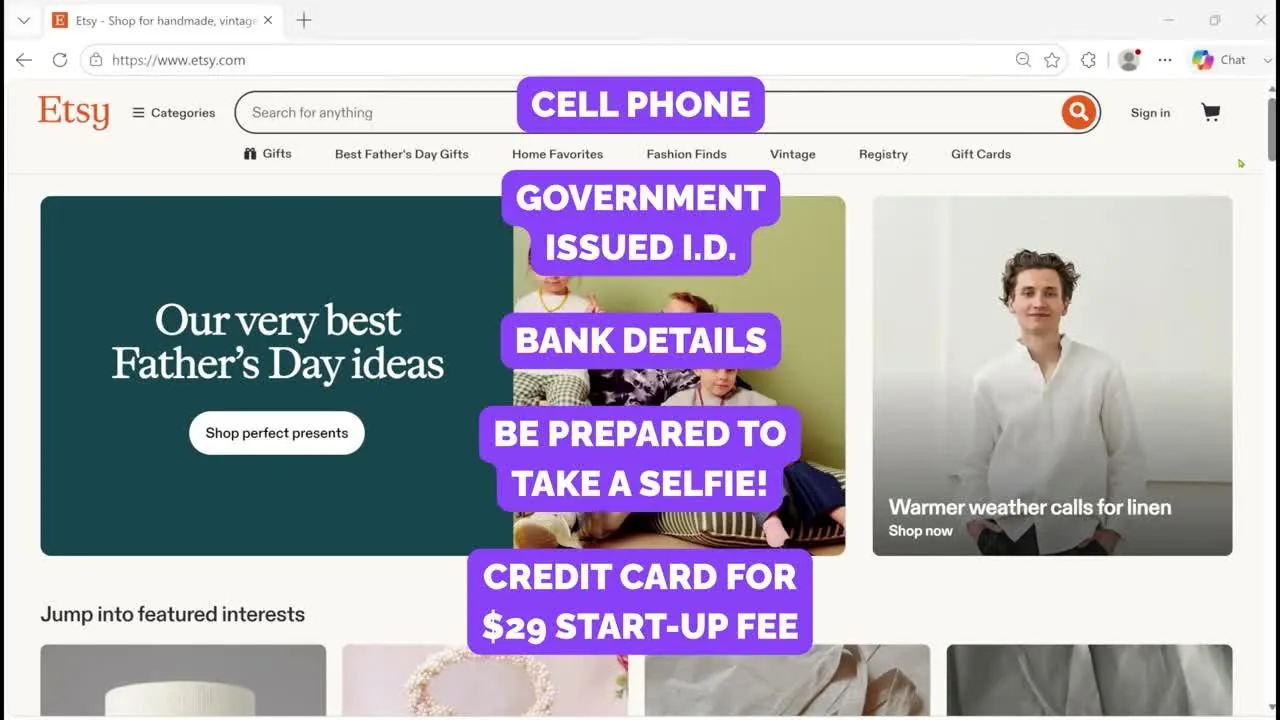
The creator's on-screen checklist of what to have ready, June 2026, from eRank's video. The $29 figure is the creator's, so use the amount on your own screen.
Now a word on taxes and licenses. Etsy's help article says Etsy doesn't require sellers to have a business license, and that you still have to follow any laws that apply to you. Whether you need a license, an LLC or an EIN is a legal question, and the answer can differ by state. My LLC and EIN guide covers the basics of both. What I've written here is general information. A state agency or an accountant can confirm the rules for your state.
And something to note is that you don't need a product ready to go through the account steps. But you do need one listing to finish, which is step 10.
Step 1: How do you create your Etsy account?
So nothing in the first step costs money.
- Go to etsy.com/sell on a desktop computer. Etsy's help article says to click Get started.
- Type your email address. A sign-in box pops up. If you don't have an Etsy account yet, Etsy asks you to create one.
- Fill in the create-account box. In eRank's June 2026 video, the box asked for a first name and a password, with a Register button. The small print says you agree to Etsy's Terms of Use and Privacy Policy.
- Answer the short questions. In eRank's video, Etsy asked "What brings you to Etsy?" and then "What categories are you interested in?"
After those questions, Etsy starts the shop set-up screens.
The progress bar across the top of the next screens has up to six labels in Simply Shawna's September 2026 video. They are Shop preferences, Name your shop, How you'll get paid, Share your billing info, Special offer and Your shop security. Keep in mind that the Special offer step doesn't show up for everyone. In that same video, the bar showed five labels on the first screen and six later, so your own screens may differ.
Step 2: What are the shop preferences, and which one can't you change?
So the first screen is called Shop preferences, and it says "Let's get started! Tell us about you and your shop." It has three drop-down menus.
- Shop language. This is the language you'll use to describe your items. Etsy's screen says "Choose carefully! You cannot change this once you save it, but may add other languages later."
- Shop country. This is where your shop is based. If you don't see your country, Etsy's screen says Etsy may not be available there right now.
- Shop currency. This is the currency you use to price your items. Etsy's screen says buyers automatically see prices in their own local currency.
- Click Save and continue.
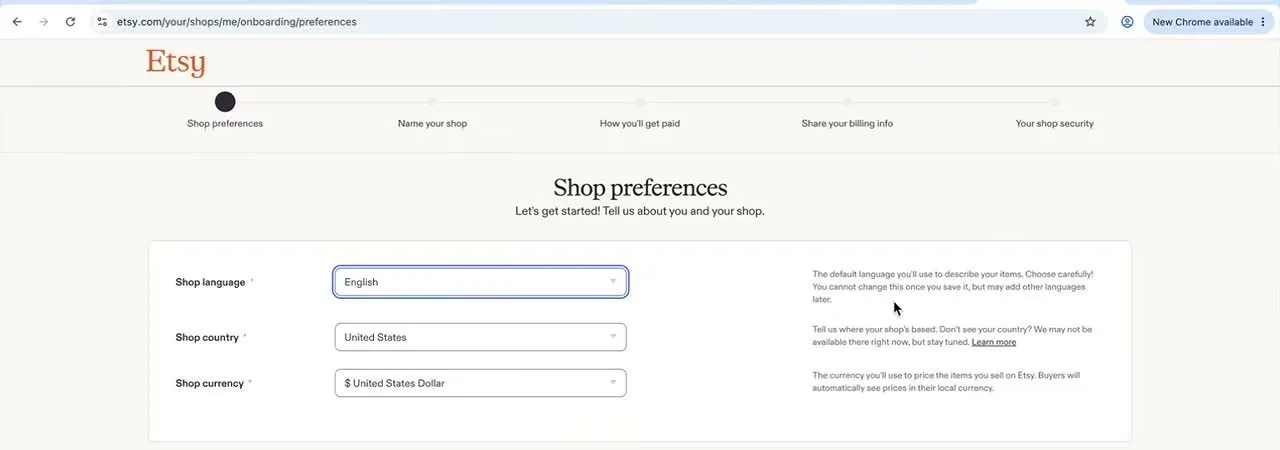
Etsy's Shop preferences screen, with the language, country and currency menus, September 2026, from Simply Shawna's video.
Something to note is that only the language carries a "can't change" warning on this screen. A later screen says the bank country can't be changed either, and I cover that in step 4.
Step 3: How do you name your Etsy shop?
So the next screen is called Name your shop. Etsy's help article gives the rules for the name.
- The name has to be 4 to 20 characters long.
- The name can't have spaces, special characters or accented letters.
- The name can't be one that's already in use, and it can't use profanity or infringe somebody else's trademark.
Type a name into the box. Etsy checks it as you type. When the name works, a message says "Great thinking! This name's available!" If somebody else has the name, Etsy's help article says you get suggestions.
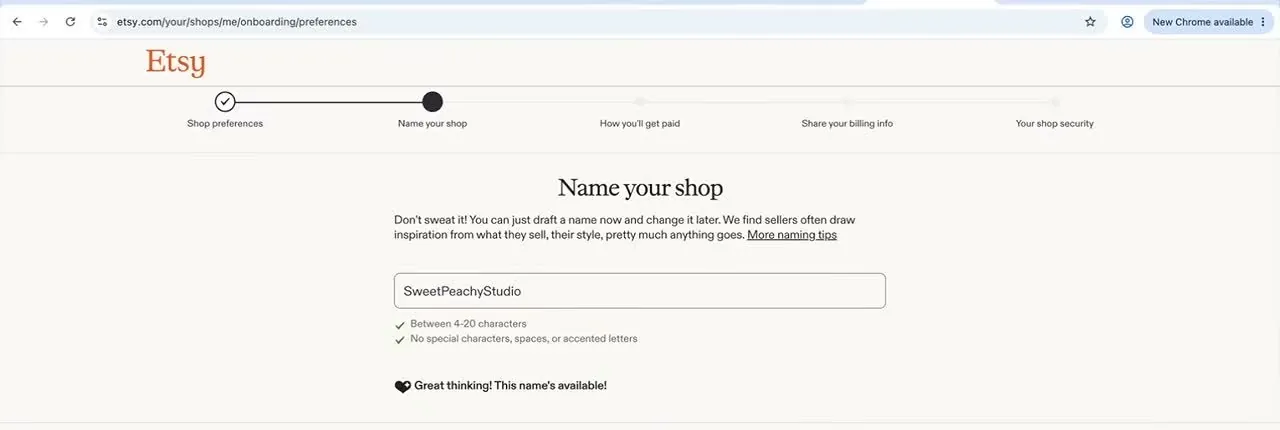
Etsy's Name your shop screen checks the length and the characters as you type, September 2026, from Simply Shawna's video. The name in the box is the creator's example.
Now the good news is that the Name your shop screen says "Don't sweat it! You can just draft a name now and change it later." Etsy's help article says you can change the name after you open. Go to Your shop, then the Shop Name tab. Etsy holds your name while you finish opening the shop.
Step 4: How do you set up getting paid?
So this is the longest screen, and it's the one that asks for personal details. The page address ends in /onboarding/payments, and the heading says "How you'll get paid."
Where is your bank, and what is the reserve note?
At the top, Etsy explains that Etsy Payments gives buyers many ways to pay and gives you Etsy's seller protection. Below that is a box called "Getting paid on Etsy" with a question, "Where is your bank located?"
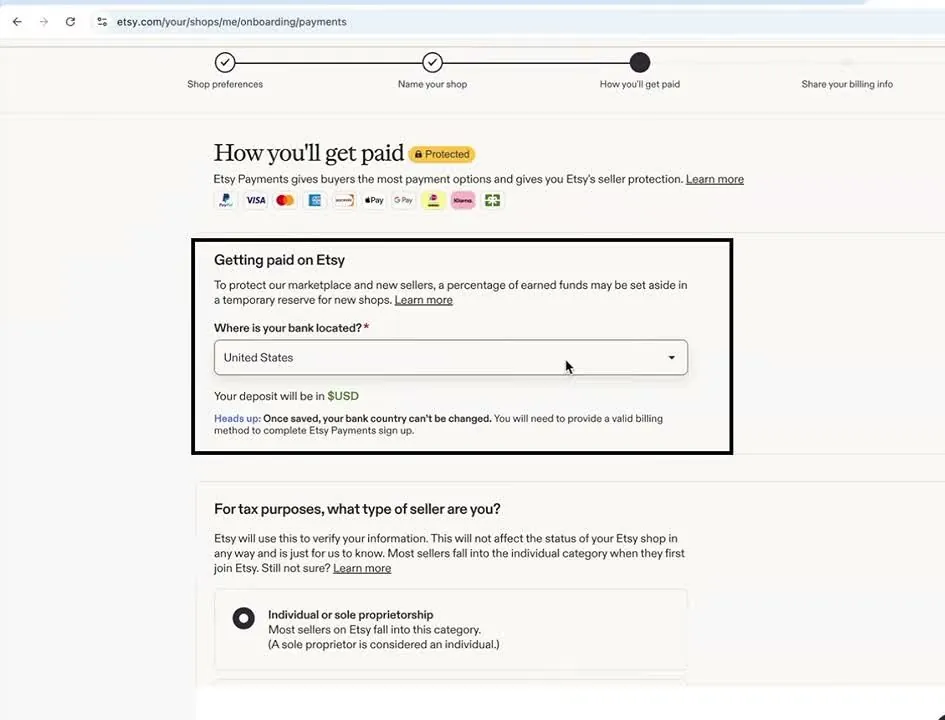
Etsy's How you'll get paid screen, with the reserve note and the bank country menu, September 2026, from Simply Shawna's video.
Two lines in that box matter for a beginner.
- The reserve. The box says "a percentage of earned funds may be set aside in a temporary reserve for new shops." Basically, a reserve is money from your sales that Etsy holds back for a while. I explain when your money arrives in the payout section below.
- The bank country. The screen says "Once saved, your bank country can't be changed."
What type of seller are you?
Below that, a question asks "For tax purposes, what type of seller are you?" There are two choices.
- Individual or sole proprietorship. Etsy's screen says most sellers on Etsy fall into this category, and that a sole proprietor is considered an individual. A sole proprietor is one person who runs a business without setting up a separate company.
- Incorporated business. Etsy's screen calls this a registered legal entity.
Etsy's screen says Etsy uses this answer to verify your information, and that the answer won't affect the status of your shop. My LLC and EIN guide explains what an LLC and an EIN are.
What does Etsy ask about you?
Next comes a box called "Tell us a bit about yourself." Etsy's screen says a secure third-party service may check you. It also says this information is never shown publicly on Etsy.
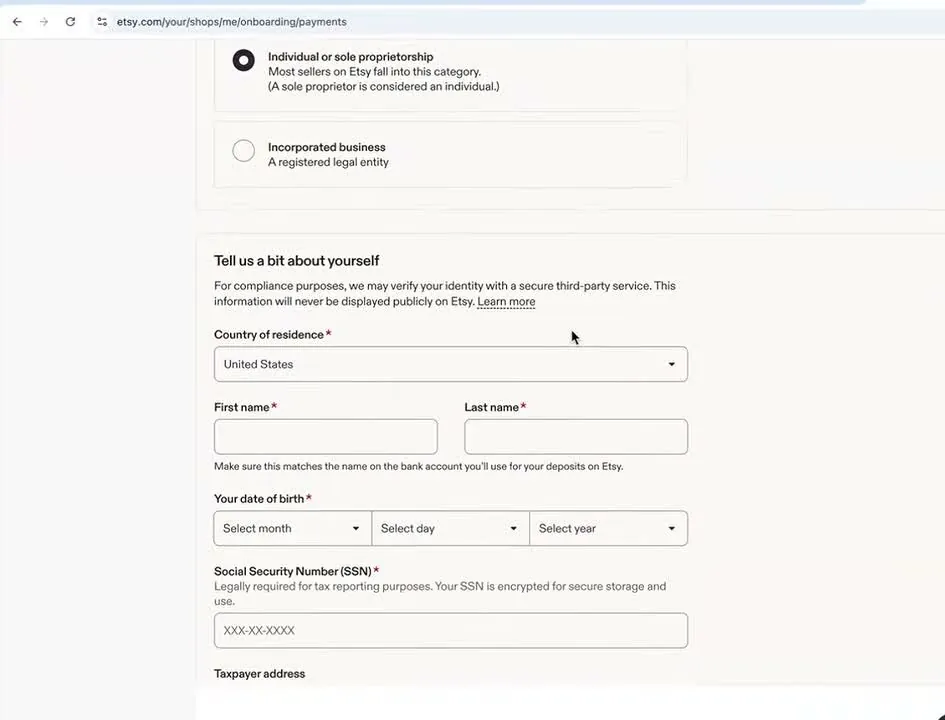
Etsy's Tell us a bit about yourself form is empty here, September 2026, from Simply Shawna's video.
- Leave Country of residence on United States if that's where you live.
- Type your first and last name. Etsy's screen says this must match the name on the bank account you'll use for deposits.
- Pick your date of birth from the three menus.
- Type your Social Security number. Etsy's screen says it's "legally required for tax reporting purposes" and that the number is encrypted for secure storage.
- Type your taxpayer address, which is the address for your tax records.
Etsy's ID verification help page says it's okay if the address on your ID doesn't match your taxpayer address. But the name on your ID has to match the name on the bank account you add.
How do you link your bank account?
The last box on the screen is "Add your bank information." It has a black button, Connect account via Plaid. Plaid is a separate company that links bank accounts to apps, and it isn't something you pay for. After you click, a Plaid box opens.
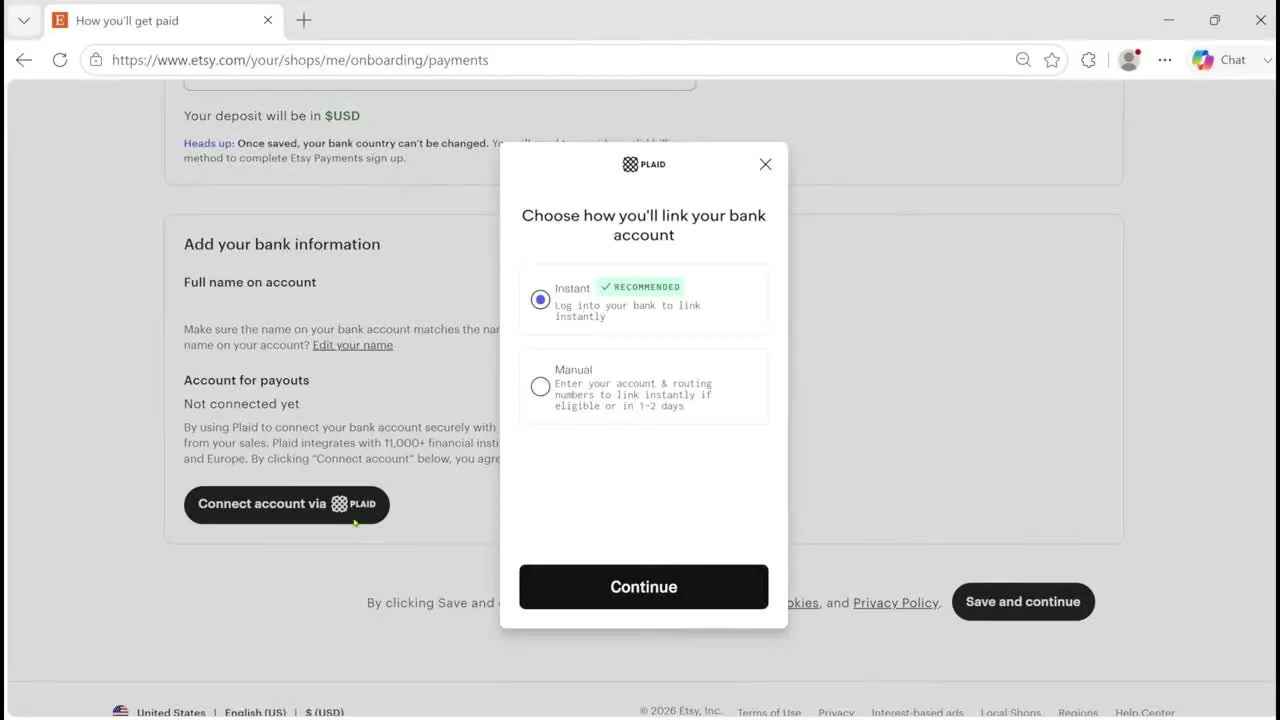
Plaid's box offers an instant link or a manual link, June 2026, from eRank's video. The account holder's name on Etsy's page behind the box was covered over.
- Instant (recommended). You log in to your bank and the account links right away.
- Manual. You type your account number and routing number. The screen says the account links instantly if it's eligible, or in 1 to 2 days.
Pick one, click Continue, and then click Save and continue on Etsy's page.
Step 5: What happens when Etsy checks your ID?
So next Etsy asks you to prove who you are. The page address ends in /onboarding/verification. The heading says "Verify your identity in just a few steps." The screen lists three steps: take a photo of your ID, pose for a selfie, and finish setting up your shop.
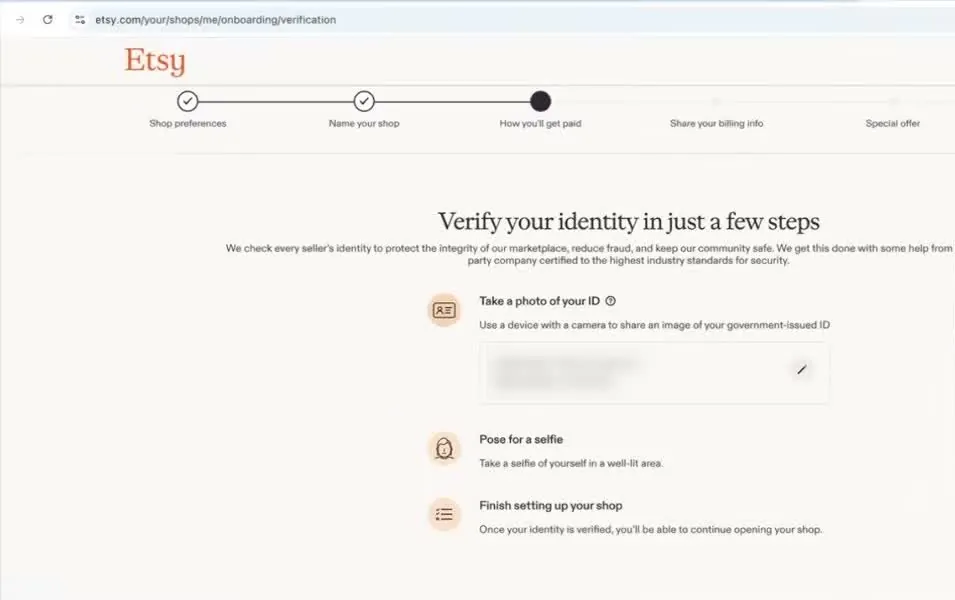
Etsy's identity screen lists three steps, September 2026, from Simply Shawna's video. The creator's camera inset was cropped out.
Etsy says a company called Persona does the check. Persona is a separate company that compares your ID photo with your selfie. The black button at the bottom right says Continue with Persona, and the line next to it says Etsy may collect and use your information to prevent fraud.
- Click Continue with Persona.
- Pick how you want to be verified from the box that opens, shown below.
- Take a photo of your ID, then take a selfie in a well-lit area. If your computer has no camera, Etsy's help page says you can pick Continue on another device and send yourself a link by email or text message.
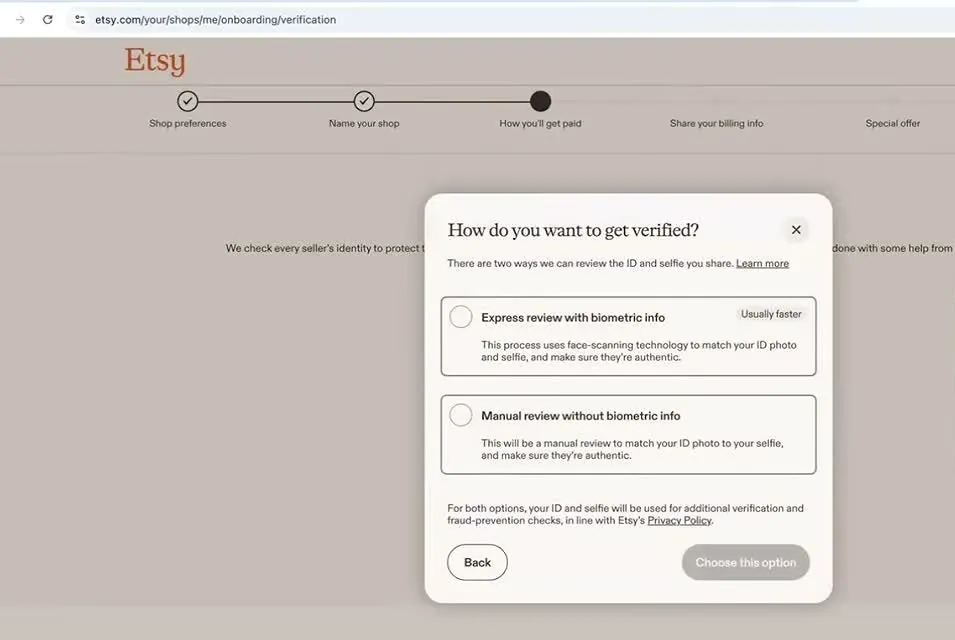
Etsy's two ways to get verified, September 2026, from Simply Shawna's video. The creator's camera inset was cropped out.
So here are the two choices. Basically, biometric info means measurements of your face.
- Express review with biometric info. The box says this uses face-scanning technology to match your ID photo and selfie, and is usually faster.
- Manual review without biometric info. The box says this is a manual review that matches your ID photo to your selfie.
Etsy's ID help page says that depending on where you live, you may or may not get the manual choice. For both choices, the box says your ID and selfie are also used for further verification and fraud checks.
How long does the ID check take?
Etsy's help pages don't give a review time. The help article does say you can keep setting up your shop while Etsy reviews your ID and selfie. After you open, you can check the status in Shop Manager, on the Legal and tax information page.
And keep in mind that some sellers say the ID review held up their new shop. In Etsy's own Community forum, several sellers wrote in 2024 and 2025 that their new shop stayed in Vacation Mode while Etsy reviewed their information. Two examples are one thread and another thread. Those are seller reports, and they don't tell you how often it happens.
If a check doesn't pass, Etsy's help page says you may be asked to try again with a different selfie. If your session runs out, the page says you don't lose your progress. Failing several times may stop you from opening a shop with Etsy for now.
Step 6: How do you share your billing info and pay the set-up fee?
So this is where the one-time set-up fee appears. The screen is called Share your billing info, and it says the card is what you'll use to pay your Etsy bill and the one-time set-up fee.
- Read the fees box. A pop-up called "Fees for selling on Etsy" opens first. Click I have read & understood these fees to close it.
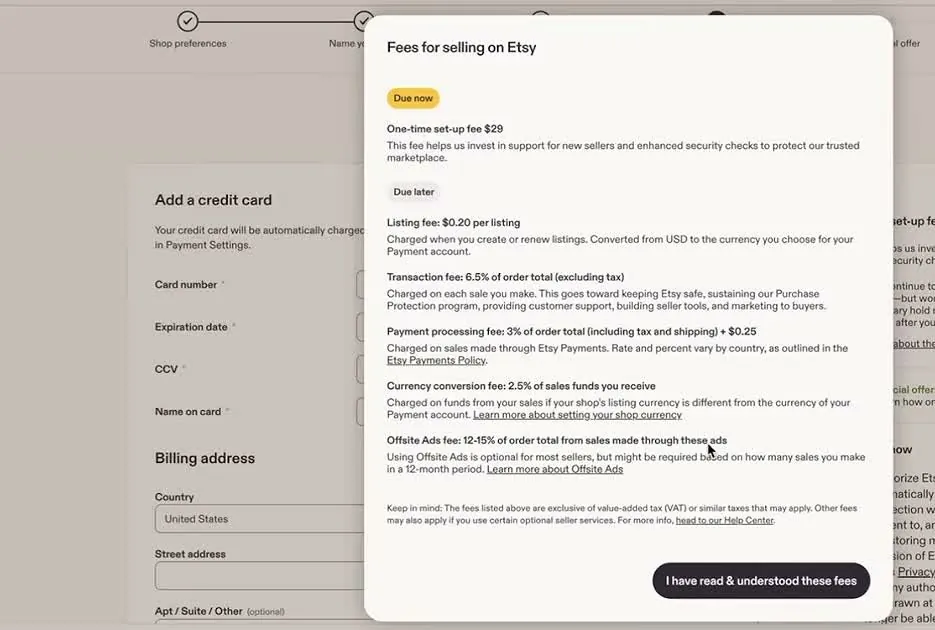
Etsy's Fees for selling on Etsy pop-up lists what is due now and what is due later, September 2026, from Simply Shawna's video. The creator's camera inset was cropped out.
The pop-up splits the fees in two. Under Due now, it shows the one-time set-up fee, $29 in that video. Under Due later, it lists these fees: the listing fee at $0.20, the transaction fee at 6.5%, and the payment processing fee at 3% plus $0.25. It also lists a currency conversion fee at 2.5% and the Offsite Ads fee at 12% to 15%. Etsy's pop-up says Offsite Ads is optional for most sellers but might be required, depending on how many sales you make in a 12-month period.
- Add your card. The left side asks for the card number, expiration date, security code and name on the card. Below that is your billing address. The screen says Etsy charges the card automatically on the 1st of each month for your Etsy bill, and that you can opt out of autobilling in Payment Settings.
- Check the box on the right. The right side shows "Due now," the one-time set-up fee and the total. Under the total is a box that says "I authorize Etsy to charge my card." You tick it to authorize the charge.
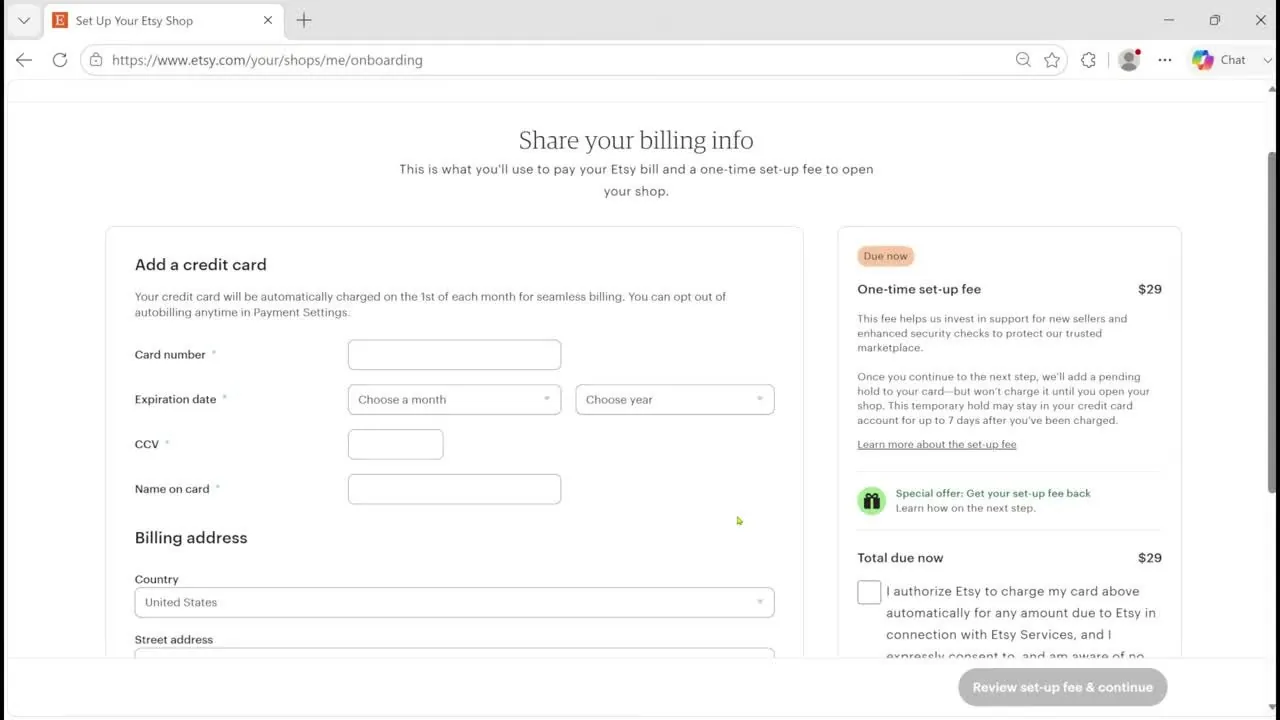
Etsy's billing screen shows the one-time set-up fee and the total due now, June 2026, from eRank's video. The card boxes are empty in the video.
- Click Review set-up fee & continue.
- Approve the pending hold. A pop-up called "Approve pending hold for one-time set-up fee" opens. Click Approve hold & continue, or click Cancel to stop.
So here's how the pending hold works. Basically, a pending hold is a temporary reserved amount on your card, and the card isn't charged yet. Etsy adds the hold when you continue, and the pop-up says the card "won't be charged until you open your shop."
The pop-up also says the hold may stay in your card account for up to 7 days after you've been charged. You're only charged once. And depending on where your bank account is located, you may be charged taxes on the set-up fee later.
Etsy's fee policy matches that. It says the charge is processed after onboarding is complete, your shop is open and you can receive orders. Checked October 16, 2026.
Step 7: Should you take the Etsy Plus offer?
So after billing, some sellers see a screen called Special offer. It appeared in the June and September 2026 videos, and it may not appear for everyone. Etsy Plus is an optional monthly subscription for sellers. Etsy's screen says it costs $10 a month plus taxes.
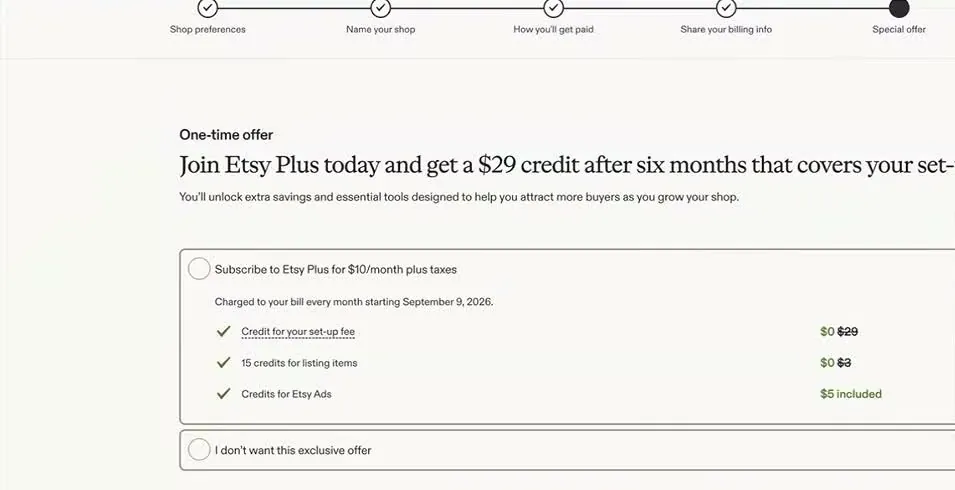
Etsy's Special offer screen from September 2026, from Simply Shawna's video. The creator's camera inset was cropped out. The screen says the charge starts September 9, 2026, so your own date will differ.
The screen has two choices. One is "Subscribe to Etsy Plus for $10/month plus taxes," with three items checked. They are a credit for your set-up fee ($29 crossed out), 15 credits for listing items ($3 crossed out) and $5 of credits for Etsy Ads. The other is "I don't want this exclusive offer."
The headline says you get a $29 credit after six months that covers your set-up fee. Something to note is that the screen doesn't spell out what you have to do to get the credit. So read the offer's terms on your own screen before you pick it. The $10 a month for Etsy Plus is on Etsy's fee policy too, checked October 16, 2026.
For me personally, I'd pick "I don't want this exclusive offer" while you're still learning whether anything sells. That's my opinion, not an Etsy rule. Keep in mind the screen calls the Etsy Plus deal a one-time offer, so the set-up fee credit may not come back. But Etsy's fee policy says sellers in good standing can opt in to Etsy Plus.
Step 8: How do you secure your shop with two-factor sign-in?
So the last set-up screen is "Keep your shop extra safe." Etsy's help article says Etsy requires you to turn on two-factor authentication. That means anyone signing in from a new device or browser has to type a code as well as the password.
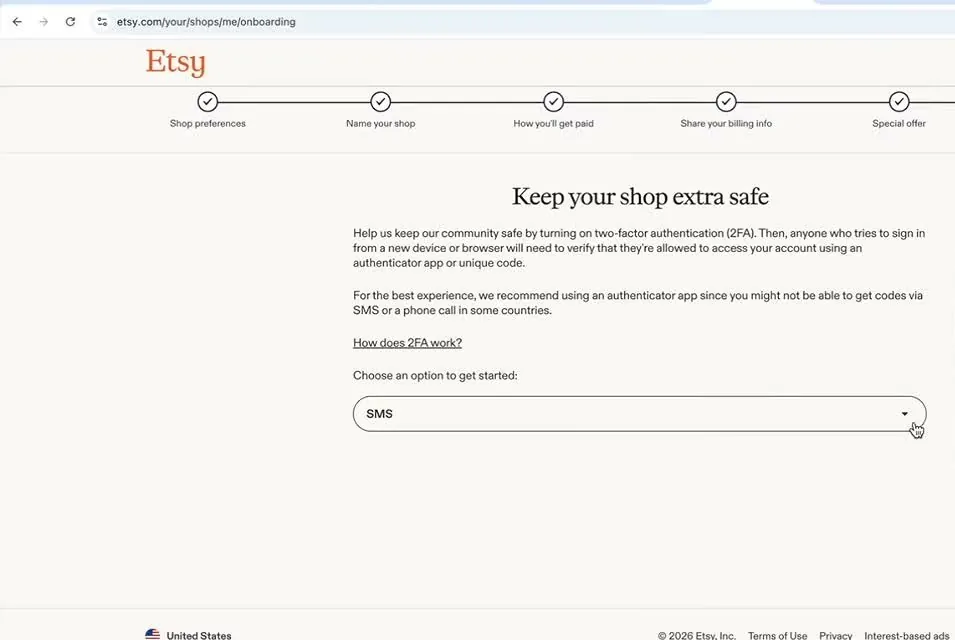
Etsy's two-factor screen has a menu to pick how you get your codes, September 2026, from Simply Shawna's video. The creator's camera inset was cropped out.
- Open the menu under "Choose an option to get started." The video shows SMS, which sends a code by text message.
- Etsy's screen recommends an authenticator app. Basically, an authenticator app is a phone app that makes sign-in codes for you. The screen says you might not be able to get codes by SMS or phone call in some countries.
- Follow the prompts to finish. Etsy's help article says you can also choose a phone call.
Etsy doesn't name a specific authenticator app on this screen, so use any one you trust.
Step 9: What is Shop Manager?
So after set-up, Etsy takes you to Shop Manager. Shop Manager is the control panel where you run your shop. A pop-up called "Welcome to Shop Manager" says it's the secure place to run your business, including your financial and identity information.
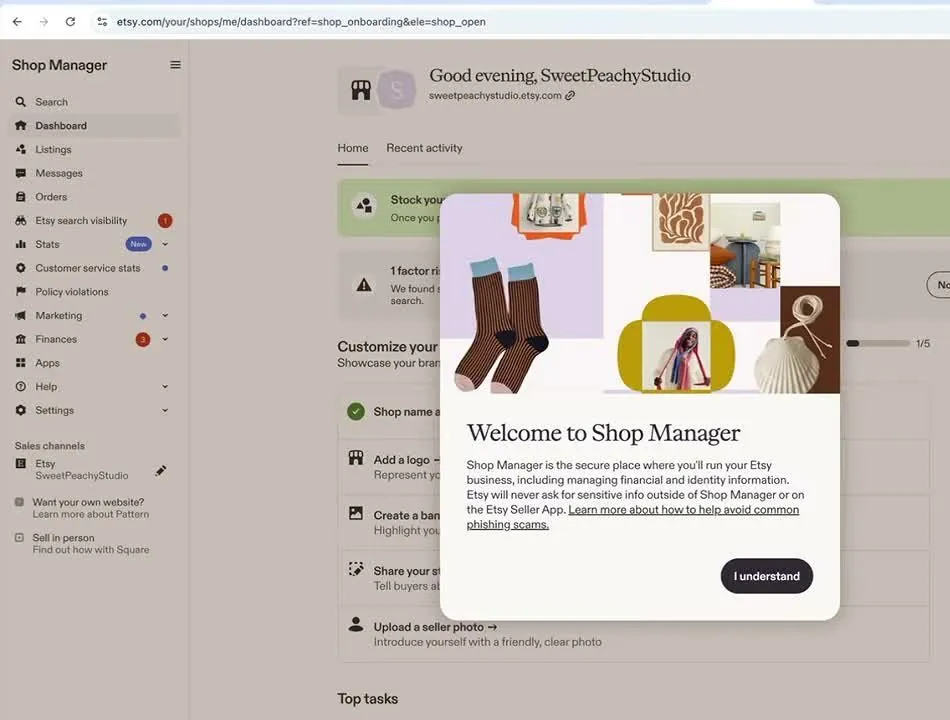
Etsy's Shop Manager opens with a welcome pop-up, September 2026, from Simply Shawna's video. The shop name is the creator's example, and the creator's camera inset was cropped out.
One line in that pop-up is worth remembering. It says Etsy will never ask for sensitive information outside of Shop Manager or the Etsy Seller app. Click I understand.
Behind the pop-up, the dashboard has a green box with an Add a listing button. Below it is a checklist: shop name, add a logo, create a banner, share your story and upload a seller photo.
Step 10: How do you add your first listing?
So a listing is one item you offer for sale, with its photos, title, description and price. Etsy's help article on creating a listing says you add your first listing before you can open your shop. But eRank's June 2026 video showed a shop-is-open message before any listing was added. So either way, you need a published listing before buyers can buy anything from you.
Click Add a listing on the Shop Manager dashboard. Etsy's help article says the listing form has seven tabs, and you fill them in before you publish.
- Photo & video. You can add up to 20 photos and 2 videos, each 5 to 15 seconds long.
- Category. You pick the kind of item.
- Item details. You type a title of up to 140 characters and a description. If the item is a digital file, you upload up to 5 files here.
- Item options. This tab has variations, which are choices like size or color, plus personalization and attributes. You can add up to 13 tags. A tag is a search word or phrase that describes your item.
- Pricing & shipping. You enter the price, the quantity and a SKU, which is a code you make up to keep track of the item. You also pick a processing time and a shipping profile.
- How it's made. You answer Etsy's questions about how the item was made.
- Settings. You pick a shop section and the renewal setting.
Etsy's help article says that once you publish, it may take up to 48 hours for your listing to show up in Etsy search results and categories. And Etsy's listing fee of $0.20 applies each time you create or renew a listing, checked October 16, 2026.
Now keep in mind that nobody can promise you a date for a first sale. Etsy publishes no figure for how long a first sale takes, so I won't guess at one.
When do you get paid after a sale on Etsy?
So a payout, which Etsy calls a deposit, is the money from your sales that Etsy sends to your bank account. For a new seller, Etsy's deposits help page says funds are generally eligible for deposit 14 days after a sale, though it may take longer. Checked October 16, 2026.
And remember the reserve note from step 4. Etsy's payment account reserve page lists "You've made your first sale on Etsy" as one reason Etsy may hold back funds. The page says sales of digital items aren't held in reserve, and that adding valid tracking can release funds. Checked October 16, 2026.
One more rule from the deposits page. If you change your bank account later, a 5-day hold starts after the new account is verified.
Can you sell digital downloads on an Etsy shop?
So yes, and the steps for opening the shop are the same. A digital download is a file the buyer gets after they pay, like a printable. Etsy's digital listings help page sets these rules, checked October 16, 2026.
- You make it. The page says digital items must be made or designed by you, like handmade items.
- Two kinds exist. An instant download is a file the buyer gets right after paying. A made-to-order download is a custom file you send after the order.
- File limits. An instant download listing can have up to 5 files at 20MB each. The help page limits file names to 70 letters, numbers, periods, underscores and hyphens.
- No variations and no shipping. Digital items can't have variations, and the buyer downloads the files after buying.
Digital items pay the same $0.20 listing fee, 6.5% transaction fee and 3% plus $0.25 processing fee as physical items, according to Etsy's fee policy, checked October 16, 2026. Sales tax and VAT on digital items are tax matters, so check Etsy's fee policy and ask a tax professional.
Can a teenager open an Etsy shop?
So Etsy's Minors Policy says every account owner must be at least 18. It doesn't allow anyone under 13. A person aged 13 to 17 can sell only through a parent or guardian who owns the account and whose name is on the billing and payment information. Etsy Payments registration has to be in the parent's name. That policy was last updated November 20, 2020.
Why do other websites say Etsy's set-up fee is $15?
Basically, Etsy changed the fee. In February 2024, Etsy started a flat $15 set-up fee, along with ID checks and slower payouts for new sellers, according to the seller news site Value Added Resource. In June 2024, Etsy's policy stopped printing the dollar amount. The same site's July 2024 report says some sellers were charged about $28.50 to $30, and others still $15.
So older blog posts that say $15 are out of date. Etsy's own announcement about new-shop onboarding calls it a nonrefundable upfront fee for most new shops. The $29 on this page is what three 2026 videos show, and Etsy shows you the amount before you pay.
When is an Etsy shop the wrong choice?
- If what you sell isn't made, designed, handpicked or sourced by you. Etsy's help article sets those words as its rule, and its What Can I Sell page has the details.
- If you want your own store with your own web address. That's a different kind of site, and my Shopify store guide walks through it. My Shopify vs Etsy guide compares the two.
- If you're weighing Etsy against Amazon. My Etsy vs Amazon Handmade guide and my Amazon selling guide cover the other side.
- If you want to know whether the effort pays off after you open. My Is Etsy worth it guide covers that.
But otherwise, if you make or design what you sell and you want shoppers who already browse a marketplace, in my opinion Etsy is a reasonable place to start.
Videos worth watching before you start
And if you'd like to watch someone click through the screens, here are two videos. You can play each one right here. Under each video is a quick summary of what its screens show, so you can decide if it's worth your time.
A screen recording of a United States shop set-up, with the creator's camera in the lower right corner. The Etsy screens run from about 6:00 to about 23:30. After that, the video moves to a demo with Printify, a print-on-demand service, which isn't part of opening an Etsy shop.
- 6:10, shop preferences: The screen shows the language, country and currency menus.
- 9:50, shop name: The screen shows the name checks and the available-name message.
- 10:30 to 13:30, getting paid and ID: The screens show the reserve note, the seller type choice, the personal details form and the ID check choices.
- 14:30, fees pop-up: The screen shows $29 due now and the fees due later.
- 19:30 to 23:10, Etsy Plus, two-factor and Shop Manager: The screens show the Plus offer, the two-factor menu and the Shop Manager dashboard.
A full-screen recording with no camera in the corner, so the Etsy screens are easy to read. Early on, the video shows an on-screen list of what to have ready.
- 1:40, what to have ready: The screen lists a cell phone, a government-issued ID, bank details, a selfie and a card.
- 5:07, linking a bank: The screen shows Plaid's instant and manual choices.
- 9:37, billing: The screen shows the card form and the $29 one-time set-up fee.
- 10:07, pending hold: The screen shows the full text of the pending hold pop-up.
So ultimately, what should you do first?
So ultimately, gather your ID, your bank details and a card, then open etsy.com/sell on a desktop computer. Read the amount on the billing screen before you tick the box, because Etsy sets that fee and the policy prints no number. And if you're not ready to sell yet, you can stop before you pay, since the set-up fee is the point where money first changes hands.
Have a question about “How to start an Etsy shop, step by step, if you've never sold online”?
Ask it here. Every question comes to me first. I answer as many as I can, and each answered question goes on this page with my answer so other people starting a store can see it too. I don't ask for your email, so check back on this page for the answer.
More etsy guides
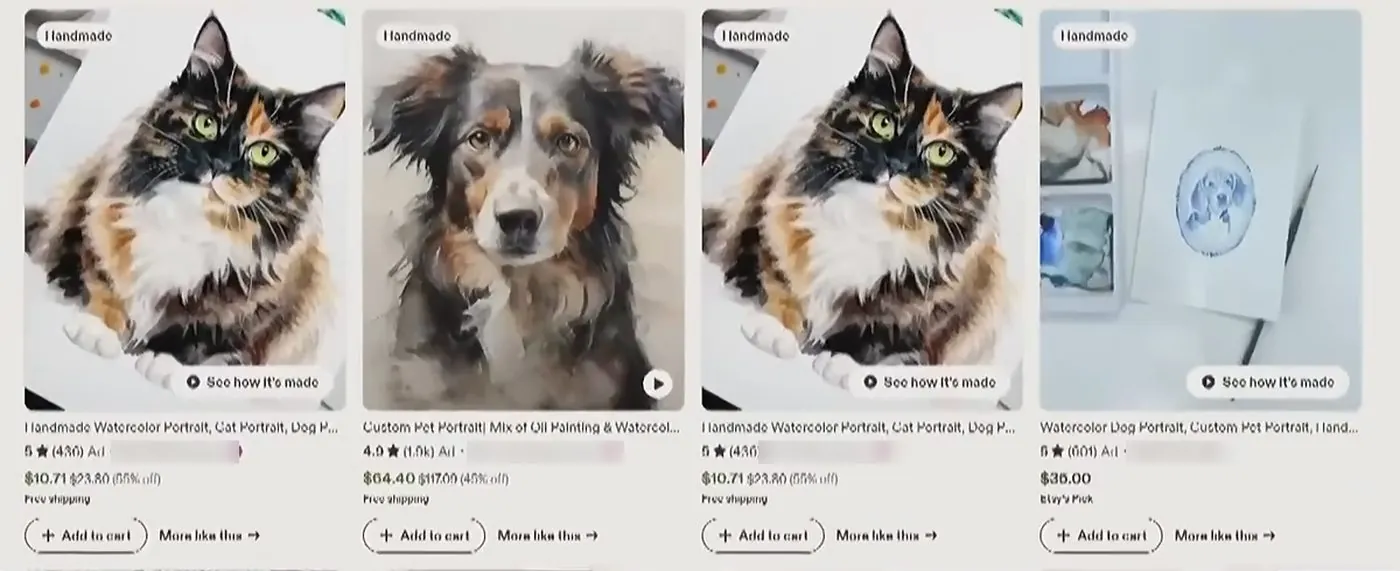
Is Etsy worth it in 2026? What it costs, what sellers complain about, and who it fits
A straight answer for someone who has never sold online, with the fee math shown so you can redo it.
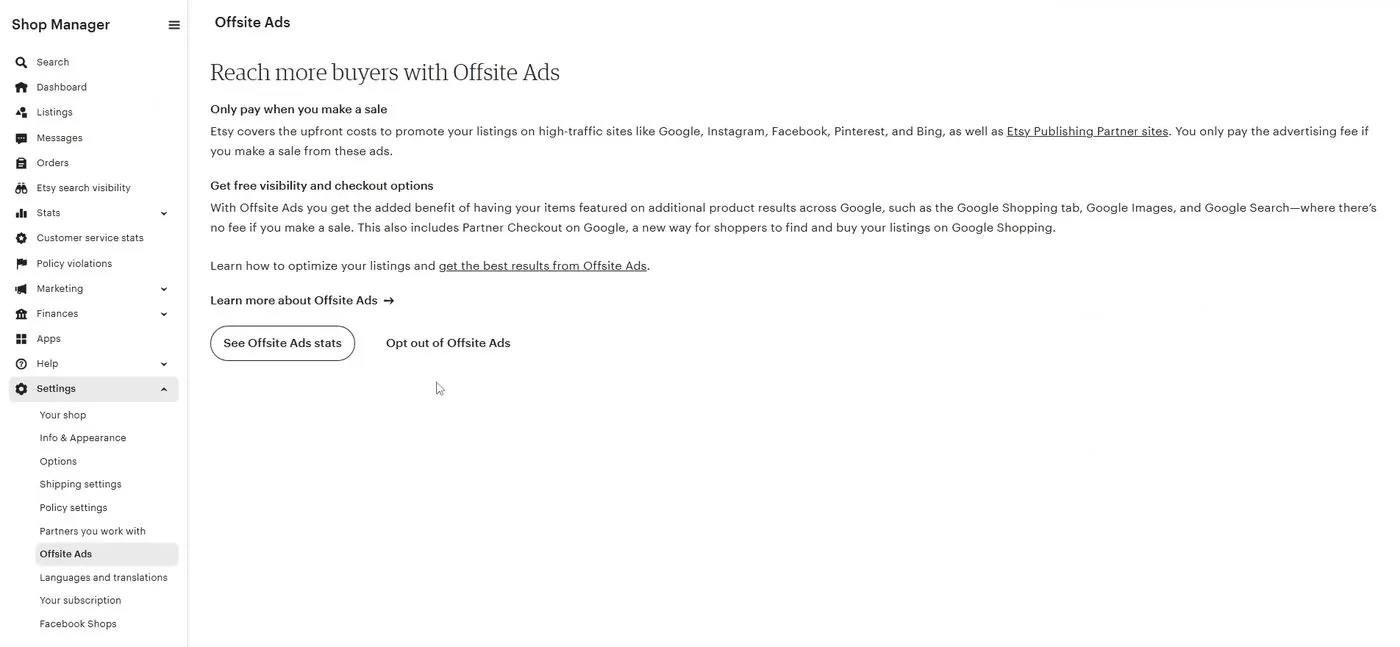
Etsy Offsite Ads explained: the 15% and 12% fee, whether you can opt out, and what Etsy's rules say about your own website
The fee Etsy charges when its own ad brings a buyer, the $10,000 line where you can no longer switch it off, and what Etsy's written rules say about sending buyers to your own site or emailing them.
- Etsy's fees and payments policy (set-up fee wording, listing fee, transaction fee and Etsy Plus price, last updated October 5, 2026), checked October 16, 2026.
- Etsy's Etsy Payments policy (United States processing fee and 2.5% currency conversion fee, last updated July 31, 2026), checked October 16, 2026.
- Etsy's Minors Policy (last updated November 20, 2020), checked October 16, 2026.
- Etsy Help Center: How to Open an Etsy Shop, checked October 16, 2026.
- Etsy Help Center: How to Verify Your Identity on Etsy, checked October 16, 2026.
- Etsy Help Center: How to Create a Listing, checked October 16, 2026.
- Etsy Help Center: How to Manage Your Digital Listings, checked October 16, 2026.
- Etsy Help Center: Why Hasn't My Money Been Deposited Yet and What is a Payment Account Reserve, checked October 16, 2026.
- Etsy Help Center: What Can I Sell on Etsy, checked October 16, 2026.
- Etsy Community: announcement about new-shop onboarding (updated June 2024), checked October 16, 2026. Seller threads on Vacation Mode during review and verification delays are individual seller reports.
- Value Added Resource, an independent Etsy seller news site: the 2024 set-up fee and ID checks report and the July 2024 variable fee report, checked October 16, 2026. Both are news reports, not Etsy statements.
- Screens and the $29 figure from Simply Shawna (September 2026), eRank (June 2026) and Kate Hayes (February 2026). These show what Etsy's screens displayed on those dates, and Etsy's own policy prints no set-up fee amount.
- Companies named on Etsy's screens: Persona (ID checks) and Plaid (bank linking). Sellers don't pay either one.
Online Store Buddy is an independent site. We're not affiliated with or endorsed by Shopify, Etsy, Amazon, WooCommerce, Wix or Squarespace. Those names are trademarks of their owners.