
Quick picks
What is the difference between Etsy and Shopify?
So you've probably read a few Etsy vs Shopify threads that all end with "it depends." Let's start with what Etsy and Shopify each are.
Basically, Etsy is a marketplace. That means one big website where many sellers list items and shoppers come to browse. You open a shop inside Etsy, and Etsy's shoppers can find your listings.
Shopify is software you use to build your own online store on your own web address. Shopify doesn't send shoppers to your store on its own. Shopify's software works that way, so that's my read and not a statement from Shopify.
Now here are the rules that decide whether Etsy fits what you want to sell. These are Etsy's platform rules, not laws.
- What Etsy allows you to sell: Etsy's help article on opening a shop says items must be made, designed, handpicked or sourced by the seller. Etsy publishes the details in its Creativity Standards, and this page doesn't cover what those words mean for each kind of item.
- Business license: The same help article says Etsy doesn't require a business license. The article also says you still have to follow the laws that apply to you.
- What Etsy asks you to set up: A desktop browser, an ID check with a selfie and a government ID, two-factor sign-in, a bank account and a card on file. Checked October 15, 2026.
Which should a beginner start with, Etsy or Shopify?
So here is my answer for each kind of beginner. The answers in this section are my opinion, based on the fees and rules further down.
- If you have no audience, a small budget, and you make, design or source what you sell, I'd start on Etsy. Etsy's one-time set-up fee and $0.20 per listing are a small bet, and Etsy's own shoppers can find you. I'd expect a first sale from a stranger to come sooner there than on a brand-new Shopify store.
- If you already have followers, an email list or a brand you want to own, I'd start with Shopify Basic. Your own visitors are what a Shopify store needs. Shopify Basic paid yearly also comes out lower on fees once your sales pass about $420 a month.
- If what you sell doesn't fit Etsy's rules on who makes or picks the items, Shopify is the one to look at. Etsy only sells items that fit those rules.
- If you already sell on Etsy and have steady sales, the fee math favors adding Shopify only for sales you bring in yourself. Keep Etsy for the shoppers who find you there.
- If you need a website to book clients, neither Etsy nor Shopify is built around booking, in my view. Our Shopify vs Wix page is a better place to start.
But keep in mind that a lower fee only helps if sales happen. Now let's look at the money.
How much do Etsy and Shopify cost for the same sales?
Now here is the short version of the fee math. The full table, with every fee spelled out and more order sizes, is on our Etsy fees vs Shopify fees page. These numbers match the fees page.
What I assumed
- Who and where: A US seller, US buyers, US dollars, and buyers paying by card.
- Orders: Every order is $50, with shipping built into the $50 and no sales tax. That is my assumption, not an average. $1,000 in sales is 20 orders, $3,000 is 60 orders and $5,000 is 100 orders.
- Etsy: One item per order, so one $0.20 listing fee per sale. No Etsy Plus subscription. The one-time set-up fee is left out because the set-up fee isn't a monthly cost.
- Etsy Offsite Ads scenario: 20 percent of sales come from an Etsy ad click, charged at 15 percent. The 20 percent is my assumption, not an Etsy number.
- Shopify: The Basic plan paid yearly, which is $29 a month, using Shopify's own card processing at 2.9% + 30 cents per order. No apps, no domain name, no paid theme.
- Left out on both sides: Your product cost, shipping labels, ads you buy, taxes, and your time. Shopify's pricing page doesn't show a domain price.
How the two cuts work
- Etsy's cut is 10.4 percent of sales. That is 6.5% for the transaction fee, 3% for payment processing, 0.5% for the 25 cents per $50 order, and 0.4% for the $0.20 listing fee. The percentages come from Etsy's Fees & Payments Policy and its Etsy Payments Policy, checked October 15, 2026.
- Shopify Basic's cut is $29 a month plus 3.5 percent of sales. That is 2.9% for card processing plus 0.6% for the 30 cents per $50 order. Both figures come from Shopify's pricing page, checked October 15, 2026.
Basically, a payment processor is the company that handles the card payment for you. Etsy runs its own, called Etsy Payments. Shopify's is called Shopify Payments.
| Monthly sales | Etsy, no Offsite Ads | Etsy, with Offsite Ads | Shopify Basic, paid yearly | Shopify Basic, paid monthly |
|---|---|---|---|---|
| $1,000 (20 orders) | 0.104 x 1,000 = $104 | 104 + (0.15 x 200) = $134 | 29 + (0.035 x 1,000) = $64 | 39 + 35 = $74 |
| $3,000 (60 orders) | 0.104 x 3,000 = $312 | 312 + (0.15 x 600) = $402 | 29 + (0.035 x 3,000) = $134 | 39 + 105 = $144 |
| $5,000 (100 orders) | 0.104 x 5,000 = $520 | 520 + (0.15 x 1,000) = $670 | 29 + (0.035 x 5,000) = $204 | 39 + 175 = $214 |
I use yearly billing for Shopify, like the Etsy fees page does. Paying yearly means $348 up front for Basic. Paying monthly is $39 a month, which gives the last column. All of these were checked October 15, 2026.
So at a $50 order, Shopify Basic costs less than Etsy at all three sales levels, on fees alone. The gap is $40, $178 and $316 a month against Etsy with no ads.
At what monthly sales does Shopify start costing less than Etsy?
Now the gap between the two cuts is 6.9 points, because 10.4% minus 3.5% is 6.9%. Shopify Basic's $29 plan price is paid back at $29 divided by 0.069. That is about $420 a month in sales, paid yearly, with no apps.
If you add about $35 a month of apps, the line moves to about $930 a month. The sample apps are listed on the full fees page.
Below those levels, Etsy costs less on fees alone. Above those levels, Shopify Basic costs less. These numbers cover fees only. They say nothing about who sends you buyers.
What is Etsy's Offsite Ads fee, and can you turn it off?
So Offsite Ads is when Etsy pays for ads on other websites, like social networks and search engines, that show your listing. An attributed order is an order from a buyer who clicked one of those ads and then bought from your shop within 30 days. Etsy charges the fee on the whole order, and only when that sale happens.
Here is the rule from Etsy's Fees & Payments Policy, last updated October 5, 2026, checked October 15, 2026. A shop under $10,000 in sales over the prior 365 days pays 15 percent and can opt out. Once the shop reaches $10,000, the fee drops to 12 percent and the shop can no longer opt out. The 12 percent stays for the life of the shop. The fee is capped at $100 per order.
Some sellers in Etsy's own community forum say new shops were signed up without clear notice and that the fee hurts margins on low-priced items. Others say the fee is manageable. These are seller reports, not Etsy statements. Here are two examples: one thread and another thread. Etsy's policy page says you can opt out while the shop is under $10,000.
What is Etsy's one-time set-up fee?
So Etsy's fee policy says a one-time set-up fee may apply when you open a shop. The policy does not print an amount. The policy says the fee is shown during shop set-up, can't be refunded once paid, and can be waived during promotions. Etsy also says Etsy can change the fee. Checked October 15, 2026.
What the policy page leaves open, a February 2026 walkthrough video shows. On the billing screen, Etsy listed a one-time set-up fee of $29. Check the amount on Etsy's own sign-up screen before you enter a card, because Etsy sets the amount. I left the set-up fee out of the monthly math above because the set-up fee is charged once.
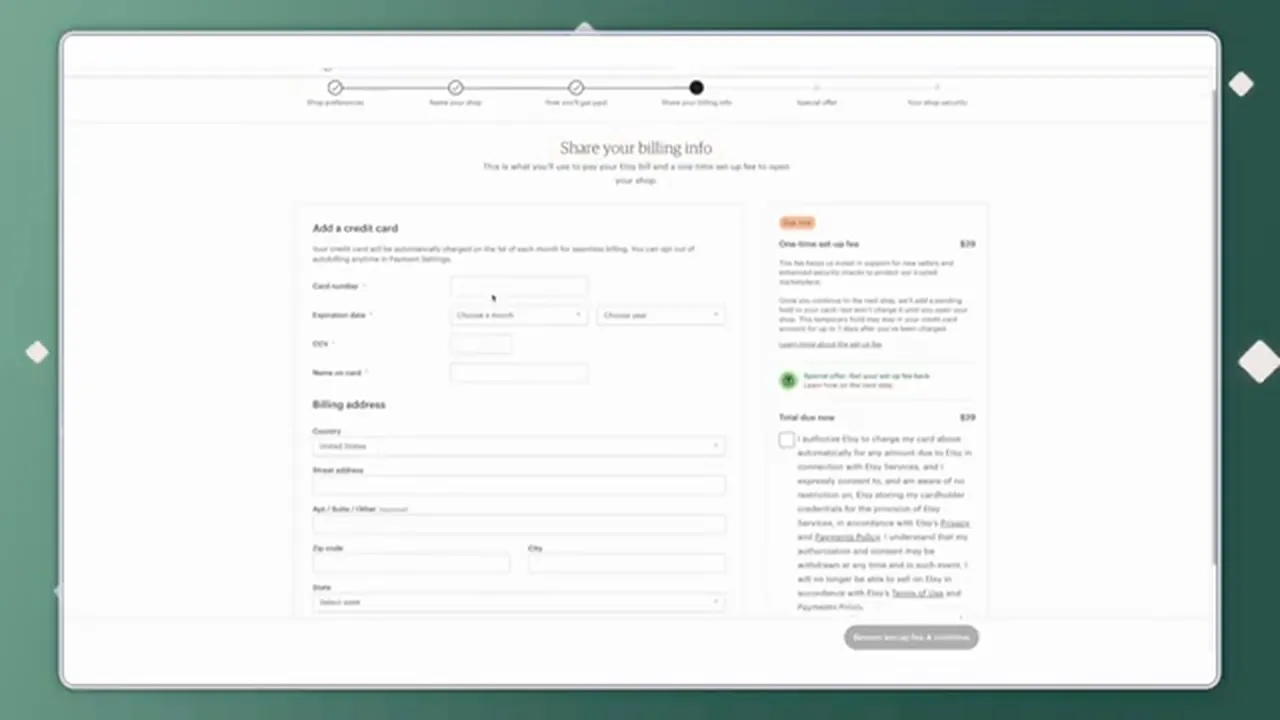
Etsy's billing step during shop set-up, showing a one-time set-up fee of $29 in February 2026, from Kate Hayes's video.
Basically, the screen says Etsy puts a pending hold on your card for the fee. The screen also says the hold won't turn into a charge until you open your shop. Etsy's policy page describes the same pending charge in its own words.
What does opening an Etsy shop look like, step by step?
Now here are the Etsy sign-up screens, in the order a beginner sees them. The screens come from a February 2026 screen recording, so Etsy may have changed some wording since.
- Go to etsy.com/sell on a desktop browser. Etsy says set-up has to be done on a desktop browser.
- Fill in your shop preferences and pick a shop name. A progress bar across the top lists the steps: Shop preferences, Name your shop, How you'll get paid, Share your billing info, Special offer, and Your shop security.
- On the "How you'll get paid" screen, pick the country your bank is in. The screen warns that you can't change the country once you save. The screen also asks what type of seller you are for tax purposes. Etsy says most sellers fall under "Individual or sole proprietorship." A note near the top says Etsy may hold back a share of a new shop's earnings for a while.
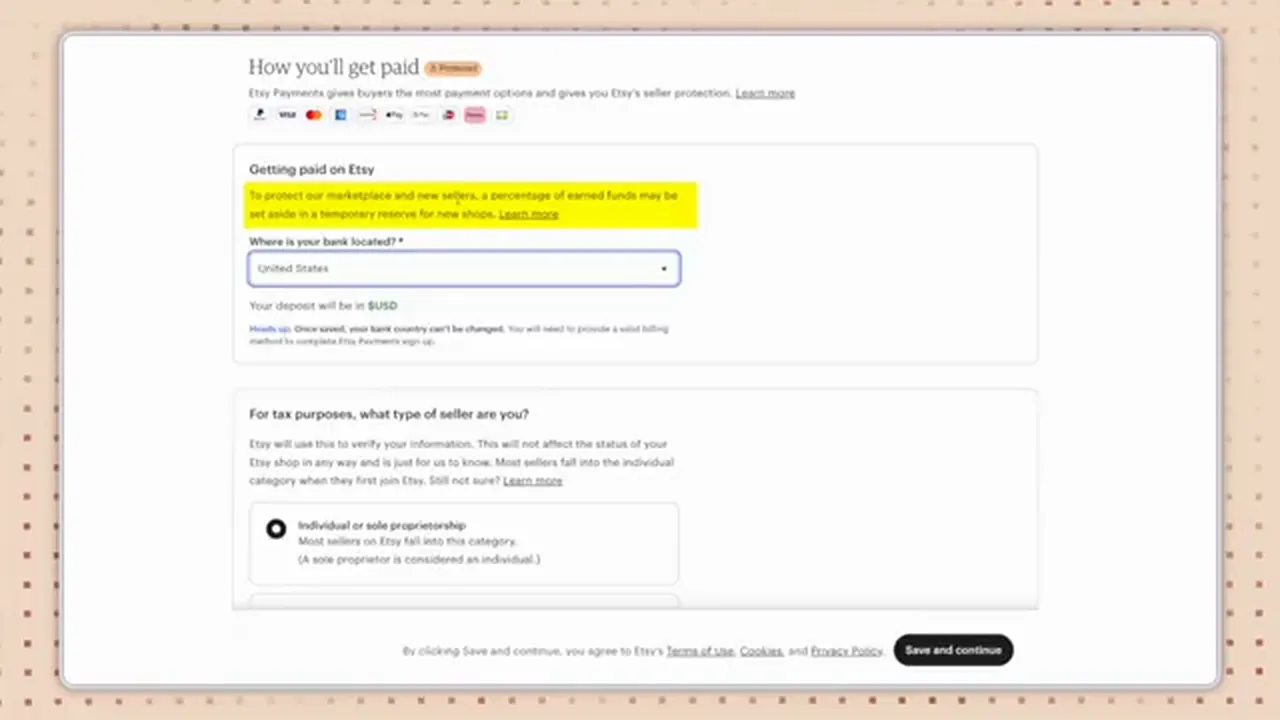
Etsy's "How you'll get paid" screen, with the temporary reserve note highlighted, from Kate Hayes's video.
- Take a photo of your government ID and a selfie. A third party runs the ID check for Etsy.
- Wait for the review. The screen says "Hold tight while we verify your identity." The screen adds that Etsy may reach out for more information within 1 to 3 days. You can't continue opening the shop until the check is done.
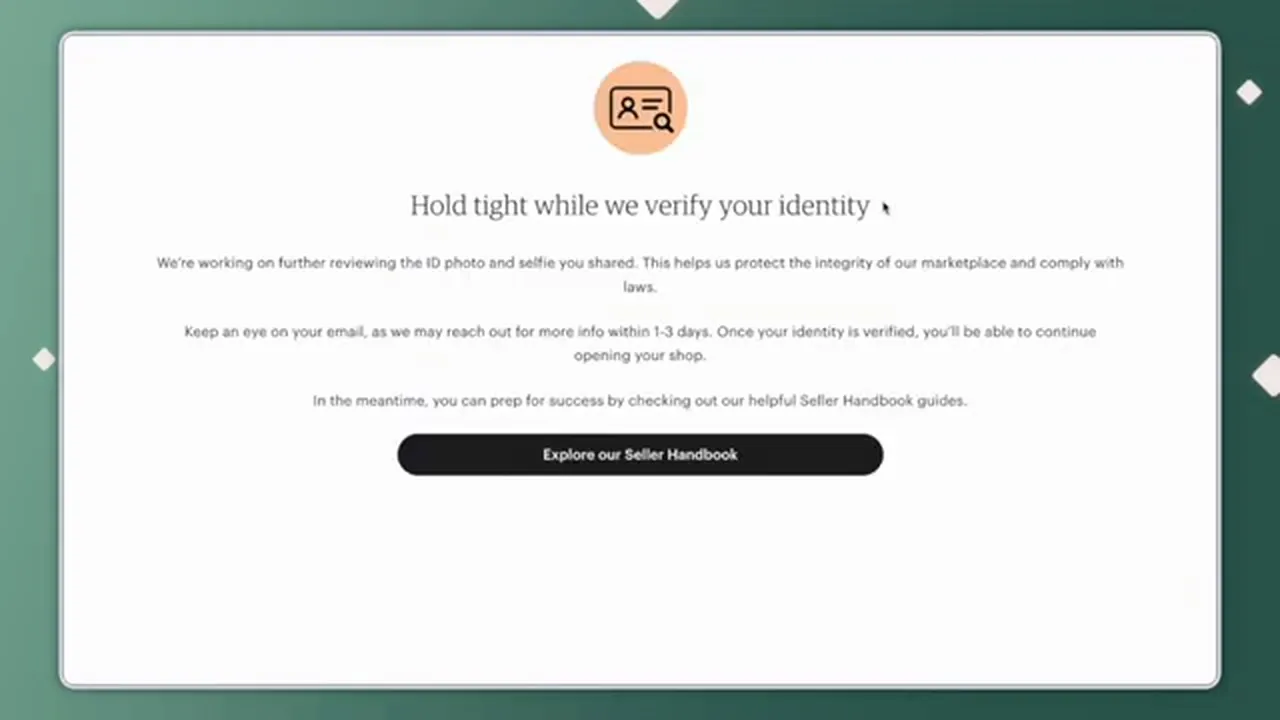
Etsy's identity review screen, from Kate Hayes's video.
- On the "Share your billing info" screen, enter a card. The one-time set-up fee shows on this screen, as in the picture in the section above.
- A pop-up called "Fees for selling on Etsy" lists what is due now and what is due later. The later fees on the pop-up are $0.20 per listing and a 6.5% transaction fee. The pop-up also lists a 3% + $0.25 payment processing fee, a 2.5% currency conversion fee, and an Offsite Ads fee of 12 to 15%. Click "I have read & understood these fees" to continue.
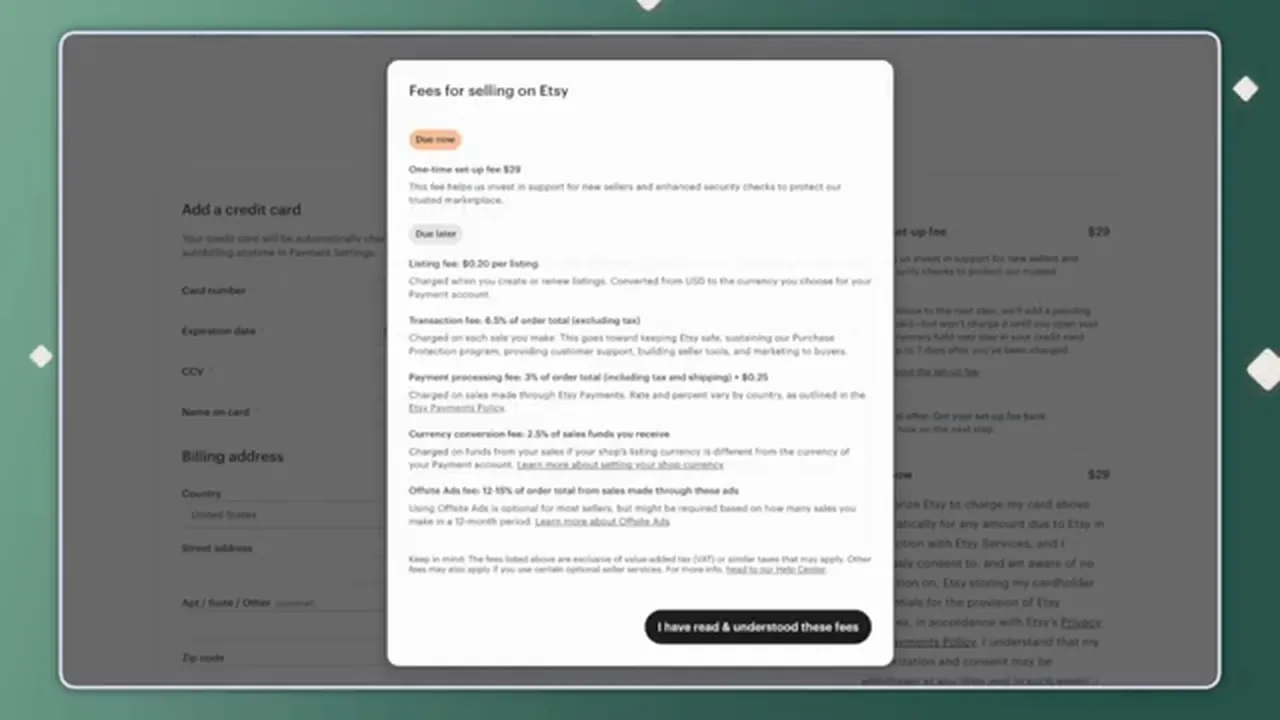
Etsy's "Fees for selling on Etsy" pop-up, with a $29 set-up fee in February 2026, from Kate Hayes's video.
- Next comes a "One-time offer" screen for Etsy Plus, which is a $10 a month subscription. You can say no by choosing "I don't want this exclusive offer." Etsy's fee policy lists Etsy Plus at $10 a month. The subscription includes 15 listing credits and $5 in Etsy Ads credit, checked October 15, 2026.
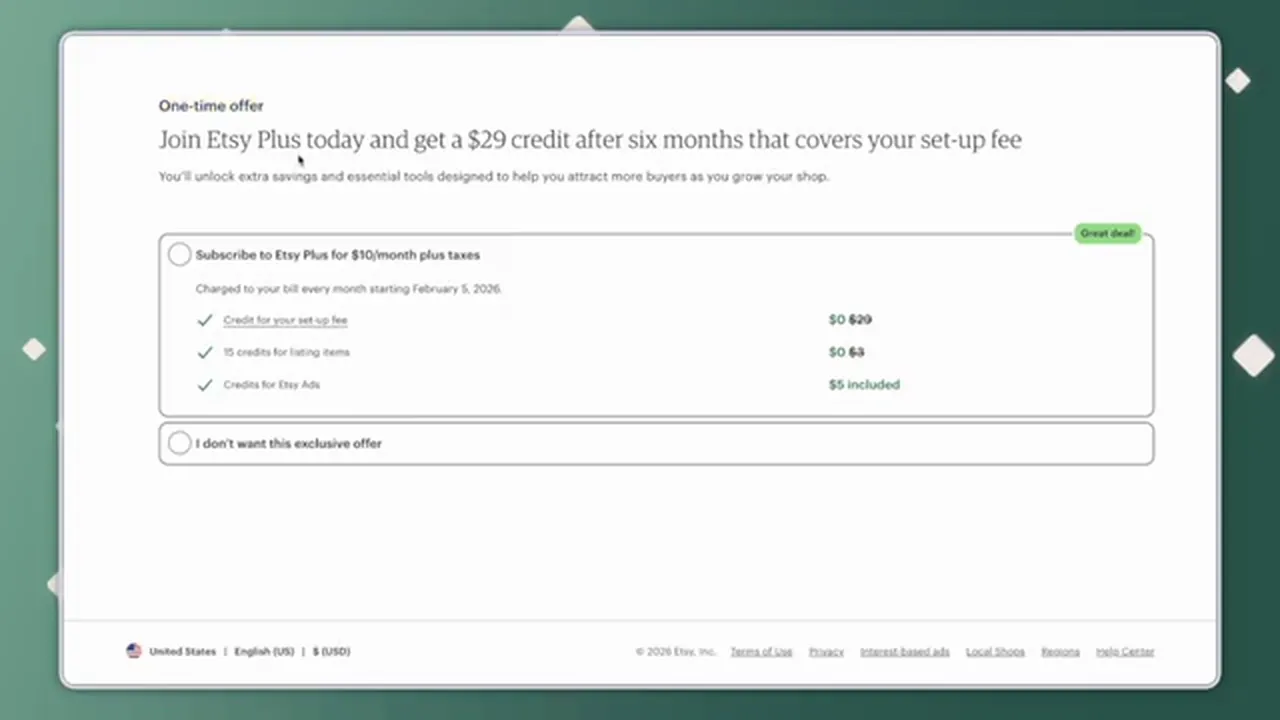
Etsy's Etsy Plus offer screen in February 2026, showing $10 a month and the choice to decline, from Kate Hayes's video.
- Finish the shop security step, which includes two-factor sign-in. Etsy then opens Shop Manager, with an "Add a listing" button. Etsy lists a $0.20 fee for each listing you publish.
Does Etsy charge less when your own followers buy?
So Etsy has a program called Share & Save. When you enroll, and a buyer orders within 30 days of clicking a trackable link you shared outside Etsy, Etsy refunds 4 percent of the order total. Checked October 15, 2026.
Etsy's help page lists some limits. Links in Etsy Messages or in listing descriptions don't count. Orders that last came from an Offsite Ad don't qualify.
Basically, the 4 percent would take Etsy's 10.4 percent down to about 6.4 percent on those orders, if every other fee stayed the same. That narrows the gap with Shopify for sellers who bring their own traffic. The 4 percent doesn't close the gap.
What does opening a Shopify store look like?
Now here are the Shopify screens, from a September 22, 2026 screen recording. The plan prices on its screens match Shopify's pricing page as of October 15, 2026. I use the pricing page for every price on this page.
- Go to Shopify's pricing page. The page says "Try 3 days free, then $1/month for 3 months," checked October 15, 2026. The page gives no end date for the offer and no fine print on which plans qualify.
- Enter your email and click "Start for free." Shopify then asks "Where would you like to sell?" There are six choices. One is "Online marketplaces," described as listing products on Etsy and other marketplaces. You can also click "Skip customized setup."
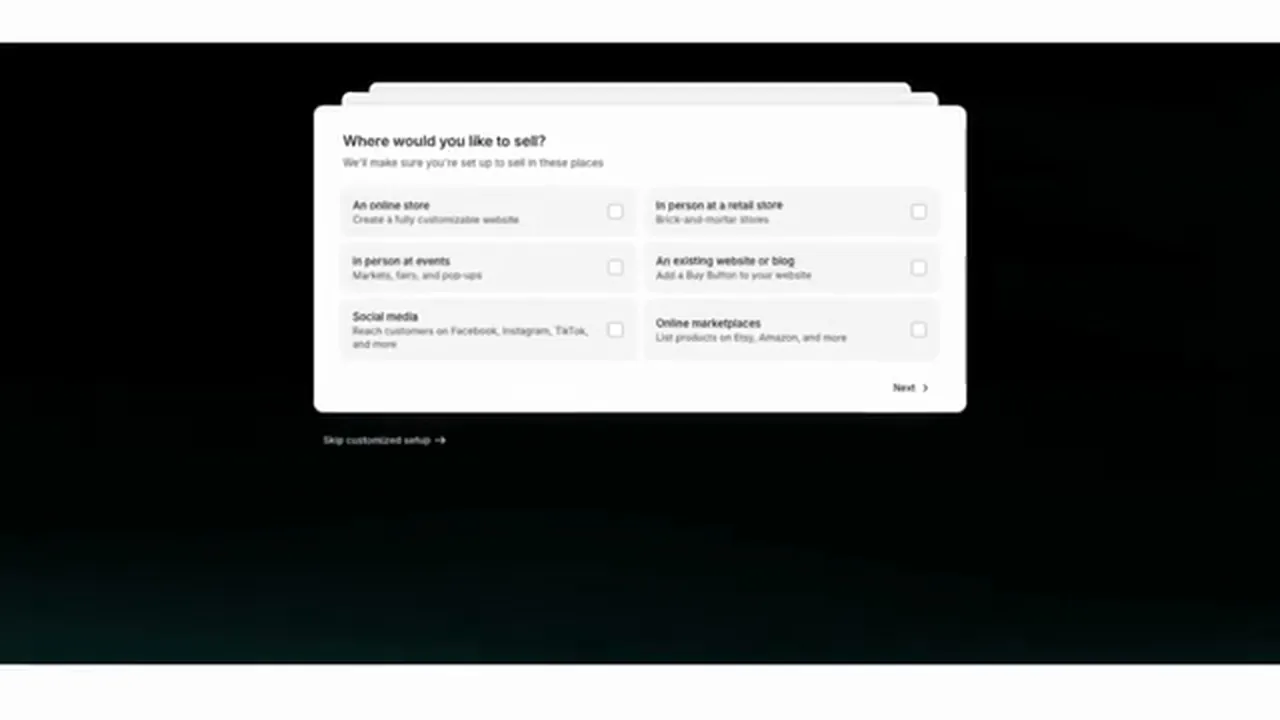
Shopify's "Where would you like to sell?" question during sign-up, from WP Cupid Blog's video of September 22, 2026.
- On the "Pick your plan" screen, you see Basic, Grow, Advanced and Plus. In the video, each of the first three shows its regular monthly price crossed out and "$1 USD/month for first 3 months" under it. The Basic card lists card rates from 2.9% + 30 cents.
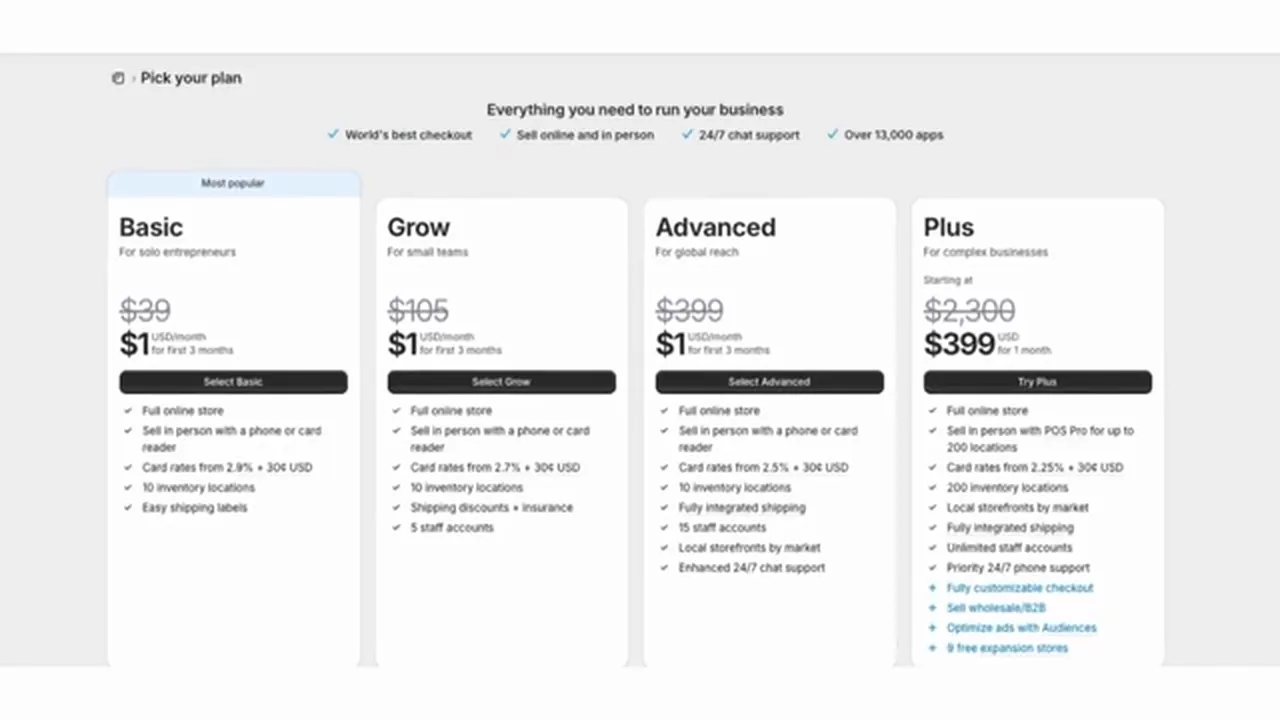
Shopify's plan picker as it looked on September 22, 2026, showing the $39 monthly price for Basic crossed out beside the $1 offer, from WP Cupid Blog's video. Shopify sometimes shows different visitors different prices for Grow and Advanced, so check Shopify's pricing page for yours.
- Once inside, open Settings, then Payments. The Shopify Payments card at the top says "No transaction fees" and "Card rates starting at 2.9% + $0.30." A "Complete setup" button starts the payment set-up.
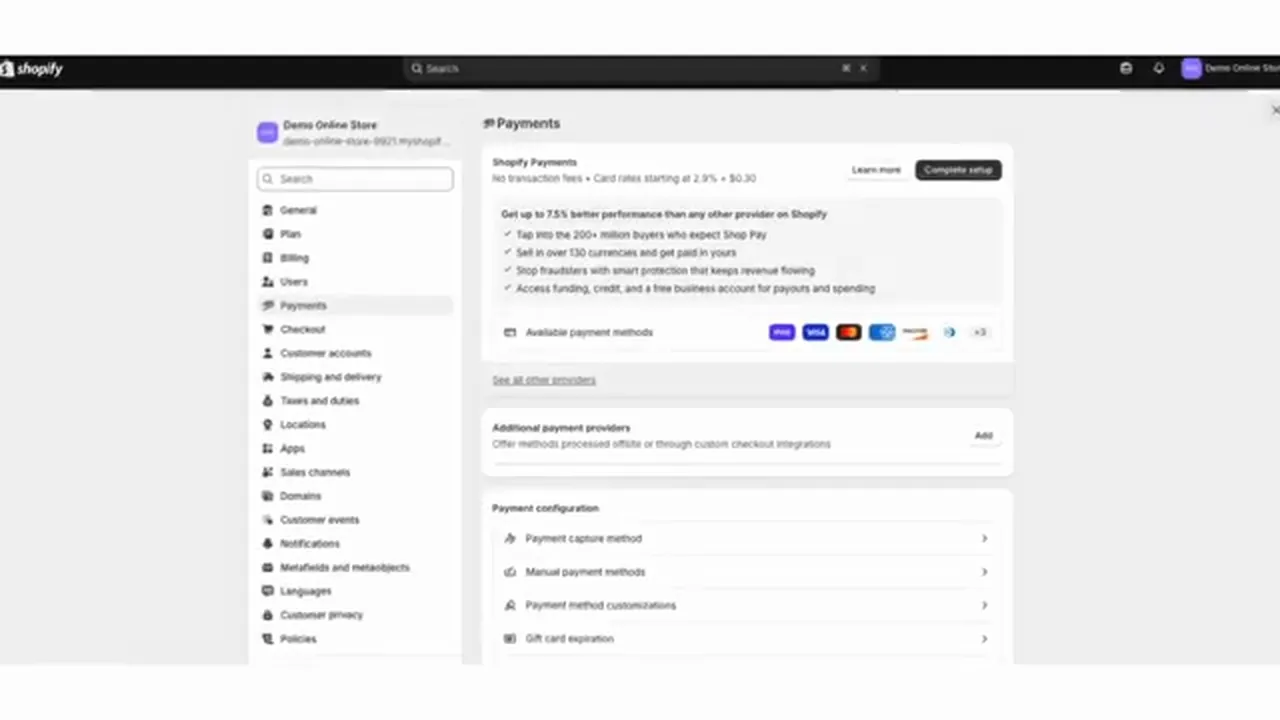
Shopify's Settings, Payments page in a new store, from WP Cupid Blog's video of September 22, 2026.
For the full set of steps, see our how to start a Shopify store guide.
What happens to your Shopify store when the free trial ends?
So here is what Shopify's free trial help page says, checked October 15, 2026. These are Shopify's platform rules.
- The trial starts when you sign up, not when you start building.
- While you're on the trial, your store is in private mode. You need a paid plan before you can sell.
- If you do nothing when the trial ends, the store is paused until you pick a plan.
- If you picked a paid plan before the trial ended, you have to pause or deactivate the store yourself to avoid the charge.
- Shopify says trial length and price can change and can vary by store location.
For more on the $1 offer and how to cancel, see our free trial and $1 offer guide.
Who sends the shoppers to your store?
So here is the biggest difference, and fee tables can't show it. On Etsy, shoppers search inside Etsy, and your listings can show up. On Shopify, the visitors are yours to bring, with your own followers, your own email list, or ads you pay for.
Shopify's own community forum has many posts from new store owners reporting no sales, or visitors but no orders. Here are three examples: one, two and three. These are reports from store owners, not measured figures from Shopify.
And keep in mind that nobody can promise you a first sale date, so I won't guess one.
How fast does each platform pay you?
Now a payout is when the platform sends your sales money to your bank account. A reserve is a share of your sales that a platform holds back for a while. Payouts and reserves both follow each platform's rules.
- Etsy: Etsy's help page on deposits says new sellers' funds are generally eligible for deposit 14 days after a sale. Established shops can get funds as soon as the next business day. New sellers are paid weekly, on Mondays, by default. A bank transfer can take 1 to 5 business days to appear. Changing your bank details triggers a 5-day hold. The Monday schedule, the bank transfer time and the 5-day hold come from Etsy's help page on bank transfers. Checked October 15, 2026.
- Etsy reserves: Etsy's reserve help page says Etsy can hold back a percentage of each physical sale. Making your first sale is listed as a risk factor. Digital items aren't held, Star Sellers don't get a reserve, and shipping with valid tracking can release funds. Checked October 15, 2026.
- Shopify: Shopify's payout timing page lists a minimum of 3 business days for US stores, plus 1 to 3 days for the bank. A new or changed bank account pauses payouts for 3 to 5 business days. Shopify can also hold payouts for review. Checked October 15, 2026.
Who handles sales tax on Etsy and on Shopify?
So sales tax is the tax a buyer pays at checkout, which the seller or the platform sends to the state. These are the platforms' own statements, not tax advice.
- Etsy: Etsy's fee policy says Etsy calculates, collects and pays US sales tax for you on orders shipped to buyers in the US. Where Etsy has to collect the tax, Etsy uses the category you give each listing to work it out. The policy says you alone are responsible for categorizing your listings correctly. The same policy says Etsy sends 1099-K tax forms to certain US sellers. Checked October 15, 2026.
- Shopify: Shopify's taxes help page says tax is your responsibility. The page says Shopify doesn't pay or file your taxes unless you use Shopify Tax and set up automated filing. Checked October 15, 2026.
Rules differ by state, and this page doesn't cover when you have to register. What I've written here is general information. A state tax agency or an accountant can confirm what applies where you live. Our LLC and EIN guide goes into the paperwork side.
Does Etsy allow you to send customers to your own website?
Now the next question matters if you sell on Etsy today and want your own store. These are Etsy's platform rules, from its Off-Platform Transactions Policy, last updated October 5, 2026, checked October 15, 2026. Platform rules aren't laws.
Basically, an off-platform transaction is a sale that happens somewhere other than Etsy's checkout. Etsy's policy says Etsy doesn't allow these things:
- Instructing a buyer to purchase an item through a personal website, a social media shop or another online marketplace.
- Asking for or sharing contact information, like a phone number or email address, to complete a sale off Etsy.
- Offering discounts, free items, cheaper shipping or other incentives to buy off Etsy.
- Using a QR code to send buyers off Etsy.
Something to note is that Etsy's own help page on the About section says a shop can add links to a website, blog or social media profile. That is in Etsy's About section help article.
And Etsy's pages don't spell out exactly where the line sits. Etsy's policy bans telling buyers to purchase elsewhere. Etsy's pages don't say whether a link to a site that sells the same items counts. So I'd read Etsy's policy page yourself. And I wouldn't tell Etsy buyers to buy from your site or offer those buyers a discount to do it.
Etsy's Seller Policy also bars unsolicited advertising and spam in messages. The same Seller Policy says a buyer's email address can only be used for Etsy-related messages and Etsy sales. Without the buyer's consent, you can't add any Etsy member to your email list. Checked October 15, 2026.
Can you sell on Etsy and Shopify at the same time?
So yes, nothing on Etsy's fee policy or Shopify's pricing page stops you from having both. You pay both sets of costs, and the rule above about sending buyers from Etsy to your site still applies.
Now one tool to be careful with. Shopify's Marketplace Connect app used to be the way to link the two. Shopify's Marketplace Connect help page now says new connections to Etsy can't be made with the app. Sellers who already connected can keep using the app. Shopify's page was checked October 15, 2026, so don't plan around Marketplace Connect for a new Etsy connection.
If you later want to move your Etsy listings, Shopify's guide to migrating from Etsy has you export your listings from Etsy as a CSV file. Then you import the CSV file into Shopify. In Etsy's Shop Manager, the export is under Settings, Options, Download Data. The guide says the file only includes listings currently for sale.
When is Etsy the wrong choice, and when is Shopify?
Now I'd rather tell you straight where each one falls short.
- Etsy is the wrong choice if what you sell doesn't fit Etsy's rules. Etsy is also a poor fit if most of your sales will come from your own followers. Etsy's fees come to about 10.4 percent of those sales, and Etsy's rules limit how you can point buyers elsewhere.
- Shopify is the wrong choice if you have no way to bring visitors yet. Lower fees don't help when nobody arrives.
- Neither is the right choice if you mainly want a site to book clients. Our Shopify vs Wix page covers site builders.
But otherwise, the choice comes down to where your first buyers will come from.
Videos worth watching before you decide
And if you want to see these screens yourself, here are four videos. You can play each one right here on the page, and YouTube's usual controls work, including skipping ahead, changing the speed and going full screen. Under each video is a short summary so you can decide if it's worth your time.
A screen recording of one person opening a new Etsy shop from the first screen to the Shop Manager home page.
- The money screens: The video shows the "How you'll get paid" step at about 4 minutes and the billing step with the $29 set-up fee at about 9 minutes. That $29 was Etsy's amount in February 2026.
- The ID check: At about 6 and a half minutes, the video shows the ID and selfie step, then the wait screen for the review.
- A heads-up about Kate Hayes's video: Her video description has referral links for Etsy, Shopify and other companies, and the description says she earns money from some of those links. I'm including the video because it shows every Etsy sign-up screen in order. This site has no referral links and earns nothing from the video.
A screen recording of a working seller account, showing where everything lives in Etsy's Shop Manager.
- The main areas: The video walks through the home page stats, Listings, Messages, Orders, Stats, and the customer service measures Etsy tracks.
- Marketing and money: The video opens the Marketing section, which includes Etsy Ads, Offsite Ads, Sales and discounts and Share & Save. The video also opens Finances.
- What doesn't match a US shop: The account shows prices in euros, so the money screens won't match what a US seller sees. Use the video to learn the layout, not the fees.
A screen recording of Shopify's admin area, the screen you use to run a store after you sign up.
- The sections: The video covers Sales Channels, Products, Inventory, Customers, Discounts and Orders, then selling when an item is out of stock.
- Worth knowing: The video is from December 2025, so some menus may have moved. From about 8 minutes on, STOQ, the maker of a preorder app for Shopify stores, promotes its own app.
A podcast episode where the host, Samantha Propper, makes the case for selling on both Etsy and Shopify. That is the host's opinion.
- What the episode compares: Fees, customer ownership, sales tax, marketplace traffic, email marketing, and how Etsy's Offsite Ads can affect profit.
- The host's view: The host suggests using Etsy to find customers and Shopify to build repeat purchases. For prices, use the figures on this page, checked October 15, 2026.
Buddy's take
So ultimately, if nobody knows you yet, I'd start on Etsy, because Etsy's shoppers can find you. If you already have followers, an email list or a brand to own, I'd start with Shopify Basic. Shopify Basic paid yearly comes out lower on fees once you pass about $420 a month in sales at a $50 order.
But for me personally, the money math is the smaller question. The bigger one is who your first buyers are, so start where your first buyers already are.
And what I've written here is general information about fees and rules, not tax or legal advice. A state tax agency or an accountant can confirm what applies where you live.
Have a question about “Shopify vs Etsy for beginners: which should you start with?”?
Ask it here. Every question comes to me first. I answer as many as I can, and each answered question goes on this page with my answer so other people starting a store can see it too. I don't ask for your email, so check back on this page for the answer.
More comparisons guides
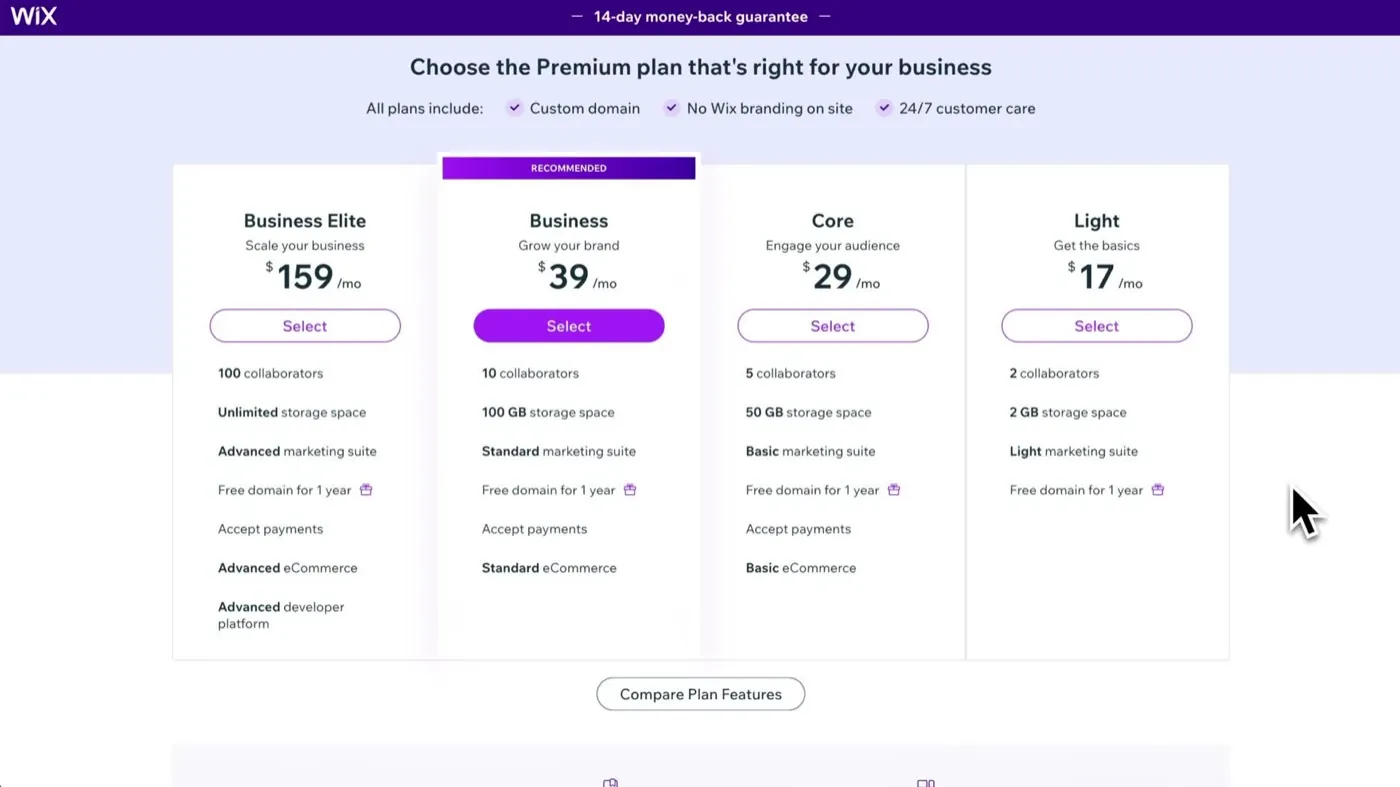
Shopify vs Wix: which should you choose for your online store?
The cheapest plan that can take payments costs the same on both. What differs is what the site is built to do.
Shopify vs WooCommerce: is the free option really cheaper?
WooCommerce's software costs $0. A store built on it still has a monthly bill, and it comes with more work.
- Etsy's Fees & Payments Policy, last updated Oct 5, 2026, checked October 15, 2026. Used for the set-up fee, listing fee, transaction fee, Offsite Ads, Etsy Plus, currency conversion, sales tax and 1099-K forms.
- Etsy's Etsy Payments Policy, last updated Jul 31, 2026, checked October 15, 2026: the US payment processing fee of 3% + $0.25.
- Etsy's Off-Platform Transactions Policy, last updated Oct 5, 2026, checked October 15, 2026.
- Etsy's Seller Policy, last updated Oct 5, 2026, checked October 15, 2026: the rules on unsolicited advertising, spam and buyers' email addresses.
- Etsy Help Center, checked October 15, 2026: How to open an Etsy shop, the About section, Share & Save, deposit timing, bank transfers and reserves, and Etsy's Creativity Standards.
- Shopify's pricing page, checked October 15, 2026. Used for Basic's prices, the 2.9% + 30 cents card rate, and the 3 days free then $1 a month offer.
- Shopify Help Center, checked October 15, 2026: free trial, payout timing, taxes, Marketplace Connect and migrating from Etsy.
- Seller posts, checked October 15, 2026: Shopify Community threads one, two and three, and Etsy Community threads one and two.
- Our Etsy fees vs Shopify fees page: the full fee math these numbers match.
- Videos and screen credits: Kate Hayes, WP Cupid Blog,Gulo Ecom Solutions, STOQ and Don't Miss The Conversation.
Online Store Buddy is an independent site. We're not affiliated with or endorsed by Shopify, Etsy, Amazon, WooCommerce, Wix or Squarespace. Those names are trademarks of their owners.