
Quick picks
What is the difference between Shopify and Amazon FBA?
So you've probably seen Shopify and Amazon FBA put side by side as if they were two versions of the same thing. They aren't. Let's start with what each one is.
Basically, Shopify is software you use to build your own online store on your own web address. Shopify doesn't send shoppers to your store on its own. That's my read of how Shopify works, not something Shopify's pages say.
Amazon is a marketplace. That means one huge website where many sellers list items and shoppers come to browse. Amazon's selling plans page says: "Put your products in front of the millions of customers who search Amazon.com every day."
Now Fulfillment by Amazon, called FBA, is a separate piece. Amazon describes FBA as "a program that lets you outsource order fulfillment to Amazon." Fulfillment means storing the item, packing it and shipping it to the buyer. Amazon says it will "pick, pack, and ship orders, as well as handle customer service and returns."
In plain steps, here is what FBA means for you:
- You buy a batch of your product from a supplier. That is your inventory.
- You ship the batch to an Amazon warehouse, and you pay for that shipping.
- Amazon stores the batch and charges you storage fees.
- A shopper on Amazon buys one unit, and Amazon packs and ships that unit.
- Amazon takes its fees out of the sale and pays you the rest.
Something to note is that FBA means paying for the product in bulk before the first sale happens. That is the biggest startup cost for a beginner, and the cost depends on the product, so there's no single number to give you. If you can't afford a batch yet, FBA isn't where I'd start.
FBA is one choice on Amazon, and you can also ship the orders yourself. Our FBA vs shipping it yourself page covers that choice, and our how to start selling on Amazon guide covers the sign-up. Amazon's two selling plans, Individual at $0.99 per item sold and Professional at $39.99 a month, are on Amazon's pricing page, checked October 16, 2026. Amazon says you can switch or cancel a plan at any time after registering. Our Individual vs Professional plan page explains the difference.
Everything quoted from Amazon and Shopify on this page is a platform rule, not a law. My opinions are marked as my read or my view.
Which should a beginner start with, Shopify or Amazon FBA?
So here is my answer for each kind of beginner. The answers in this section are my opinion, based on the fees and rules further down.
- If nobody knows you and you can pay for a batch of product, I'd look at Amazon FBA first. Amazon's shoppers can find your product. Just know that on the $25 example below, Amazon's fees take more than a third of the sale before you count the cost of the product or any ads.
- If you already have followers, an email list or a brand people ask for by name, I'd look at Shopify Basic first. Your own visitors are what a Shopify store runs on, and Shopify's card fee on the $25 example is $1.03.
- If you can't afford to buy product in bulk, neither one is a good first step. Amazon FBA needs the batch up front. A Shopify store needs a product to sell too.
- If you want a list of customers you own, I'd lean toward Shopify. Amazon's rules limit how you can contact buyers, as you'll see below.
- If you already sell on Amazon and want your own store too, running both is allowed, with limits on what you can say to Amazon's buyers. The section on selling on both has the details.
But keep in mind that a lower fee only helps if sales happen. Shopify with no visitors means no sales. If you're an Amazon seller thinking of leaving, our is Shopify worth it page goes through that side. And if you're weighing Etsy against Shopify instead, see our Shopify vs Etsy page.
What does each one cost before your first sale?
Now here are the costs you pay up front on each side. All were checked October 16, 2026 unless the line says otherwise.
Amazon FBA
- Selling plan: $39.99 a month on the Professional plan, or $0.99 per item sold on the Individual plan, from Amazon's pricing page.
- Your inventory: the product itself, bought in bulk before it sells. The cost depends on what you sell.
- Shipping the batch to Amazon: you pay for this. If you use Amazon's Partnered Carrier program, the cost is billed to your Seller Central account, which is Amazon's dashboard for sellers. It shows up as an inbound transportation charge after you accept it, per Amazon's help page. Amazon doesn't list one fixed price.
- Inbound placement fee: a per-unit charge Amazon bills 45 days after the shipment arrives. If you send the whole batch to one Amazon location, the inbound placement fee for large standard-size items of 12 ounces or less is $0.20 to $0.40 a unit. If you split the batch yourself and send it to several Amazon locations, there's no inbound placement fee, but that needs at least five identical cartons or pallets per item. Source: Amazon's inbound placement page.
Shopify
- Plan: Basic is $29 a month paid yearly or $39 paid monthly. Shopify's trial is "3 days free, then $1/month for 3 months." Both are on Shopify's pricing page. Our Shopify plans page compares the plans, and our free trial guide covers the $1 offer.
- Domain name: from $9 a year at Shopify's domain page, checked October 15, 2026. A free myshopify.com address also exists.
- Theme: a theme is the design template for your store. Free themes exist. Paid themes run $100 to $500 one time, such as Allure at $100 and Impulse at $500, checked October 15, 2026.
- Apps: most are free to install. Our Shopify real monthly cost page builds up the full total.
- Your inventory: the same bulk-buying question as Amazon, unless you dropship or print on demand. This page doesn't cover those two.
Amazon's pages also advertise new-seller incentives, including credits and fee waivers. Amazon's pricing page and FBA page describe them, and the pricing page sends you to a separate incentives page for the details. I left every one of them out of the totals on this page, because who qualifies is set out on those separate Amazon pages. Read those terms before counting on any credit.
And I don't cover business paperwork on this page. Our LLC and EIN guide has the basics. That guide is general information, and a state agency or an accountant can confirm what applies for you.
How much does one $25 sale cost on Amazon FBA and on Shopify?
Now here is the money math. Every number below is built from Amazon's and Shopify's own fee pages, so you can redo it with a calculator. Amazon's FBA page links a revenue calculator that works out Amazon's side for your own product.
What I assumed
- Who and where: a US seller, US buyers and US dollars.
- The sale: one $25 item, sold at $25 on both sides, with shipping to the buyer free. The $25 is all the buyer pays. One unit per order.
- The product: large standard-size, shipping weight over 8 ounces and up to 12 ounces, packed size 12 x 8 x 2 inches. That volume is 192 cubic inches, or 0.1111 cubic foot.
- Amazon account and category: a Professional account, in Amazon's "Everything Else" category, where the referral fee is 15 percent with a $0.30 minimum. The minimum doesn't apply at $25.
- Amazon fulfillment fee: the rate for a large standard-size item over 8 ounces up to 12 ounces, priced from $10 to $50. At Amazon's holiday peak rate, which runs October 15, 2026 to January 14, 2027, that is $4.48. At the regular rate, which ran January 15 to October 14, 2026, that is $4.20. Amazon also adds a 3.5 percent fuel and logistics surcharge to every fulfillment fee, so I multiply each fulfillment fee by 1.035.
- Inbound placement: $0.30 a unit, the middle of Amazon's $0.20 to $0.40 range. That is my assumption.
- Storage: each unit sits in the warehouse one month on average. That is my assumption. Amazon charges $0.78 per cubic foot from January to September and $2.40 per cubic foot from October to December.
- Shopify: the Basic plan, with the buyer paying by card through Shopify's own card processing, Shopify Payments. Basic's online card rate is 2.9% + 30 cents, per Shopify's pricing page, checked October 16, 2026. In the monthly table I use the $39 monthly plan price.
- Amazon doing the shipping for a Shopify order: I price two ways, and a later section explains both. The first is Amazon Multi-Channel Fulfillment, called MCF, at standard speed with plain packaging. The second is Buy with Prime, which adds a Prime badge to your store.
- Left out of every line: the cost of the product, ads, returns, taxes and your time. Also left out are postage in the Shopify self-ship column and the cost of getting visitors to a Shopify store.
A few terms first. Basically, a referral fee is Amazon's cut of each sale, a percentage of the total the buyer pays. A fulfillment fee is what Amazon charges to pack and ship one unit. A storage fee is what Amazon charges to keep your stock in its warehouse. A payment processor is the company that handles the buyer's card payment. Amazon's referral fee and fulfillment fee come from Amazon's fee schedule and its 2026 fulfillment fee page. The storage rates come from Amazon's storage fee page. All were checked October 16, 2026.
I round each fee to the cent, and each total is the sum of the rounded fees shown.
How the Amazon FBA fees add up on $25
- Referral fee: 15% x $25.00 = $3.75.
- Fulfillment fee at the peak rate: $4.48 x 1.035 = $4.6368, which rounds to $4.64.
- Inbound placement: $0.30.
- Storage at the October to December rate: 0.1111 cubic foot x $2.40 = $0.2667, which rounds to $0.27.
- Total at peak rates: $3.75 + $4.64 + $0.30 + $0.27 = $8.96, which is 35.8 percent of $25.
- Total at the regular rates: fulfillment is $4.20 x 1.035 = $4.347, which rounds to $4.35. Storage is 0.1111 x $0.78 = $0.0867, which rounds to $0.09. So $3.75 + $4.35 + $0.30 + $0.09 = $8.49, which is 34.0 percent.
Amazon's own page says FBA fees rise by an average of $0.08 per unit sold in 2026, with no new FBA fee types, per Amazon's 2026 fee changes page.
How the Shopify fees add up on $25
- Shopify Basic, shipping it yourself: 2.9% x $25 = $0.725, plus $0.30 = $1.025, which rounds to $1.03, or 4.1 percent. Postage, boxes and labels are extra, and you pay those to your carrier.
- Shopify Basic with Amazon MCF: the $1.03 card fee, plus $9.20 for Amazon to ship the order ($8.89 x 1.035 = $9.2012), plus $0.30 inbound placement and $0.27 storage. The total is $1.03 + $9.20 + $0.30 + $0.27 = $10.80, which is 43.2 percent. No Amazon referral fee applies. The $8.89 is from Amazon's MCF rate card for October 15, 2026 to January 14, 2027.
- Shopify Basic with Buy with Prime: the $1.03 card fee, plus a Prime service fee of 3% x $25 = $0.75. Fulfillment adds $7.69 ($7.43 x 1.035 = $7.6901), and inbound placement and storage add $0.30 and $0.27. The total is $1.03 + $0.75 + $7.69 + $0.30 + $0.27 = $10.04, which is 40.2 percent. Amazon's page words the Prime service fee as "3% of order value, $0.30 per order minimum," per Amazon's Buy with Prime pricing page. The $7.43 is from its rate card. Amazon's page says Amazon's own payment processing fee doesn't apply when you use the Amazon MCF and Buy with Prime app for Shopify, so Shopify's card fee applies instead.
Keep in mind that the MCF and Buy with Prime rate cards use different weight bands and different numbers for the same product. They are two different services, so the two totals aren't the same.
| On one $25 sale | Amazon FBA, peak rates | Amazon FBA, regular rates | Shopify Basic, shipped by you | Shopify Basic + Amazon MCF | Shopify Basic + Buy with Prime |
|---|---|---|---|---|---|
| Card payment fee | none separate | none separate | $1.03 | $1.03 | $1.03 |
| Amazon referral fee | $3.75 | $3.75 | none | none | none |
| Prime service fee | none | none | none | none | $0.75 |
| Fulfillment fee (with the 3.5% surcharge) | $4.64 | $4.35 | your postage | $9.20 | $7.69 |
| Inbound placement | $0.30 | $0.30 | none | $0.30 | $0.30 |
| Storage for one month | $0.27 | $0.09 | none | $0.27 | $0.27 |
| Total per sale | $8.96 (35.8%) | $8.49 (34.0%) | $1.03 (4.1%) plus postage | $10.80 (43.2%) | $10.04 (40.2%) |
The Amazon FBA columns have no separate card fee line, because Amazon takes the buyer's payment itself and doesn't list a card fee for sellers.
How much do the fees come to at $1,000, $3,000 and $5,000 a month?
So now let's scale the $25 sale up. At $25 an order, $1,000 in sales is 40 orders, $3,000 is 120 orders and $5,000 is 200 orders. The assumptions are the same ones listed above. Each total includes the monthly plan price. Amazon FBA uses the Professional plan at $39.99. Shopify uses Basic at the $39 monthly price.
| Monthly sales | Amazon FBA, peak rates | Amazon FBA, regular rates | Shopify Basic, shipped by you (leaves out postage) | Shopify Basic + Amazon MCF, peak | Shopify Basic + Buy with Prime, peak |
|---|---|---|---|---|---|
| $1,000 (40 orders) | $398.39 (39.8%) | $379.59 (38.0%) | $80.20 (8.0%) | $471.00 (47.1%) | $440.60 (44.1%) |
| $3,000 (120 orders) | $1,115.19 (37.2%) | $1,058.79 (35.3%) | $162.60 (5.4%) | $1,335.00 (44.5%) | $1,243.80 (41.5%) |
| $5,000 (200 orders) | $1,831.99 (36.6%) | $1,737.99 (34.8%) | $245.00 (4.9%) | $2,199.00 (44.0%) | $2,047.00 (40.9%) |
Here is how to redo any cell. Take the total per sale from the $25 table above, multiply by the number of orders, and add the plan price.
- Amazon FBA at peak rates: $8.96 x 40 = $358.40, plus $39.99 = $398.39. At $3,000 it is $8.96 x 120 = $1,075.20, plus $39.99 = $1,115.19. At $5,000 it is $8.96 x 200 = $1,792.00, plus $39.99 = $1,831.99.
- Amazon FBA at regular rates: $8.49 x 40 = $339.60, plus $39.99 = $379.59. And $8.49 x 120 = $1,018.80, plus $39.99 = $1,058.79. And $8.49 x 200 = $1,698.00, plus $39.99 = $1,737.99.
- Shopify Basic, shipped by you: $1.03 x 40 = $41.20, plus $39 = $80.20. And $1.03 x 120 = $123.60, plus $39 = $162.60. And $1.03 x 200 = $206.00, plus $39 = $245.00. On the yearly plan at $29 a month, take $10 off each cell: $70.20, $152.60 and $235.00.
- Shopify Basic + Amazon MCF: $10.80 x 40 = $432.00, plus $39 = $471.00. And $10.80 x 120 = $1,296.00, plus $39 = $1,335.00. And $10.80 x 200 = $2,160.00, plus $39 = $2,199.00.
- Shopify Basic + Buy with Prime: $10.04 x 40 = $401.60, plus $39 = $440.60. And $10.04 x 120 = $1,204.80, plus $39 = $1,243.80. And $10.04 x 200 = $2,008.00, plus $39 = $2,047.00.
Shopify's marketplace sync fee isn't in these totals, because that fee is only for orders synced from a marketplace such as Amazon.
What does the fee table actually tell you?
So the Shopify column looks far cheaper, and I want to be plain about why. The Shopify self-ship column leaves out your postage. It also leaves out the cost of getting visitors to your store. Shopify brings no buyers by itself, so that cost is real, and I'm not putting a number on it. The Amazon FBA column already includes shipping and Amazon's own shoppers.
Basically, a fair comparison needs your own postage and your own cost per visitor. Here is one way to use the table. On this $25 item, Amazon FBA at peak rates costs $8.96 and Shopify's card fee is $1.03. The gap is $7.93. Say your postage and packaging per order is under about $7.93, and you don't pay for ads to get the order. Then self-shipping on Shopify costs less per sale before the plan price. But every dollar you spend to get one customer to your store comes out of that $7.93.
Now two more things the table shows.
- Amazon takes more than a third of this $25 sale, at both peak and regular rates, before the cost of the product and before ads.
- Putting Amazon's warehouse behind a Shopify store didn't lower the fees on a one-unit order. MCF came to $10.80 and Buy with Prime to $10.04, against $8.96 for FBA. Skipping Amazon's 15 percent referral fee saved less than the higher shipping fee cost.
Multi-unit orders are cheaper per unit. Amazon's MCF rate card for the same size item lists $8.89 for a one-unit order. It lists $6.28 per unit for two units and $4.78 per unit for four or more. All of those are before the 3.5 percent surcharge. Amazon's MCF pricing page says volume discounts of up to 50 percent per unit apply to multi-unit orders. Buy with Prime has its own multi-unit rates on its rate card.
Do other products land differently?
Yes, a lot. Amazon's referral fee depends on the category, and the $25 example uses the 15 percent one. Here are the categories on Amazon's fee schedule, checked October 16, 2026. Most categories have a $0.30 minimum.
| Amazon category | Referral fee |
|---|---|
| Everything Else | 15% |
| Beauty, Health and Personal Care | 8% if the item sells for $10 or less, 15% if it sells for more than $10 |
| Clothing and Accessories | 5% if the item sells for $15 or less, 10% if it sells for more than $15 up to $20, 17% if it sells for more than $20 |
| Computers | 8% |
| Consumer Electronics | 8% |
| Electronics Accessories | 15% on the part of the price up to $100, 8% on any part above $100 |
| Amazon Device Accessories | 45% |
And the fulfillment fee depends on size and weight. For small items, the fixed fees matter most. Amazon's fulfillment fee page, checked October 16, 2026, lists fees for small standard-size items priced under $10. At the holiday peak rates running now, those items cost $2.62 to $3.17 per unit to fulfill. At the regular rates, the same items were $2.43 to $2.95. Both ranges are before the 3.5 percent surcharge. So on a very cheap item, the fixed fees can eat most of the price. Use Amazon's revenue calculator on the FBA page for your own item.
These fees aren't in the totals above, but they exist:
- The low-inventory-level fee, which applies when your inventory falls under 28 days of supply.
- The returns processing fee for products with high return rates.
- Aged inventory charges for stock sitting more than 181 days.
- Removal fees, covered in the section on leaving FBA below.
- A referral fee refund administration fee when you refund a buyer, which is the lesser of $5.00 or 20 percent of the referral fee.
- Advertising on Amazon, which is optional.
For every Amazon fee in more detail, see our Amazon seller fees page. That page's $25 Home and Kitchen example weighs 12 to 16 ounces, more than the item here, so its peak total is $9.42 instead of $8.96.
Who sends the shoppers?
So here is the biggest difference, and fee tables can't show it. On Amazon, shoppers search inside Amazon, and your product can show up. On Shopify, the visitors are yours to bring, through search, social media, email or ads you pay for.
Amazon's pricing page also prints a testimonial from a seller about how cheap it was to get new customers on Amazon. That is Amazon choosing a quote, so it is opinion and not evidence for a beginner. Nobody can promise you a first sale date on either side, so I won't guess one.
Now a point from the first two videos below that I agree with. Amazon has buyers, but those buyers are Amazon's customers. On Shopify, as one presenter puts it, you have to go out and drag every single visitor to the site. That is the trade.
Who owns the customer on Amazon and on Shopify?
Now this is a big worry for Amazon sellers, often put as "I don't own my customers." The answer comes from Amazon's own pages, read October 16, 2026. These are Amazon's platform rules, not laws.
Here is what Amazon's Communication program policy says:
- Subject to the Seller Code of Conduct, "all communications between buyers and sellers must occur through the Buyer Seller Messaging Service. Direct contact with buyers through any other channel (including, but not limited to, email, phone, mail, or social media) is strictly prohibited."
- You may only message buyers who "initiated a pre-order contact" or "recently purchased."
- Prohibited content includes "External links unless they are secure working links (https, not http) necessary for order completion or links to Amazon." It also includes "Marketing or promotional messaging, including coupons or offering free products," and external contact information such as email addresses and phone numbers.
- Messages you send first have to go out within 30 days after the order is completed, with the full 17-digit order number. They also have to fit one of the purposes the policy lists. Those include fixing an order problem, asking for information needed to complete the order, and certain return or refund questions. They also include sending an invoice and asking for an unbiased review through Amazon's Request Review feature.
And here is what Amazon's Seller Code of Conduct says:
- One listed rule is "Not contact customers except through Buyer-Seller Messaging." The page also says "Marketing communications are prohibited."
- Customer information you get to fulfill an order may be used "only to fulfill orders." You "must delete it after the order has been processed." You may not use it to contact customers except through Buyer-Seller Messaging, or share it with any third party.
- "You may not attempt to circumvent the Amazon sales process or divert Amazon customers to another website. This means that you may not provide links or messages that prompt users to visit any external website or complete a transaction elsewhere."
So here is my plain reading of those quotes. Amazon's text bars messages or links that prompt Amazon's buyers to visit another website or buy somewhere else. A package insert is a card or flyer you put in the box. Amazon's two pages are silent on package inserts that carry a website address. How Amazon enforces its rules for inserts isn't written down either.
One seller blog from 2022 and one forum thread say these inserts are common and that Amazon's enforcement is uneven. A consultant quoted in one of them said sending buyers to a brand's website isn't acceptable. Those are reports, not Amazon statements. If you want to be safe, ask Amazon or leave the insert off.
Now on Shopify the picture is different. The buyer's email, address and order history sit in your store, and you can use them for messages about the order. Marketing email has its own rules, which this page doesn't cover. Shopify's own email tool includes the first 10,000 emails a month free, checked October 15, 2026, and our real monthly cost page has the details.
One more thing for Shopify orders that Amazon ships. Amazon's MCF page says "We pick and pack orders with unbranded packaging by default." So a Shopify buyer doesn't get an Amazon-branded box.
Can you sell cheaper on your own website than on Amazon?
So here is what Amazon's Marketplace Fair Pricing Policy says, checked October 16, 2026. It starts with "Sellers are responsible for setting their own prices on Amazon stores." Then it says Amazon "regularly monitors the prices of items on our stores, including shipping costs, and compares them with other prices available to our customers."
If a practice "harms customer trust," Amazon "can remove the Featured Offer, remove the offer, suspend the ship option, or in serious or repeated cases suspend or terminate selling privileges." The Featured Offer is the seller offer Amazon puts forward on a product page, which sellers also call the Buy Box. One practice the policy lists is "Setting a price on a product or service that is significantly higher than recent prices offered on or off Amazon."
Basically, that means Amazon penalizes an Amazon price that is far above your prices off Amazon. The policy text doesn't ban a lower price on your own site. But a much lower price on your site makes your Amazon price look high, and that can cost you the Featured Offer.
In one Amazon Seller Forums thread, an Amazon staff member called the comparison price the "Competitive External Price." That label isn't on Amazon's help page, so treat it as unconfirmed.
On Shopify, you set your own prices, discounts, store look and policies. On the Basic, Grow and Advanced plans, Shopify's pricing page lists checkout customization as "Limited," and as "Full" on Plus, checked October 16, 2026.
What about branding and reviews?
Now on Amazon, you sell on an Amazon product page. Amazon's brand tools, such as A+ Content and a Brand Store, need Amazon Brand Registry, Amazon's program for brand owners, per the footnote on Amazon's pricing page. One presenter in the videos below puts it this way: your storefront on Amazon looks very much like an Amazon web page. That is the presenter's opinion.
Reviews work differently on each side. On Amazon, reviews belong to the Amazon listing. A new Shopify store starts with none. Apps such as Judge.me add them, and Judge.me is free, with its Awesome plan at $15 a month, checked October 15, 2026. Amazon says Buy with Prime shows "Reviews from Amazon," per its pricing page.
How does a Shopify store ship orders?
Basically, a Shopify store can ship orders three ways.
- You ship them yourself, or use a shipping company that stores and ships for you. The postage and packing are your own cost.
- Amazon Multi-Channel Fulfillment, called MCF, through the Shopify app Amazon MCF and Buy with Prime. The app listing says "Free to install. Additional charges may apply" and "Pay-as-you-go fulfillment fees." Amazon is the developer. Amazon's MCF page says standard delivery reaches customers in 3 business days and expedited in 2 business days. The app lists the US, UK, EU, Japan, Canada and Australia as destinations.
- Buy with Prime, which puts a Prime badge and a Prime checkout option on your own store. The fees are on the Buy with Prime pricing page. That pricing page doesn't spell out who qualifies, so check Amazon's Buy with Prime pages before you sign up.
Something to note is that MCF has a surcharge for far-away addresses. Amazon's MCF pricing page says orders outside the 48 contiguous states and Washington D.C. "will incur a surcharge," and the surcharge is 100 percent for standard-size items. MCF has a per-unit return fee too, shown on the rate card.
The MCF and Buy with Prime fees in the $25 example are the fees for orders shipped through the Amazon MCF and Buy with Prime app. For the basics of opening a store, see our how to start a Shopify store guide.
How do you install the Amazon MCF and Buy with Prime app on Shopify?
Now here are the screens for installing the app, from a 2 minute video uploaded October 13, 2026. The video covers only the install. The app's own settings aren't shown in it.
- Open your Shopify admin and click Apps in the left menu, then open the Shopify App Store.
- Type "Amazon MCF and Buy with Prime" in the App Store search box and open the listing from Amazon.
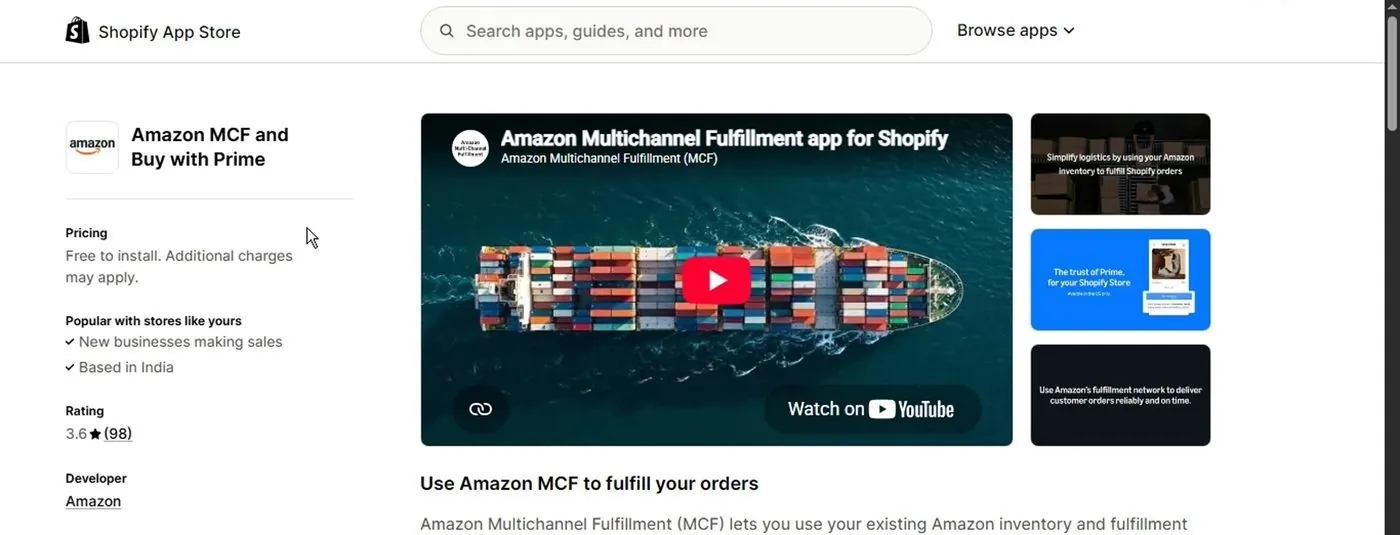
The app's listing in the Shopify App Store, showing "Free to install. Additional charges may apply." The video shows 98 ratings, and the live listing showed 100 on October 16, 2026. From Jim's Ecommerce Tutorials' video.
- On the listing, the left column shows the price: "Free to install. Additional charges may apply." The usage fees from the earlier sections are the "additional charges."
- Click the Install button on the listing.
- Shopify shows a screen called "Install app" listing what the app needs access to. The three items are "View customer data," "View staff and contributor data" and "View and edit store data." The third covers customers, products, orders, store analytics and Shopify Functions. Click Cancel to stop or Install to go on.
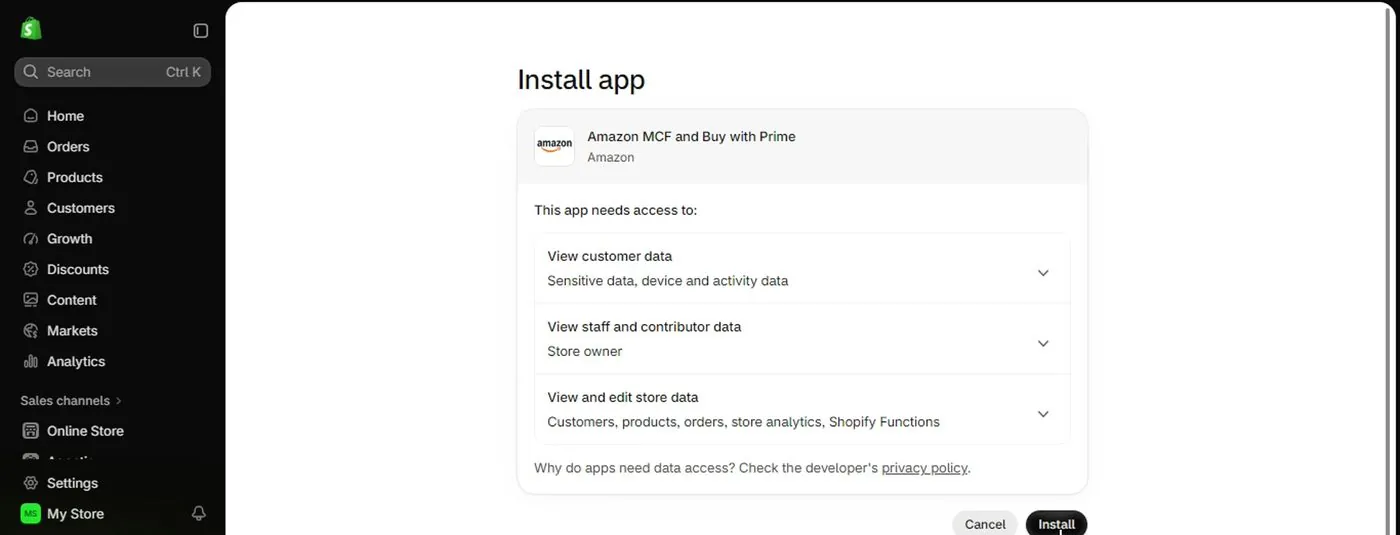
Shopify's permission screen for the app, with the Cancel and Install buttons, from Jim's Ecommerce Tutorials' video of October 2026.
- After you install, the video says you continue with the app setup inside your store, and the video ends there.
So in my read, the permission screen means Amazon's app can see your customers and edit your orders, which is how Amazon learns which orders to ship. The screen links to the developer's privacy policy for the reasons. Read that policy before you click Install.
What does connecting Amazon to a Shopify store involve?
Next comes the setup after the install. The screens below come from Amazon's own September 2023 demo of the older MCF app, not the current combined app. The current app may look different. The ideas are the same ones you'll meet: connect your Amazon account, match your product codes, match your shipping speeds, then assign products.
Basically, a SKU is the product code you give each item you sell. Amazon needs to know which Shopify product code matches which Amazon product code.
- The welcome screen lists four steps: connect a US Amazon marketplace account, map SKUs, manage shipping, and assign products to Amazon MCF in Shopify. That app version supported US Amazon marketplace accounts only.
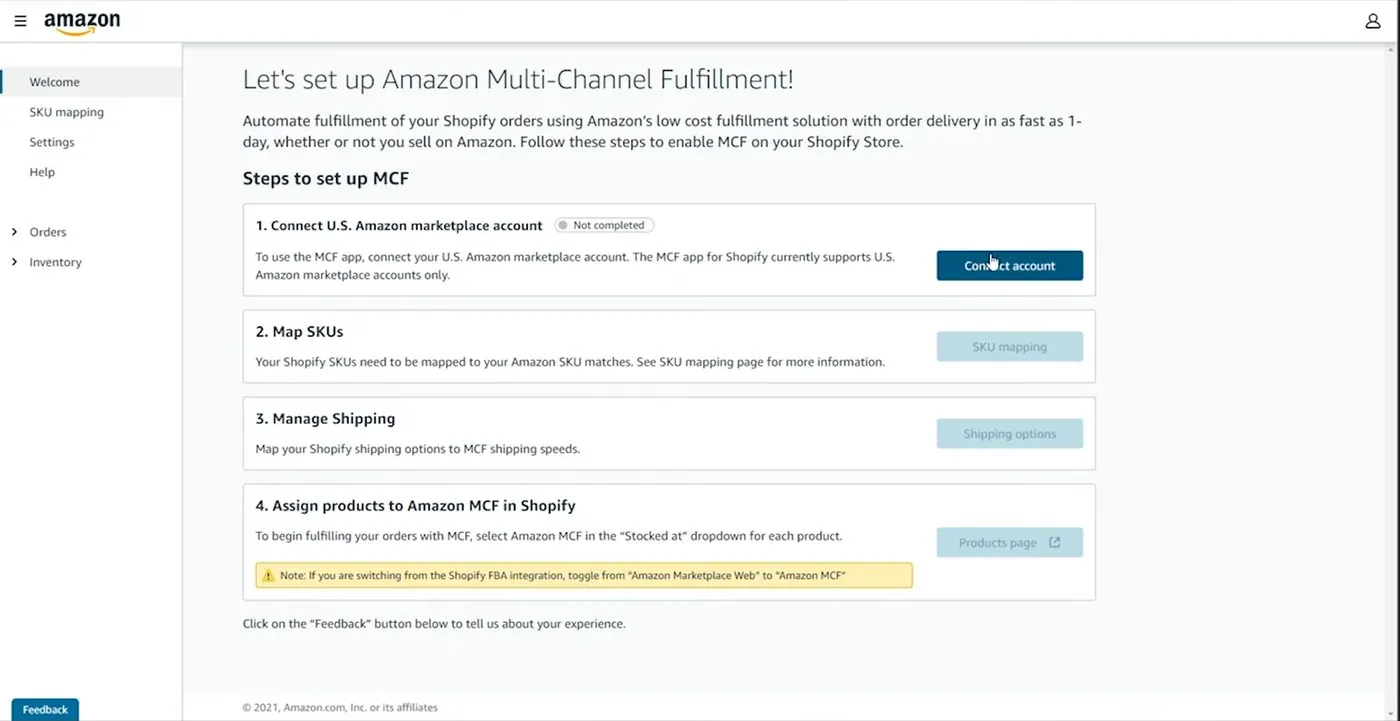
The older MCF app's welcome screen as it looked in 2023, with the four setup steps, from Amazon Multichannel Fulfillment's own demo video.
- Click "Connect account" and sign in to your Amazon account.
- Open "SKU mapping." The demo says the app maps any Shopify SKU that matches an Amazon SKU automatically, and you can map the rest by hand.
- Open "Shipping options." The screen says the shipping option name must match your Shopify store's shipping option name "verbatim." The screen also says Amazon MCF must be added to your US shipping profile in Shopify. It goes in as a shipping origin.
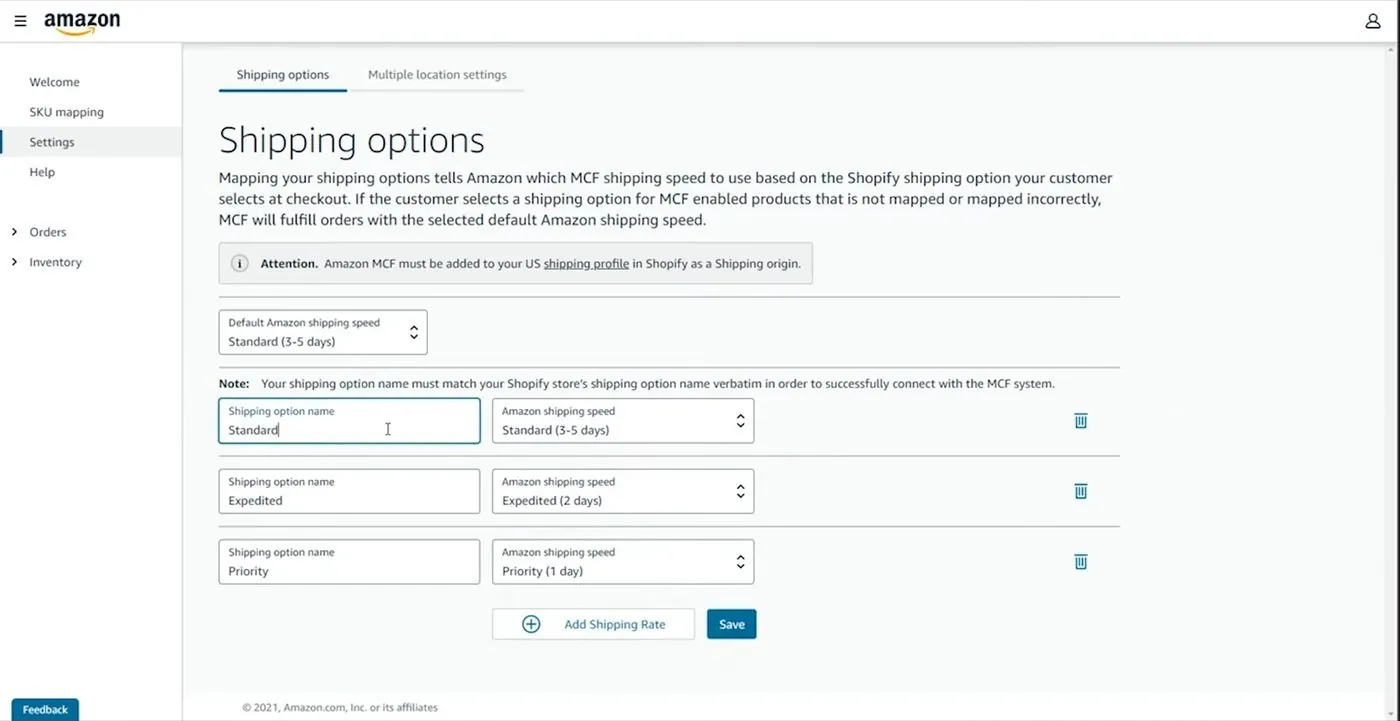
The older MCF app's Shipping options screen as it looked in 2023, matching Shopify's shipping names to Amazon speeds, from Amazon Multichannel Fulfillment's own demo video.
- In Shopify, open each product and choose Amazon MCF in the "Stocked at" dropdown. The demo's welcome screen adds a warning for sellers switching from Shopify's older FBA integration.
What do Shopify merchants say about the Amazon MCF app?
So here are the reports, and they are small samples. The app's Shopify App Store listing showed a 3.6 rating from 100 reviews on October 16, 2026. Of those 100, 65 were five-star and 20 were one-star.
Three recent reviews stand out. An October 4, 2026 review says the app takes over shipping profiles for all products and that deleting them doesn't work, because the app puts them back. A September 15, 2026 review says you have to watch the app constantly because it breaks a lot, with wrong inventory numbers and failed fulfillment. An August 12, 2026 review praises faster delivery and better conversion, meaning more visitors buying. Three reviews out of 100 can't tell you how often any of this happens.
What happens if Amazon or Shopify freezes your account or your money?
Now both can freeze money or shut an account. Both have forum reports of it with little explanation. These are seller reports, not rates.
- Amazon's rules: the Seller Code of Conduct says breaking it "may result in actions against your account, such as cancellation of listings, suspension or forfeiture of payments, and removal of selling privileges." The Fair Pricing Policy above adds suspension for repeated pricing problems.
- Amazon forum reports: a search of Amazon's Seller Forums on October 16, 2026 returned 10 results, and all 10 were sellers reporting a deactivation or suspension. Two of those threads are linked here. In one thread, a seller said their account was deactivated after a first shipment to an Amazon warehouse. The notice cited an inability to verify account information, with no specific reason. The thread had 10 replies. In another thread, shown as about 3 years old, a seller was deactivated on October 31 and suspended on November 3 with no appeal instructions. That is 2 stories out of 10 results, and it measures nothing about how often deactivations happen.
- Shopify's rule: for US stores, Shopify's payout timing page says payouts take at least 3 business days after a sale and can be held for review, checked October 15, 2026. A payout hold is when the platform keeps your sales money instead of sending it to your bank.
- Shopify forum reports: a search of the Shopify Community on October 16, 2026 returned 10 results, and all 10 were merchants reporting payout holds, paused payments or disabled Shopify Payments. In one of them, dated September 25, 2026, a merchant with a $31,749.80 payout scheduled said a second verification request was rejected and payouts were paused. The thread had 5 replies, and two of the other posters said the merchant's store looked suspicious to them. That is one story out of 10 results, and it measures nothing about how often holds happen.
And here is my read of the difference. On Amazon, one company is your marketplace, your buyer's address book and your warehouse. So one decision can stop sales, messages and shipping together. On Shopify, a payments hold stops your payouts while the store and your customer list stay yours. Sales may still stop if Shopify Payments is the only way you take cards, and that part is my inference.
Can you sell on Amazon and Shopify at the same time?
So yes, nothing in the Amazon and Shopify rules quoted on this page stops you from having both. You pay both sets of costs, and the rules above still apply. That means no messages or links to Amazon's buyers that prompt them to buy elsewhere, and no Amazon price far above your own prices.
Now here are the tools that link the two.
- Shopify Marketplace Connect: an app that lists your products on marketplaces and syncs orders and stock. Shopify's help page lists Amazon, Target Plus (US), Walmart (US) and eBay. The app listing is free to install. The first 50 marketplace-synced orders a month are free. After that, Marketplace Connect charges 1 percent per extra synced order, capped at $99 a month. Its rating was 4.1 from 2,126 reviews, all checked October 16, 2026.
- What Marketplace Connect needs: Shopify's requirements page lists four things. You need a Shopify store that isn't in private mode, an active payment provider, shipping rates for the countries you sell to, and a verified seller account on the marketplace. The page says to sign up for an Amazon seller account in the correct country.
- Amazon MCF: the Amazon MCF and Buy with Prime app listing says you can "Use one Amazon inventory pool" for web, marketplace and social orders. So the same stock in an Amazon warehouse can fill an Amazon order and a Shopify order.
Keep in mind that two channels can oversell. That means you sell a unit that is already gone. The MCF app reviews above mention wrong inventory numbers from August to October 2026. Neither app listing says how quickly stock numbers sync between Amazon and Shopify, so check how often the numbers refresh before you run a sale.
Amazon also limits you to one seller account per region unless there is a legitimate reason, per the Seller Code of Conduct.
The 2:12 video below from Guides With Garry shows the Marketplace Connect steps. Shopify says new Etsy connections can't be made with the app, so ignore the Etsy parts.
How do you move your stock out of FBA and onto your own store?
Now if you sell on Amazon today and want your own store, you have two ways.
- Keep the stock at Amazon and use MCF. Shopify orders ship from the same stock. There is no removal fee, but you pay the MCF fulfillment fee on each order, as in the table above.
- Create a removal order. That is a request for Amazon to send your stock back to you. Amazon's removal fee page, checked October 16, 2026, lists these standard-size fees per unit. A unit up to half a pound is $0.84, half a pound to 1 pound is $1.53, and 1 to 2 pounds is $2.27. Over 2 pounds it is $2.89 plus $1.06 per pound above 2 pounds. Amazon's table also lists $1.04 for the smallest size, with a note that $0.84 applies from January 15, 2026. The page says fees are charged when each unit is removed, since March 1, 2026.
Something to note is the wait. Amazon says removal orders are typically processed in 14 business days, and in 30 business days or more during the holiday season. Add about two more weeks for the carrier.
And leaving FBA doesn't change Amazon's rules on customer data and on sending buyers to another website. Those rules apply as long as you sell on Amazon. How to find visitors for your own store without Amazon isn't covered on this page.
When is Amazon FBA the wrong choice, and when is Shopify?
Now I'd rather tell you straight where each one falls short. These are my opinions, based on the facts above.
- Amazon FBA is the wrong choice if you can't afford to buy the stock in bulk first. It is also a poor fit if your item sells for under about $10 to $15, because the fixed fees eat most of the price. And it is a poor fit if you want a customer list from your sales, or plan to run promotions from your own site and message Amazon's buyers about them. And if you sell something Amazon restricts, check Amazon's seller site before you buy stock.
- Shopify is the wrong choice if you have no audience, no email list and no ad budget, and you need a stranger to find you. It is also a poor fit if your product is the kind people search for on Amazon by name. And it is a poor fit if you can't spend time every week on bringing visitors. If you'd use Amazon to ship every order anyway, you pay Amazon's fulfillment price on each order without getting Amazon's search traffic.
- Neither one is the right choice if you have no product yet and expect either to hand you the idea.
But otherwise, the choice comes down to where your first buyers will come from.
Videos worth watching before you decide
And if you want to see more, here are four videos. You can play each one right here, and YouTube's usual controls work, including skipping ahead, changing the speed and going full screen. Under each video is a short summary so you can decide if it's worth your time. The screens in the install section above come from a fifth video. That one is How To Install Amazon MCF And Buy With Prime On Shopify, by Jim's Ecommerce Tutorials, October 2026, 2 minutes. The uploader turned off embedding for that video, so I've linked it instead.
A talking-head video where the presenter argues that the choice is fast access to buyers against long-term control. That is the presenter's opinion.
- Shopify's side: the presenter says you have to bring every visitor to your store, but you own the customer relationship, including email and retargeting.
- Amazon's side: the presenter says Amazon has buyers ready to purchase, but they are Amazon's customers, and Amazon guards the customer data. The presenter says Amazon can take 30 or 40 percent of revenue.
- A heads-up about Merchant Mind's video: the presenter says the video description has affiliate links for Shopify and Amazon. I'm including the video for the talk. This site has no affiliate links and earns nothing from the video. Prices in it aren't current, so use the figures on this page.
A talking-head video comparing the two as ways to sell, with the presenter's own opinions throughout.
- What it compares: the presenter says Amazon is an online store with over 300 million customers worldwide, and Shopify is a way to build your own.
- Branding and data: the presenter says Shopify gives you branding control and ownership of customer data. The presenter also says Amazon limits email access and requires its own messaging, which matches Amazon's policy pages quoted above.
- The presenter's pick: running both. That is the presenter's view, and the video gives no source for its revenue claims, so I don't repeat them.
A screen recording made by Amazon showing how its older MCF app for Shopify is set up.
- The steps: install the app, sign in to your Amazon seller account, match Shopify product codes to Amazon product codes, match shipping speeds, then assign products to MCF.
- What doesn't match today: the video shows the older app, which supported US Amazon accounts only. The current app is the combined Amazon MCF and Buy with Prime app, and its screens may differ.
- Worth it for: seeing how product codes and shipping names have to line up, which is the part that trips people up.
A short screen recording of connecting Shopify Marketplace Connect to a marketplace seller account.
- The steps: install Marketplace Connect from the App Store, review the permissions, click Connect marketplace, choose a region, click Connect account, and sign in to the seller account to authorize.
- After the connection: the video maps product fields in the listing section, such as title, category and brand.
- What doesn't match today: the video also covers Etsy, but Shopify's help page says new Etsy connections can't be made with the app.
Buddy's take
So ultimately, if nobody knows you yet and you can pay for a batch of product, I'd look at Amazon FBA first. Amazon's shoppers can find you there. If you already have followers, an email list or a brand to own, I'd start with Shopify Basic. On the $25 example, Amazon's fees came to $8.96 at the holiday rates, and Shopify's card fee came to $1.03 before postage and the cost of getting visitors.
But for me personally, the fee math is the smaller question. The bigger one is where your first buyers will come from, and whether you can pay for the stock before they arrive.
And what I've written here is general information about fees and rules, not tax or legal advice. A state agency or an accountant can confirm what applies for you.
Have a question about “Shopify vs Amazon FBA for beginners: which should you start with?”?
Ask it here. Every question comes to me first. I answer as many as I can, and each answered question goes on this page with my answer so other people starting a store can see it too. I don't ask for your email, so check back on this page for the answer.
More comparisons guides
Etsy vs Amazon Handmade: which should a maker sell on first?
A straight answer for someone who makes things and has never sold online, with the same facts for both and the real sign-up screens.
Shopify vs Etsy for beginners: which should you start with?
A straight answer for someone who has never sold online, with the real fees and the real sign-up screens.
Shopify vs Wix: which should you choose for your online store?
The cheapest plan that can take payments costs the same on both. What differs is what the site is built to do.
Shopify vs WooCommerce: is the free option really cheaper?
WooCommerce's software costs $0. A store built on it still has a monthly bill, and it comes with more work.
- Amazon's selling plans page and Fulfillment by Amazon page, checked October 16, 2026. Used for the Individual and Professional plan prices, the FBA description and the new-seller incentive claims.
- Amazon Seller Central help pages, checked October 16, 2026: fee schedule and referral fees, 2026 FBA fulfillment fees and surcharge, 2026 fee changes, inbound placement, storage fees, low-inventory-level fee, returns processing fee, removal fees and Partnered Carrier inbound shipping.
- Amazon Seller Central policy pages, checked October 16, 2026: Communication program policy, Seller Code of Conduct and Marketplace Fair Pricing Policy.
- Amazon's multi-channel fulfillment pages, checked October 16, 2026: MCF overview, MCF pricing and the MCF rate card effective October 15, 2026 to January 14, 2027.
- Amazon's Buy with Prime pricing page and rate card, checked October 16, 2026.
- Shopify's pricing page, checked October 16, 2026: Basic's prices, the 2.9% + 30 cents card rate, the trial offer, checkout customization and marketplace sync fees. Also domains, Allure and Impulse, and the payout timing page, checked October 15, 2026.
- Shopify apps, checked October 16, 2026: Amazon MCF and Buy with Prime and Shopify Marketplace Connect. Judge.me, checked October 15, 2026.
- Shopify Help Center, checked October 16, 2026: Marketplace Connect, its requirements, and Shopify Payments fees.
- Seller posts, checked October 16, 2026: Amazon Seller Forums threads one and two, and the Shopify Community search and its September 25, 2026 payout thread.
- Our Amazon seller fees page and Shopify real monthly cost page.
- Videos and screen credits: Jim's Ecommerce Tutorials, Amazon Multichannel Fulfillment, Merchant Mind, Ecommercetrix and Guides With Garry.
Online Store Buddy is an independent site. We're not affiliated with or endorsed by Shopify, Etsy, Amazon, WooCommerce, Wix or Squarespace. Those names are trademarks of their owners.