
Quick picks
What is the difference between verification, suspension and termination?
Now these words get mixed up in forum posts, so here is what each one means.
- Payment processor: The company that takes your customer's card and moves the money to you. Shopify's own processor is called Shopify Payments.
- Verification: Shopify and its banking partners ask for your ID and business details so you can take payments. Shopify says US rules meant to prevent financial crimes require this.
- Suspension: Shopify locks the store or your payments for a time. On its terms violations page, Shopify says it can lock admin access or the store, or stop payments.
- Termination: Shopify closes the store and takes it offline.
- Restricted access: This is the word Shopify's store termination help page uses for a closed store while you appeal. Customers can't see your store, but you can still get into a few pages of your Shopify admin.
- Appeal: You ask Shopify to look again because you think the closure was a mistake.
So a failed verification is not the same as a ban. But a verification problem can still cost you your payments. Shopify's Payments terms say that not answering Shopify's requests for information "may result in suspension or termination of your Shopify Payments Account."
What do Shopify's rules say about suspending a store?
So Shopify has two documents that talk about this, and they don't sound alike. The table puts the Terms of Service next to the Acceptable Use Policy. Both are Shopify's own rules, not laws, and the Terms of Service quoted here were last updated August 1, 2026.
| Question | Terms of Service | Acceptable Use Policy |
|---|---|---|
| Can Shopify close a store without a stated reason? | Yes. Section 14.3 says Shopify may suspend or terminate your account "for any reason, without notice." Section 1.1 says Shopify may reject or cancel an account "for any reason, at our sole discretion." | The policy lists prohibited activity instead. That includes illegal activity where you do business, threats of violence, products that help intentional self-harm, defrauding Shopify, merchants or buyers, and spam. |
| Does Shopify warn you first? | Notice isn't required, except where the law requires it. | Shopify says it will give notice and a chance to fix things. |
| Does Shopify close the whole store, or only the problem product? | The terms don't say. | Shopify says it defaults to action on the product and treats action on the whole account as a last resort. It calls account-level action "oftentimes more appropriate" when someone acts in bad faith. |
| What happens to the fees you paid? | Section 14.4 says "you will not be entitled to any refunds of any Fees, pro rata or otherwise." | The policy doesn't say. |
| Does the document list restricted products? | Not in full. The Payments terms point to the payment processor's lists, which I cover further down. | The policy has no full list and points to other terms instead. It names one restriction: uploading health information protected under the US health privacy law HIPAA isn't supported. |
Now keep in mind that Shopify's two documents and what sellers report don't line up. The Acceptable Use Policy promises notice and a chance to fix things. The Terms of Service allow action without notice. And sellers describe closures that came with only a general reason. Shopify's pages don't say which of these applies to a given store.
Something else to note is that Shopify's terms violations page says Shopify's terms are "carefully calibrated to differentiate between honest mistakes and deliberate violations." And Shopify says it uses a mix of automated checks and human review to find violations.
That same page lists what Shopify may do about a violation. It can ask you for information by email, ask you to remove content, or remove it itself. It can change your shipping settings, or stop you from receiving payments, buying shipping labels or issuing refunds. It can lock your Shopify admin or your store for a time. It can block you from Shopify Support if you're abusive to the support staff. And it can terminate your account.
What happens to my money and my store after a termination?
So these are the money rules in Shopify's Terms of Service, section by section.
- The store: Section 14.4 says Shopify stops providing its services, the store goes offline, and any balance you owe becomes payable right away.
- Fees already paid: You get no refunds, as the quote in the table shows. Section 5.10 separately says Shopify doesn't provide refunds.
- The last invoice: Section 14.6 says you get one final invoice by email, and once you pay it, you aren't charged again.
- Domains: Section 14.5 says domains you bought through Shopify stop renewing automatically.
Now a different cause is plain non-payment. Section 5.4 says that if a payment fails within 28 days of the first try, Shopify may suspend your access. If the fees stay unpaid 60 days after the suspension, Shopify may close the account. I cover the monthly bill in my Shopify real monthly cost guide and the $1 start in my free trial and $1 offer guide.
And there's one billing rule on Shopify's store termination help page. Shopify says "Billing is paused while your store is in restricted access," so you aren't charged while you wait on an appeal.
But Shopify's pages don't say how long your payouts are held or how long your store data is kept after a termination. The Terms of Service give no deletion timeline either. So for me personally, I'd keep your own copy of your product, customer and order information from the day you start. That's my opinion, not a Shopify rule.
How do I appeal if Shopify terminated my store?
So Shopify tells you about a closure by email or with a notice in your Shopify admin. Shopify sends official messages to your store's primary email address (Terms of Service section 1.4), so check that inbox and your spam folder first. Then these are the four steps on Shopify's store termination help page.
- Log in to your Shopify admin. Your store is in restricted access, but you can still sign in.
- Follow the on-screen prompt to the appeal form. Shopify shows the prompt inside your admin.
- Fill in the appeal form. Explain your business in plain words, and add any documents that show you follow Shopify's rules.
- Check that everything is correct, then click Submit for review.
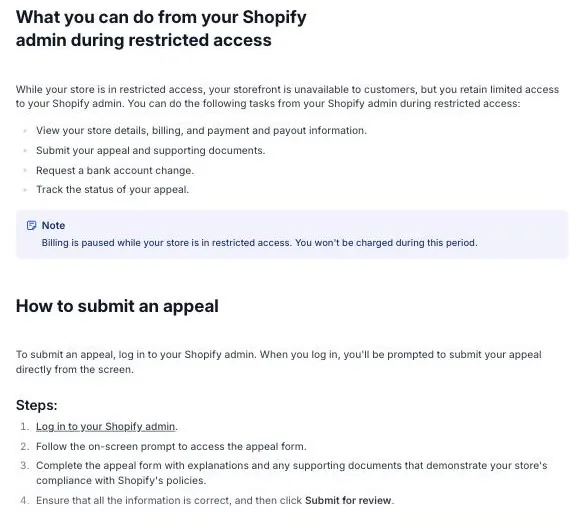
The restricted access list and the four appeal steps on Shopify's store termination help page, as the page read on October 17, 2026.
Basically, Shopify then reviews your documents, your identity verification and your explanation. Shopify's terms violations page says each appeal "is reviewed by a Shopify team member." And the answer comes by email to the store owner's email address.
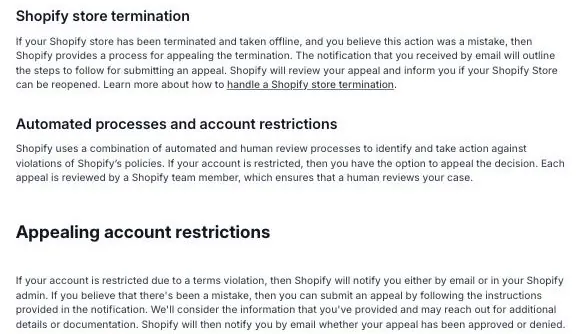
The store termination and appeal sections of Shopify's terms violations help page, as the page read on October 17, 2026.
Now if the appeal works, you get full access to your Shopify admin again. But Shopify Payments may stay off, and in that case Shopify says you can file a separate appeal just for Shopify Payments.
And keep in mind what Shopify's pages leave out. They give no timeframe for a decision. And they give no phone number or other contact besides the appeal form and email.
Something else to note is how Shopify asks for sensitive documents. Shopify's account security page says Shopify Support asks for them only through a secure upload page that starts with app.shopify.com or .shopify.com. And Shopify says the Files page under Content in your admin is only for files meant to be public. So never put ID or business papers there. And if someone messages you offering to verify your account for you, keep in mind that's not how Shopify asks for documents.
What ID and business documents does Shopify ask for in the US?
So this is the verification part. These rules come from Shopify's US requirements page for Shopify Payments. They are Shopify's rules and its banking partners' rules. What you give depends on the business type you pick.
| Business type you pick | What Shopify asks for |
|---|---|
| Individual (no EIN) | Your legal name, date of birth, Social Security number or ITIN, email, US phone number and US home address. |
| Sole proprietorship (has an EIN) | You are the account representative. You give your personal details, plus the registered name, EIN, business phone and business address. |
| LLC, partnership, company or nonprofit | An account representative gives personal details plus the business details. Multi-member LLCs, private partnerships and private companies must also list other owners with 25% or more equity. |
An EIN is the business tax number the IRS gives out, and you can get one from the IRS. If you don't have one, Shopify says to select Individual. For individuals and sole proprietors, Shopify says a valid Social Security number or ITIN "is a requirement that can't be bypassed." I explain the choice in my LLC and EIN guide and the signup screen in my guide to starting a Shopify store.
Which documents does Shopify accept?
- Photo ID: A passport, driver's license or state-issued ID card. It must be valid and not expired.
- EIN proof: The IRS SS-4 confirmation letter, IRS Notice CP575, or IRS Letter 147c.
- Proof of business address: A utility bill, bank or credit card statement, insurance statement, tax assessment notice or proof of business registration. It must show an issue date within the past 6 months.
- Military addresses: Shopify doesn't accept APO or FPO mailing addresses for US military personnel stationed overseas.
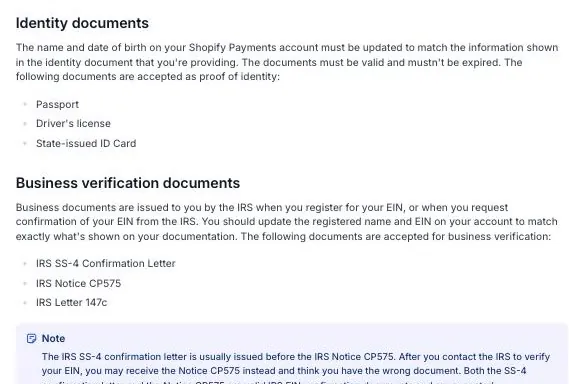
The identity and business documents Shopify lists on its US requirements page, as the page read on October 17, 2026.
What does "exact match" mean?
Basically, the name and address you type into Shopify must match your government documents. For a business, Shopify says the registered name must match "exactly as it is shown on your IRS documents," and that includes punctuation and capitalization. So if your IRS letter says "Smith Goods LLC," then "Smith Goods" typed into the form is not an exact match.
What if Shopify says my information didn't pass verification?
So Shopify says that if it can't verify your information, it can ask you for a photo ID. If you have an EIN, it might ask for an IRS document. Here's what the requirements page tells you to do.
- Compare your account details with the document. Shopify says to check that they match.
- Photograph the original paper document with a camera. Shopify says not to photocopy, scan or screenshot it, and not to photograph a printout or a computer screen.
- Upload a document you got digitally as the original PDF. Shopify wants every page, with no changes.
- Watch your email and your Shopify admin. Shopify says it "never physically mails documentation to you." Documents come by email or show up on the Settings, then Users page of your Shopify admin.
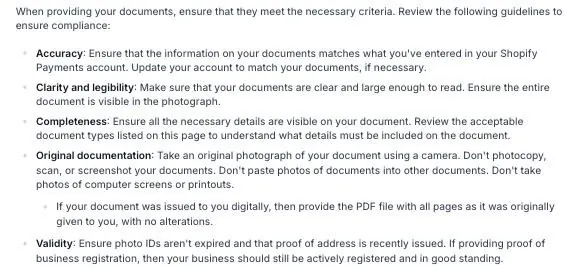
Shopify's document guidelines on the same US requirements page, as the page read on October 17, 2026.
Now two more things to know. First, Shopify says you "might be contacted" by it and its banking partners for more information "throughout the lifespan" of your Shopify Payments account. So a request can come later, not only at setup. Second, Shopify's page gives no processing time for verification.
And for getting paid into an outside bank account, the requirements page says the account must be a full US checking account in US dollars that accepts ACH transfers. ACH is the standard US bank-to-bank transfer system. Savings accounts, wire-only accounts, flex-currency accounts and money-transfer accounts aren't supported. I cover when payouts get held in my payout holds guide.
Which products can get a store in trouble?
So Shopify's own pages don't hold a full list. The Acceptable Use Policy points elsewhere, and the Payments terms say the prohibited and restricted business lists are "provided by each Payment Processor in your Designated Country." Your Designated Country is the country your business runs from. Shopify calls the lists "representative but not exhaustive" and says they can change without notice.
Now for the US, Shopify's Payment Processor List names Stripe, Inc. as the payment processor. And it links Stripe's Prohibited and Restricted Businesses page as the list that applies. Here is some of what Stripe lists.
- Prohibited includes: illegal products and services, adult content and services, gambling, marijuana, illegal weapons and explosives, products that infringe intellectual property rights, and unfair, deceptive or abusive practices.
- Prohibited items new sellers often run into: counterfeit or unauthorized brand-name and designer goods, supplements with unsafe or harmful claims, "get rich quick" and outrageous-claim selling, high-pressure upsells, and low-price trials with unclear or hidden pricing.
- Allowed with extra review: CBD, cryptocurrency, legal firearms and weapons, pharmaceuticals and telemedicine, and tobacco and vaping. For the US, Stripe lists only FDA-authorized electronic tobacco.
Stripe updates that list often, most recently on September 22, 2026, so check Stripe's page itself before you pick a product. And if you're picking a product, my guides on a print on demand store and a dropshipping store setup cover where brand-name and supplier questions come up. For the money side of dropshipping, see is dropshipping worth it.
What do sellers report about stores closed before launch?
So these are seven posts on the Shopify Community forum, as they stood on October 17, 2026. They are the sellers' own words, and none of the replies is marked as Shopify staff. These seven are not a sample of all sellers, so please don't read any rate into them. Sellers whose store comes back may be less likely to post.
| Post | Store stage | What the seller wrote | What the thread shows |
|---|---|---|---|
| December 5, 2024 | Paid annual plan | Terminated December 4, 2024. The appeal form link showed an application error. | 5 replies to May 26, 2025. No confirmed restoration. One user says live chat solved a compliance flag, which isn't verified. |
| February 28, 2025 | Not stated | Store deactivated February 26, 2025. Daily chats get "We escalated your situation." | No resolution. The page lists 5 related deactivation threads from January to March 2025. |
| April 25, 2025 | Before launch | Terminated earlier that week, with no warning. Suspected "illegitimate commerce practices." Appeal filed. | 3 replies. The last, on May 26, 2025, says the same happened and there was no answer after 12 days. |
| June 25, 2025 | After the first sale | Had imported reviews with an app and suspected that. Appeal pending 13 days. | 4 replies, all on June 26, 2025. That day the poster wrote "I got reinstated right after I posted this." |
| July 1, 2025 | 1 to 2 weeks live, 2 sales | Had been running ads, then got the "legitimate commerce practice" notice. Appeal filed. | 1 reply on July 3, 2025, not labeled as staff. It says closures can come from automated detection and appeals are often answered in a few business days. No update from the seller. |
| August 26, 2025 | A few sales, before the first payout | Same notice wording. Customers were writing in. | 6 replies. Unresolved. On August 30, 2025 the owner said they won't use Shopify again. |
| September 12, 2025 | No sales | Got the termination email that morning and asked how others got their store back. | 6 replies from September 12, 2025 to July 6, 2026. One said on October 28, 2025 there was still no appeal reply, and a new seller said the same on July 6, 2026. No reinstatement reported. |
Now here is what repeats. Four of the seven posts quote the same notice wording, "activity that is not, or that we suspect is not, a legitimate commerce practice," with no specific reason. A fifth seller describes the same reason in their own words. Two sellers guess at a cause, imported reviews in one post and ad claims in another. Shopify hasn't confirmed either.
And the reported wait for an appeal answer runs from about two weeks, for the one seller whose store came back, to no answer after more than four months. That is what these posters wrote, not something Shopify has promised.
What does Shopify not say?
So I want to be plain about the gaps, because a lot of confident claims float around forums. Shopify's pages don't state any of these.
- How often new stores are suspended. No source gives a rate, so this page doesn't either.
- Whether a VPN, an IP address or a device triggers a closure. Shopify's pages don't name one. Sellers and blogs make claims about this, but none of them is confirmed by Shopify.
- How long an appeal takes. Shopify's terms violations page and store termination page give no timeframe.
- How long payouts are held after a closure. Some sellers quote a number from their termination email, but Shopify's help pages don't state one.
- How long Shopify keeps your store data after a termination. The Terms of Service give no timeline for deleting it.
What can I do before launch to lower the risk?
Basically, nobody can promise a store won't be closed. But Shopify's own pages link each of these to verification holds or closures, so these are the ones I'd handle first.
- Make your account details match your documents. Use the exact legal name and address from your ID, and the exact registered name from your IRS letter.
- Pick the right business type. Choose Individual if you have no EIN. Choose a business type only if you have the IRS papers for it.
- Turn on two-step authentication. Shopify says you need it to use Shopify Payments, and without it payouts might be held.
- Answer any request for information quickly. The Payments terms say not answering Shopify's requests for information may lead to suspension or termination of your Shopify Payments account.
- Check your products against the lists above. Pay extra attention to brand-name goods, supplements and anything with big income or health claims.
- Pay your bill. A failed payment can lead to a suspension under section 5.4 of the Terms of Service.
- Watch the email address Shopify has on file. That's where Shopify sends its notices.
A video about a suspended Shopify account
Now one video is worth a look, with a caveat. Its title says the Shopify account is suspended, but it's about Shopify Payments being suspended or closed, not the whole store. It's also from July 2024, and the speaker promotes a payment service provider, which I don't link. You can play it right here, and YouTube's usual controls work.
Maria Sparagis talks about what to do when Shopify Payments is suspended or closed. It's her opinion, and it's not checked against Shopify's rules.
- Act fast: She says to move quickly so your customers can still pay you.
- A second way to take payments: She suggests setting up another option, such as the Authorize.net payment gateway through a merchant account, or Stripe.
- Write to Shopify calmly: She says to send a factual email asking what happened and when payments can reopen.
- What it doesn't cover: It doesn't cover a whole-store termination or the appeal steps Shopify prints.
Buddy's take
So ultimately, if Shopify closes your store, the appeal form in your Shopify admin is the route Shopify names. And no one outside Shopify can tell you the reason or how long the answer takes.
But keep in mind that most of the trouble people ask about starts earlier, at verification. For me personally, I'd match every name and address to your documents exactly and pick Individual if you have no EIN. And I'd turn on two-step authentication before you ever list a product.
And I wouldn't try to work around a closure. Read Shopify's email, file the appeal from your admin and answer whatever Shopify asks. And keep your own copy of your product and customer information from day one, because exporting it isn't on Shopify's list of what you can do during restricted access.
This page is general information about Shopify's rules as Shopify prints them. Shopify's own pages and the email Shopify sends you are what apply to your store, and an accountant or the IRS can answer questions about your tax number.
Have a question about “Shopify suspended my store before I even launched: why it happens, how to appeal, and how verification works”?
Ask it here. Every question comes to me first. I answer as many as I can, and each answered question goes on this page with my answer so other people starting a store can see it too. I don't ask for your email, so check back on this page for the answer.
More shopify guides
How do I set up a Shopify dropshipping store from scratch, and what does the first month cost?
The exact clicks with the DSers app, a first-month cost table where every line is sourced or marked as a guess, and the money timing nobody warns you about.
Is Shopify's $1 for 3 months offer real, and how do you avoid being charged?
A walk through the real signup screens, the exact fine print, the price after the $1 months, and the cancel steps.
How to start a Shopify store, step by step, if you've never sold online
Every screen from signup to launch, in the order you'll see it, with what each one asks for and what you can skip.
Is Shopify worth it in 2026? What it costs, what sellers complain about, and who it fits
A straight answer for someone who has never sold online, with the fee math shown so you can redo it.
How do I start a print on demand store on Shopify with Printful or Printify, and what do I actually keep from each shirt?
The setup steps for both apps with real screens, how orders and payment move, and the profit on one $24.99 shirt worked out line by line.
Will Shopify hold my money, and how do payouts work for a new store?
How Shopify Payments pays you, what a hold or a reserve is, what Shopify says causes them, and what to do on day one.
Shopify plans explained: Basic vs Grow vs Advanced, and which one a beginner should pick
Start on Basic. Here is what Grow and Advanced add, what each costs, and the sales level where paying more actually saves money.
- Shopify, Terms of Service, last updated August 1, 2026, sections 1.1, 1.4, 5.4, 5.10 and 14.3 to 14.6, read in full October 17, 2026.
- Shopify, Acceptable Use Policy, read October 17, 2026.
- Shopify Help Center, Resolving terms violations and Handling your Shopify store termination, checked October 17, 2026.
- Shopify, Shopify Payments terms of service (US), read October 17, 2026. Shopify Help Center, Shopify Payments. Shopify, Payment Processor List, checked October 17, 2026.
- Shopify Help Center, Shopify Payments requirements for the United States, checked October 17, 2026.
- Shopify Help Center, Account security, checked October 17, 2026.
- Stripe, Prohibited and Restricted Businesses, last updated September 22, 2026, checked October 17, 2026. Shopify's Payment Processor List links this page for US stores.
- IRS, Get an employer identification number.
- Seller reports, Shopify Community, all read October 17, 2026: December 2024, February 2025, April 2025, June 2025, July 2025, August 2025, September 2025.
- Click and Convert with Maria Sparagis, Shopify Account SUSPENDED! How to Recover FAST, July 2024.
- Shopify Help Center, Handling your Shopify store termination, screenshot of the public page, checked October 17, 2026.
- Shopify Help Center, Resolving terms violations, screenshot of the public page, checked October 17, 2026.
- Shopify Help Center, Shopify Payments requirements for the United States, two screenshots of the public page (acceptable document types and document guidelines), checked October 17, 2026.
Online Store Buddy is an independent site. We're not affiliated with or endorsed by Shopify, Etsy, Amazon, WooCommerce, Wix or Squarespace. Those names are trademarks of their owners.