
Quick picks
What do print on demand, print provider and base cost mean?
Now a few words come up all the way through this page, so here is what each one means.
- Print on demand: You upload a design, a company prints it on a shirt only after a customer orders, and that company ships the shirt to the customer. You never hold stock.
- Printful and Printify: Two print on demand services. Each one has a free app that connects your Shopify store to its printing, and you install it from the Shopify App Store.
- Print provider: A company that actually prints and ships the shirt. Printful says it makes its products in its own facilities. Printify is a marketplace of independent print providers, and Printify's pricing page says it has 70+ of them (checked October 17, 2026).
- Blank: The plain shirt before your design goes on it. The Bella+Canvas 3001 is a popular blank, and both apps sell it.
- Base cost: What the print company charges you for the blank plus one print. It is not what the customer pays.
- Mockup: A picture of your design on a shirt that you use as the product photo in your store. The apps make these for you.
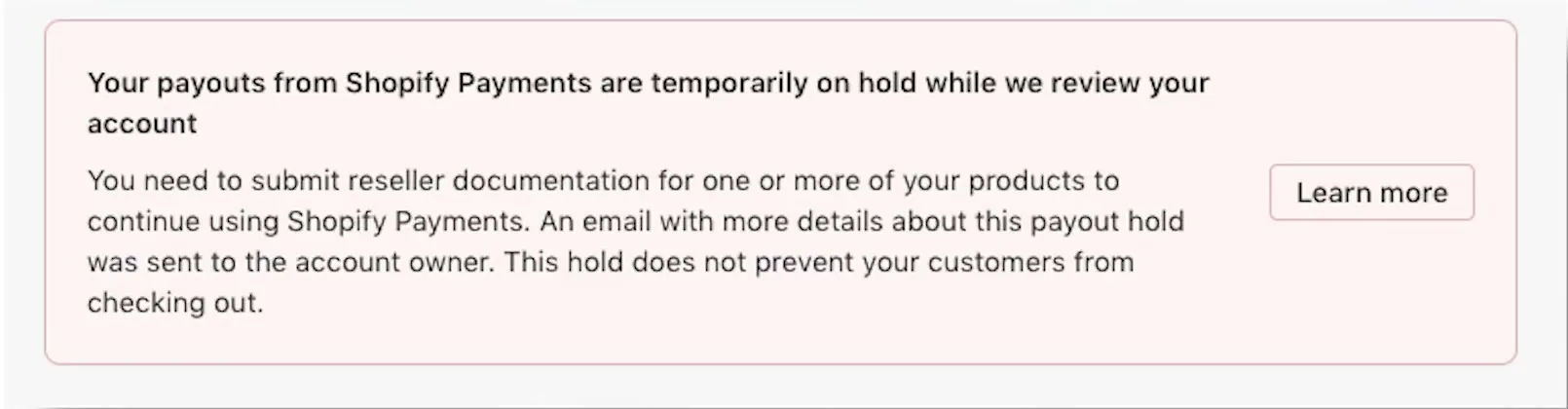
- Payment processor: The company that takes the customer's card. On Shopify, the one Shopify runs itself is called Shopify Payments, and my payouts and holds page covers how its payouts work.
- Shopify admin: The back end of your Shopify store, where you see products and orders.
I'll mark each fact as a platform rule, a reported experience, an opinion, or my own assumption for the math. Prices are US dollars for a US customer.
How do orders and payment work with Printful and Printify?
Basically, two separate payments happen on every order. The customer pays you, and then you pay the print company. Here is the order of events, from the makers' own help pages (checked October 17, 2026).
- The customer pays on your Shopify checkout. Shopify takes its card fee. On the Basic plan with Shopify Payments, the standard online card rate is 2.9% plus 30 cents (checked October 17, 2026 on Shopify's pricing page). The rest reaches you on Shopify's payout schedule.
- The app copies the order to the print company. Printful's help page on charging for Shopify orders says new orders "automatically appear in your Printful Dashboard."
- You pay the print company separately. Printful's help page says the customer pays you directly, and then Printful charges you separately for fulfillment, meaning making and packing the shirt, and for shipping. Printful charges the billing method you picked. You add that billing method first, under Billing in your Printful dashboard.
- Printify charges your card or balance on a timer. Printify's help page on what happens when an order comes in says Printify "cannot pull funds directly from your sales channel." So Printify charges your linked card or your Printify Balance for the shirt plus shipping. Printify's help page on when you are charged says that by default, the charge happens 24 hours after the order arrives.
- The shirt is printed and shipped. The tracking number goes back to Shopify.
Printify gives you four settings for when it charges you. You can approve each order by hand, or have Printify charge after 1 hour, after 24 hours (the default), or at a set time each day. Basically, that wait is your window to edit or cancel an order before Printify charges your card.
So what does that mean for you? You put up the print company's money out of your own pocket. If your card is declined or your balance is empty, the order waits. The Metics Media walkthrough video below says the same thing, that it's up to you to pay for the product before it ships to your customer.
Printful's official video (October 31, 2025) adds that you can pay Printful from a Printful wallet and turn on automatic top-ups. Printful's wallet screen is in step 7 of the Printful steps below.
What do Printful and Printify cost, and what is the difference?
Both apps show "Free to install" on their Shopify App Store pages (checked October 17, 2026). Each also sells an optional paid plan that lowers your base cost. Here is what each maker's own pages say.
| Printful | Printify | |
|---|---|---|
| Shopify App Store page | Printful: Print on Demand. 4.8 from 3,950 reviews, 4% of them one star. | Printify: Print on Demand. 4.7 from 4,355 reviews, 3% of them one star. |
| Who makes the shirt | Printful's own facilities, per its pricing page. | Independent print providers, "70+ Print Providers, 140+ print facilities," per its pricing page. |
| Catalog size | 584 custom products on the Free plan line. | 2,000+ products. |
| Free plan | $0 a month, unlimited stores. Printful says it charges only for fulfillment and shipping when a product sells. | $0, 5 stores per account. Printify says it has no platform fees or listing fees and earns when you sell, because its production price includes its margin. |
| Paid plan | Growth, $24.99 a month, free when you reach $12,000 a year in sales. Up to 33% off product pricing and 25% off sample orders. | Premium, $39 a month, or $24.99 a month billed yearly ($299.88 once). Up to 33% off new products, and the comparison table says up to 20% off all products. 10 stores. |
| Free trial of the paid plan | Conflict: 14 days on Printful's pricing page, 90 days on Printful's Shopify listing. See the conflicts section below. | Printify's pages list none. |
| Reprint promise for a manufacturing error | Printful says it covers a free reprint or refund. | Printify's Merchant Protection says a free reprint or refund within 30 days. |
All of that is a platform rule, meaning it comes from each maker's own page on October 17, 2026. A few notes on it:
- Printify's Premium plan is not refundable. Printify's pricing page says to unsubscribe before the renewal date to avoid next month's charge.
- If you move from Printify Premium back to the Free plan, you pay regular prices on products again.
- Printify's $39 and $24.99 are the same Premium plan. The $39 is monthly billing. The $24.99 is the yearly price spread over 12 months, because $299.88 divided by 12 is $24.99.
- Printful's Shopify listing says 20% off sample orders on the Free plan. Its pricing page says 25% off on Growth.
- Both makers also have custom Enterprise pricing for big sellers.
Now for the plain difference. Printful makes everything itself, so one company is responsible for every shirt. With Printify you choose which print company makes each product, and you can sort by price, speed and ranking before you choose. Printful's way is simpler. Printify's way can get you lower prices on some products, but the shirt you get depends on which print company you pick.
How do I set up Printful or Printify on Shopify, step by step?
Now here are the steps in the order the screens come up. The Printful screens come from Printful's own video, recorded October 31, 2025. The Printify screens come from a video by Metics Media, uploaded March 5, 2025. Both makers change their layouts, so go by the words on your own screen. Where a price on a screen is old, the caption says so and the page text uses the live price.
Before either app: your Shopify store and your markets
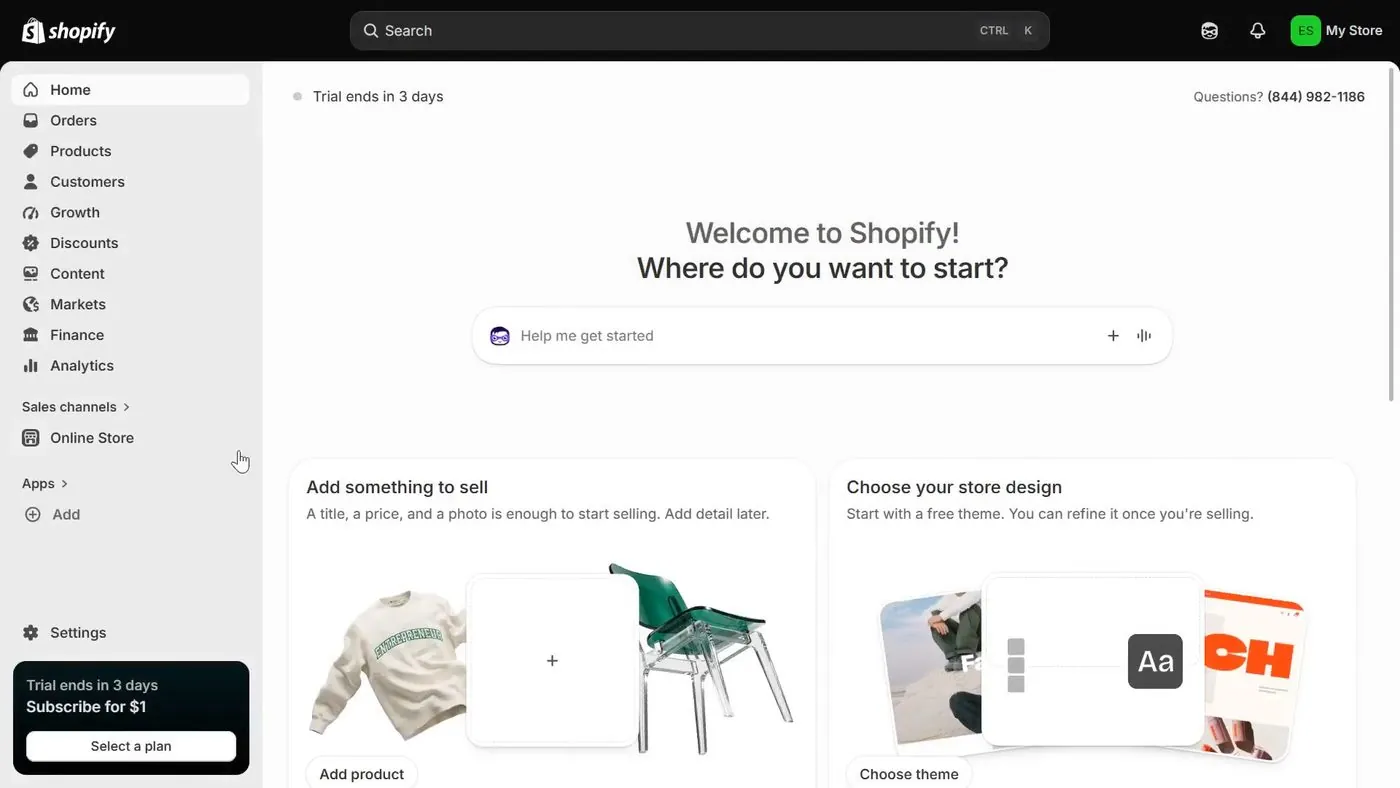
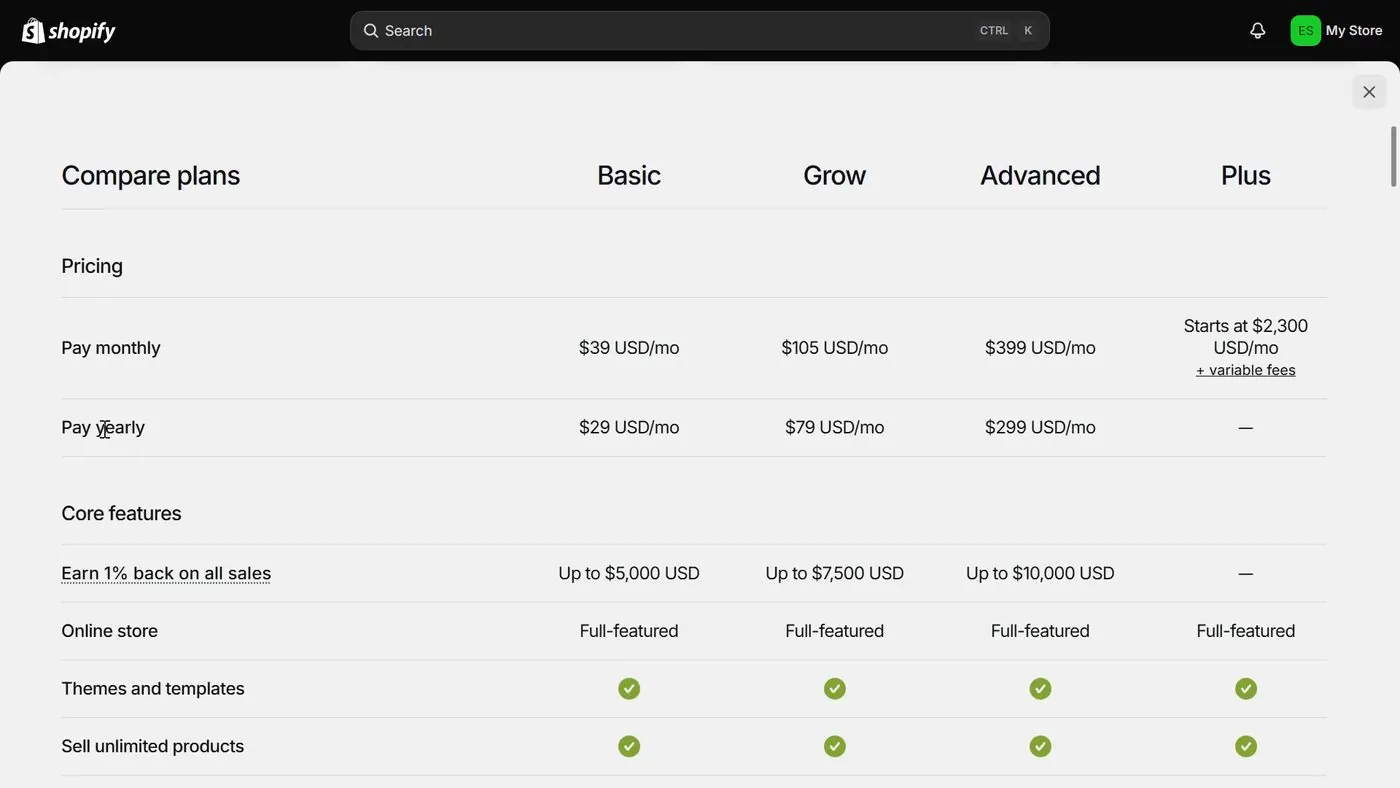
- Open a Shopify store. My how to start a Shopify store page walks through the sign-up screens. Basic is 3 days free, then $1 a month for 3 months, then $29 a month paid yearly or $39 paid monthly (checked October 17, 2026). My Shopify $1 offer page explains how that offer works and when the full price starts.
- Open Shopify's app store from your admin. In your Shopify admin, open the app store and search for "Printful" or "Printify." Shopify's "Picked for you" box in the screen below lists both.
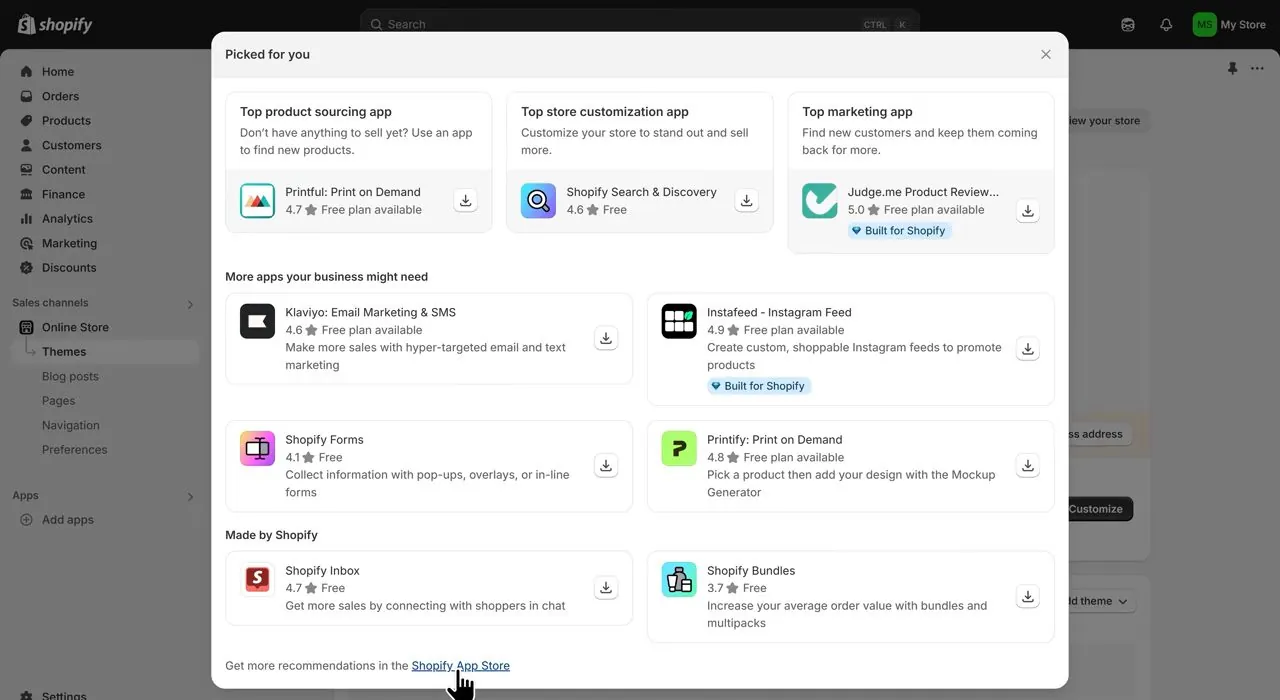
Shopify's "Picked for you" box with Printful under Top product sourcing app and Printify under More apps your business might need. The star ratings on this March 2025 screen are not today's. From Metics Media's video.
- Turn on the markets you sell to. Printful's video says that in Shopify you should switch on each country you plan to sell to. If you skip that step, customers in some countries can't check out.
Printful: eight steps from install to first product
- Install the app. Open the Printful page in the Shopify App Store and click Install, then click Install again to confirm. Printful's video says you will be asked to log in to your Printful account, and then you authorize access.
- Open the product list. In Printful, open My Products, then Create product. Pick Men's or Women's clothing, then T-shirts, then the Unisex Staple T-Shirt, Bella + Canvas 3001, and click Start designing.
- Design the shirt. Printful's design tool is called the Design Maker. You upload your art in the circle that says "Upload or drop your design here." On the left you pick a technique, a printing type and a color. The video picks the Printing technique and DTG printing. DTG is short for direct to garment, which means the ink is printed straight onto the fabric. The price under the shirt in this old screen reads from $12.25, which is not today's price.
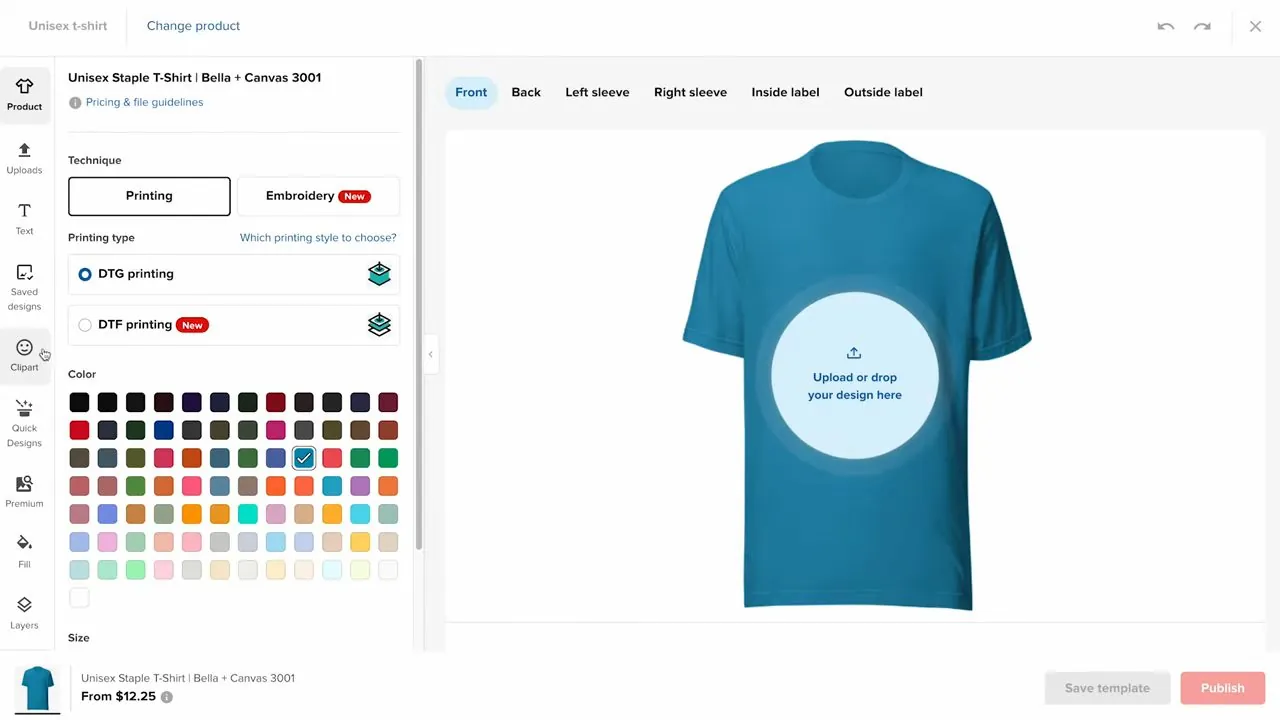
Printful's Design Maker for the Bella + Canvas 3001, October 2025, from Printful's own video. The $12.25 shown at the bottom is an old price.
- Choose mockups. The next screen is titled Choose mockups. You pick a mockup style, tick the pictures you want in the listing, and Printful's video says the star icon marks the main photo. Until you tick at least one picture, the Continue button at the bottom stays faded, with a red note beside it saying "Mockup must be selected."
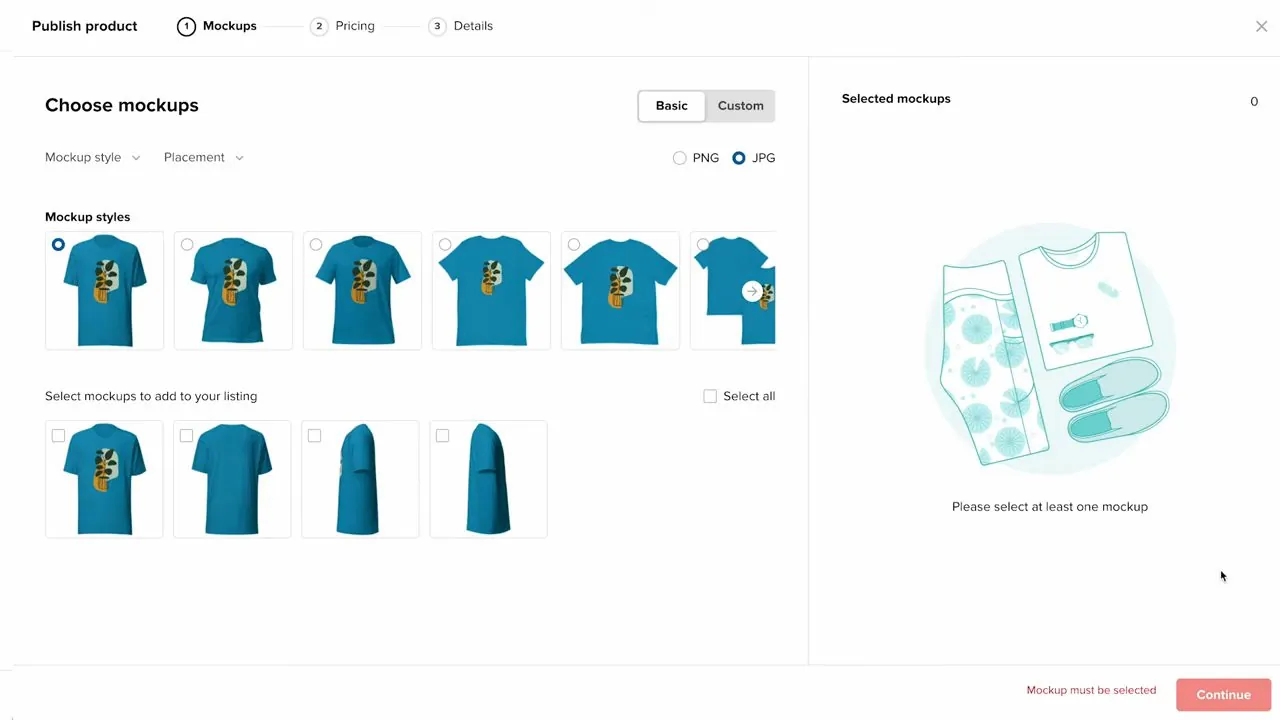
Printful's Choose mockups step, October 2025, from Printful's own video.
- Set your price. The Set pricing step shows the Printful price, your retail price and an estimated earnings line. You can set the retail price, set your earnings, or set a markup. Basically, a markup is a percentage added on top of Printful's price. A markup of 35% on the screen below gives a retail price of $16 to $21.50. A box labeled "Include shipping costs in calculation" is unticked on this screen, and the profit section further down this page explains why that matters.
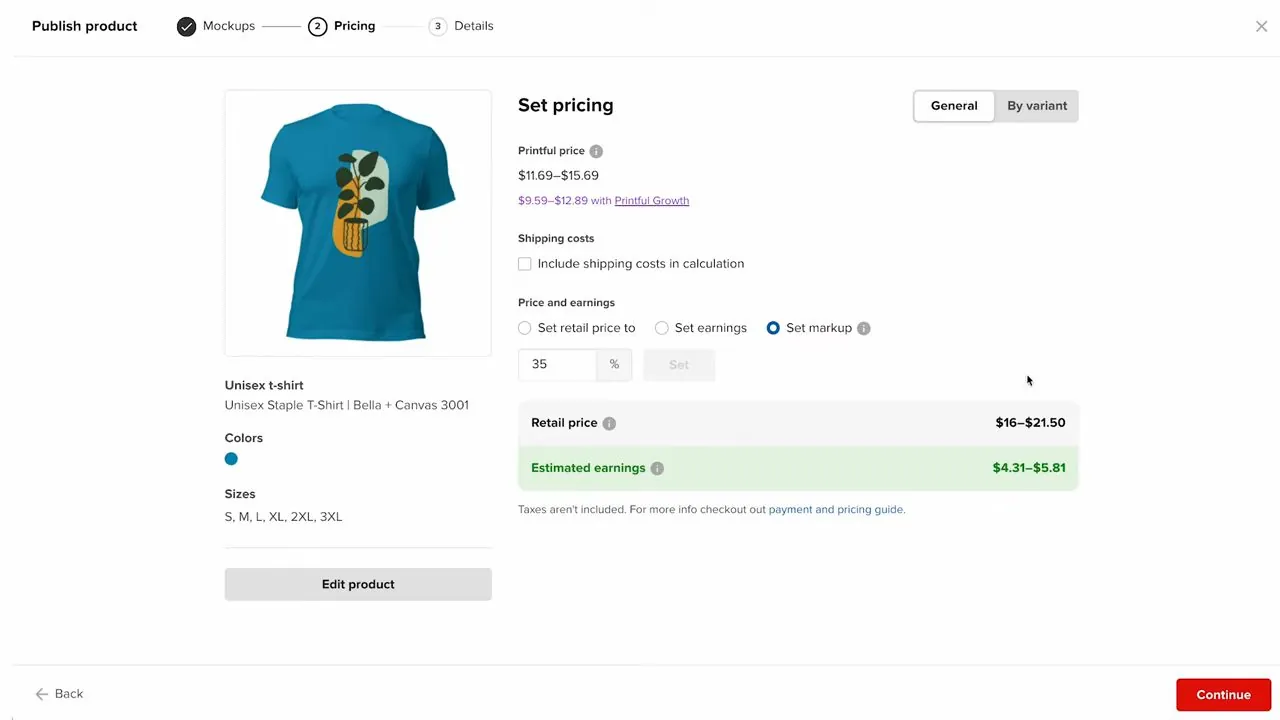
Printful's Set pricing step, October 2025, from Printful's own video. The prices on this screen are from 2025, so use the layout and not the numbers.
- Publish the product. The Details step shows the product description, a size guide box, tags and a Product visibility box. Make sure "Publish product (this product will be visible in your online store)" is ticked, then click Publish.
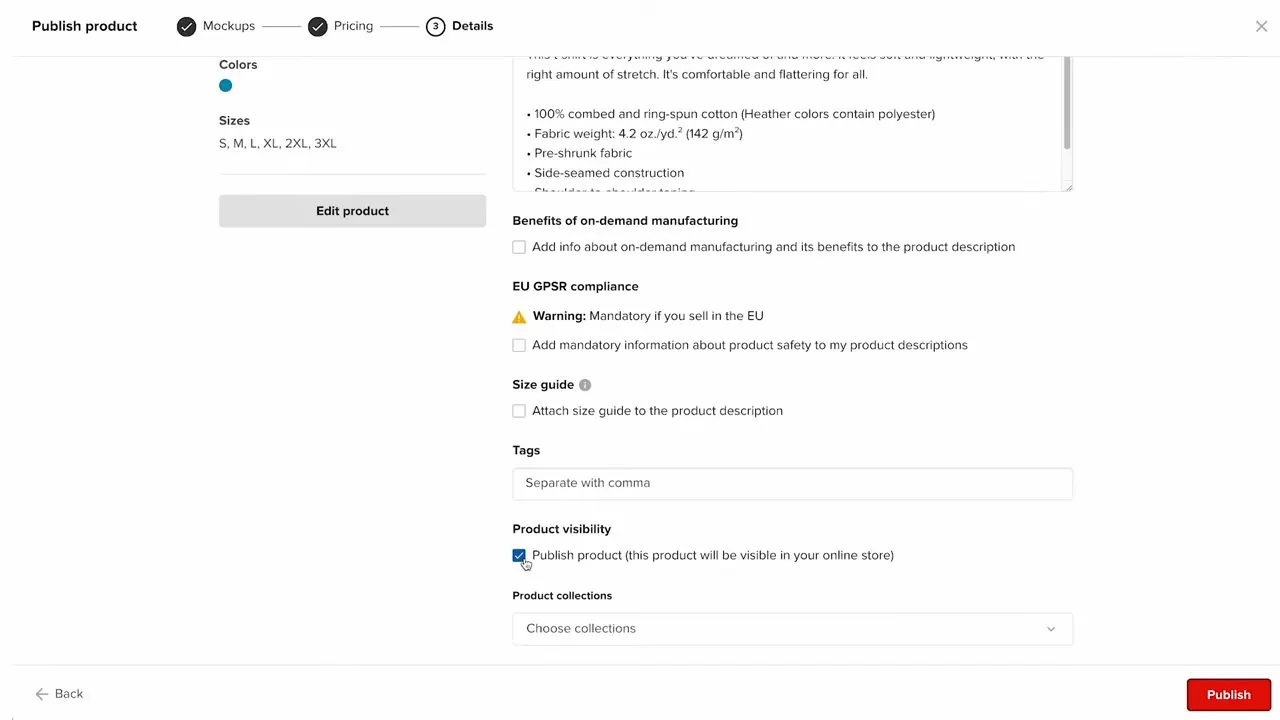
Printful's Details step with the Publish product box, October 2025, from Printful's own video.
- Add a billing method. In your Printful dashboard, open Billing, then Billing methods, and add a card or PayPal. Printful charges that billing method for each order, so set it up before your first sale. The Printful Wallet screen below lists PayPal, a payment card, Apple Pay and Pay over time with Klarna, plus an Add money button for putting money in the wallet.
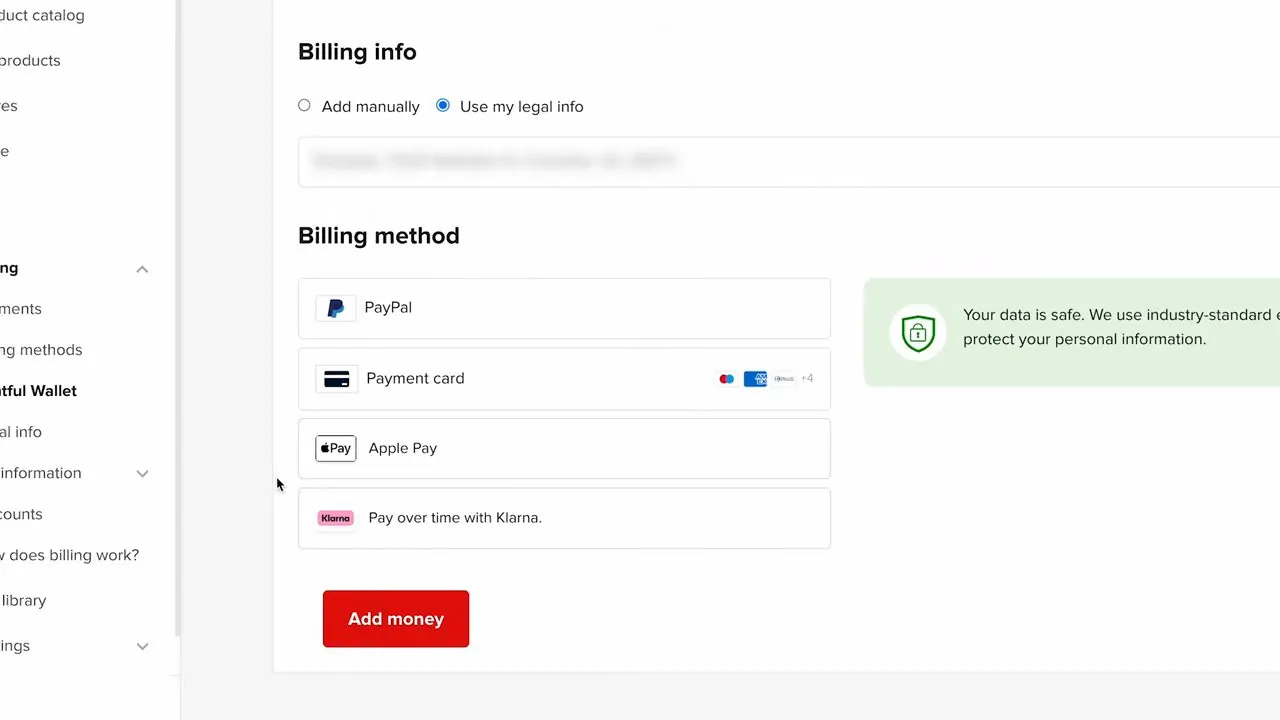
Printful's Wallet screen with its Billing method list, October 2025, with the address line blurred in the video, from Printful's own video.
- Leave the shipping profiles alone. Shipping profiles are the shipping rate settings Shopify uses at checkout. Printful sets them up in Shopify for you, under Settings, then Shipping and delivery, then App shipping profiles. Printful's video says to leave them as they are, because changes get reset. The video also says live carrier rates, meaning rates pulled from a shipping company at checkout, only work on Shopify's Advanced and Plus plans. So confirm that on my Shopify plans page before you count on it.
Printify: seven steps from install to first product
- Install the app. Open the Printify page in the Shopify App Store and click Install. Printify then opens its own dashboard inside your Shopify admin, and you sign in or make a free Printify account.
- Name your store. In Printify, open Store settings and type your store name. The name shows in the "ship from" part of shipping labels. The same screen has a safety rule box named GPSR, which stands for General Product Safety Regulation. The screen marks it "Required in the EU," so pick "I intend to sell in Europe" only if you will sell there.
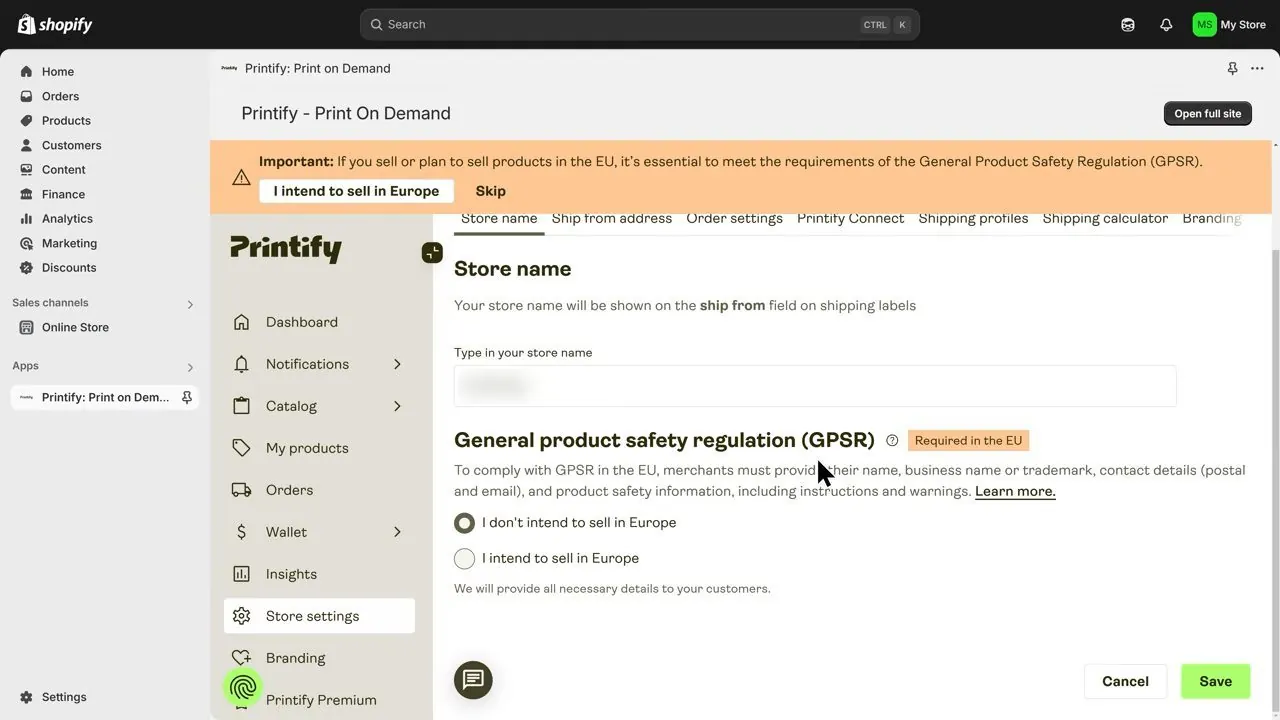
Printify's Store settings screen inside Shopify, March 2025, with the demo store name blurred, from Metics Media's video.
- Add a way to pay. In Printify, open Wallet, then Payments. You can add a card or put money in your Printify Balance. Printify charges that card or balance when an order goes to production.
- Pick the shirt and the print company. Open Catalog, then T-shirts, then the Unisex Jersey Short Sleeve Tee by Bella+Canvas 3001. Printify then offers "Printify Choice," where Printify picks a top-rated print company for each order, or "Choose manually," where you pick one. When you choose manually, you can sort by Printify's ranking, production time, price or shipping cost. The catalog screen below also shows how many print providers make each shirt and what the shirt costs from.
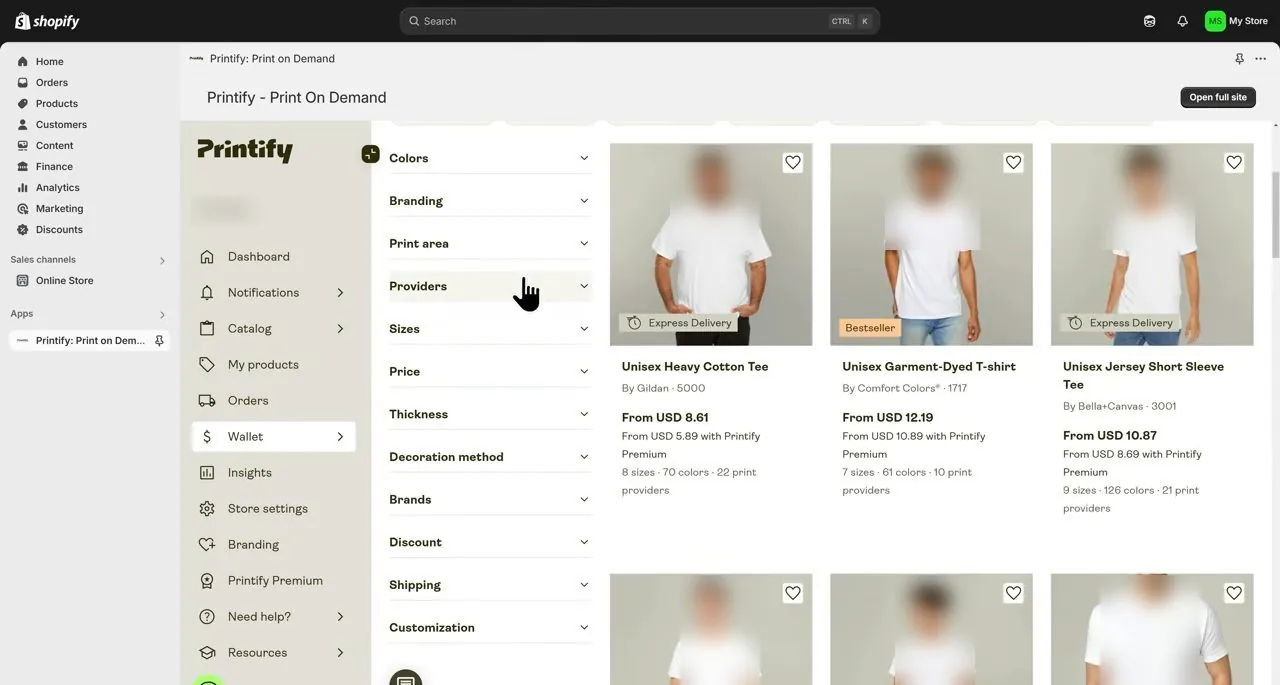
Printify's catalog with the Providers filter, March 2025, from Metics Media's video. The prices on this old screen are not today's. The demo store name and the models' faces are blurred.
- Design and set your price. In Printify's editor you upload art. Printify shows a safe zone border, and art outside it gets cut off. Then the Pricing table lists each size with your retail price, profit, profit margin, production cost and buyer shipping cost. The Edit price button changes all sizes at once.
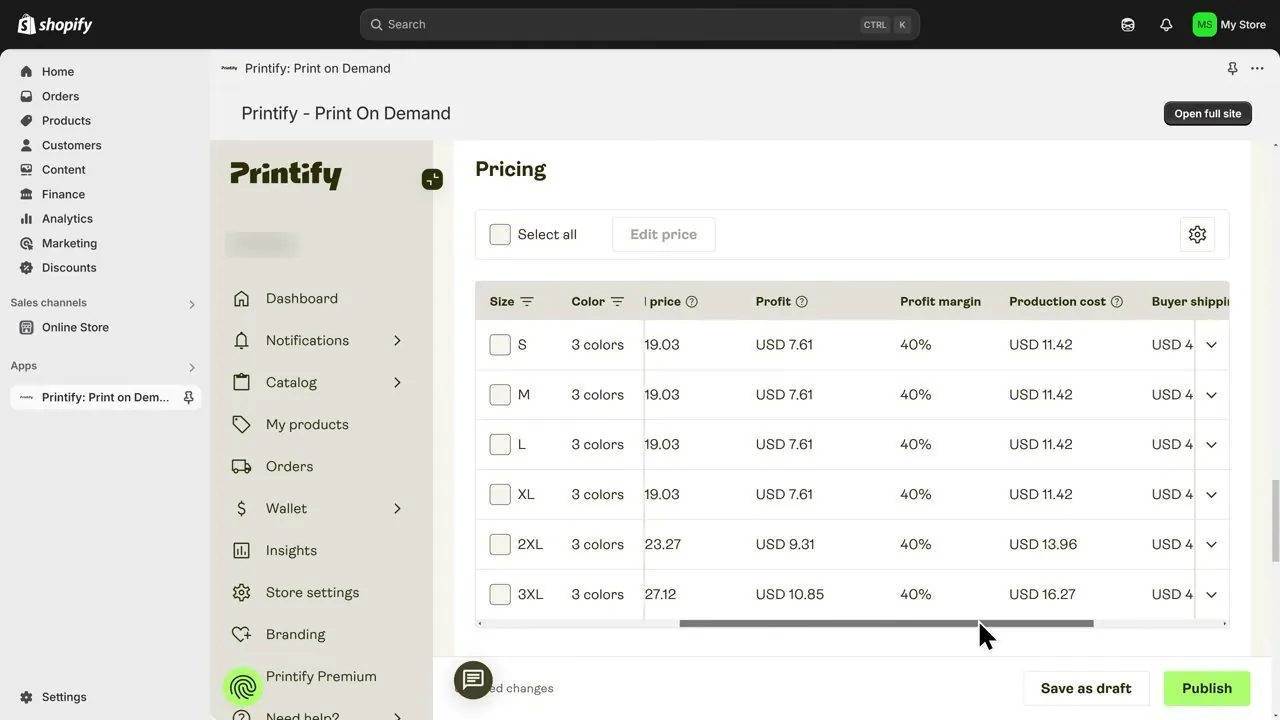
Printify's pricing table with one print company's production costs, March 2025, from Metics Media's video. These are old prices from one print company.
So notice what that pricing screen shows. Sizes 2XL and 3XL cost more to produce than S to XL. After the presenter sets one retail price of $19.99 for every size, the profit shown drops from $8.57 on S to XL to $6.03 on 2XL and $3.72 on 3XL.
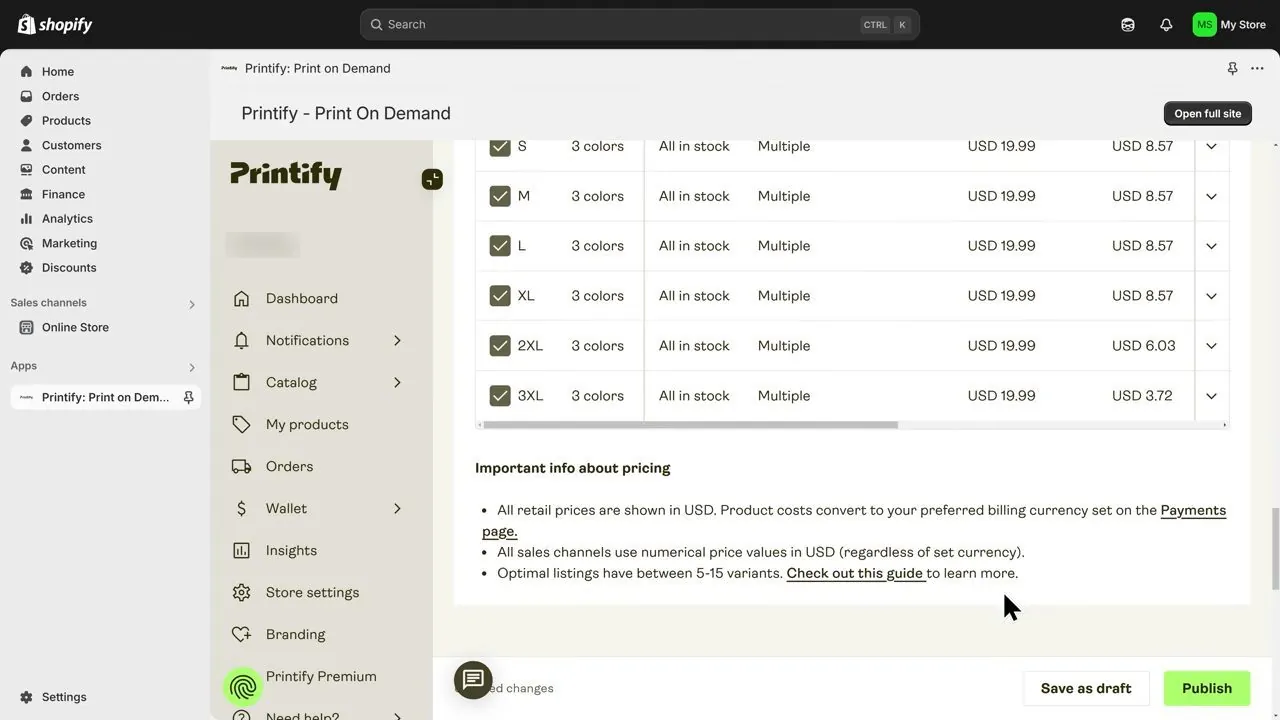
The same table after one $19.99 price for every size, March 2025, from Metics Media's video. The profit column here leaves out Shopify's card fee and shipping.
- Check the mockups, details and shipping. The Metics Media video previews the product, saves it, and then removes some of the default mockup pictures in the Mockup library. Then you write the title and description and choose the shipping option, Economy or Standard. Leave "automatically assign a new shipping profile" selected. The video also recommends "Only show in stock variants," so customers can't buy a size or color that's out of stock.
- Publish. Under product visibility, make sure "Hide in store" is not ticked, as the Metics Media video does, so the shirt actually shows in your store. Click Publish, and then open Products in your Shopify admin. The shirt shows there with an Active label, and its vendor reads Printify.
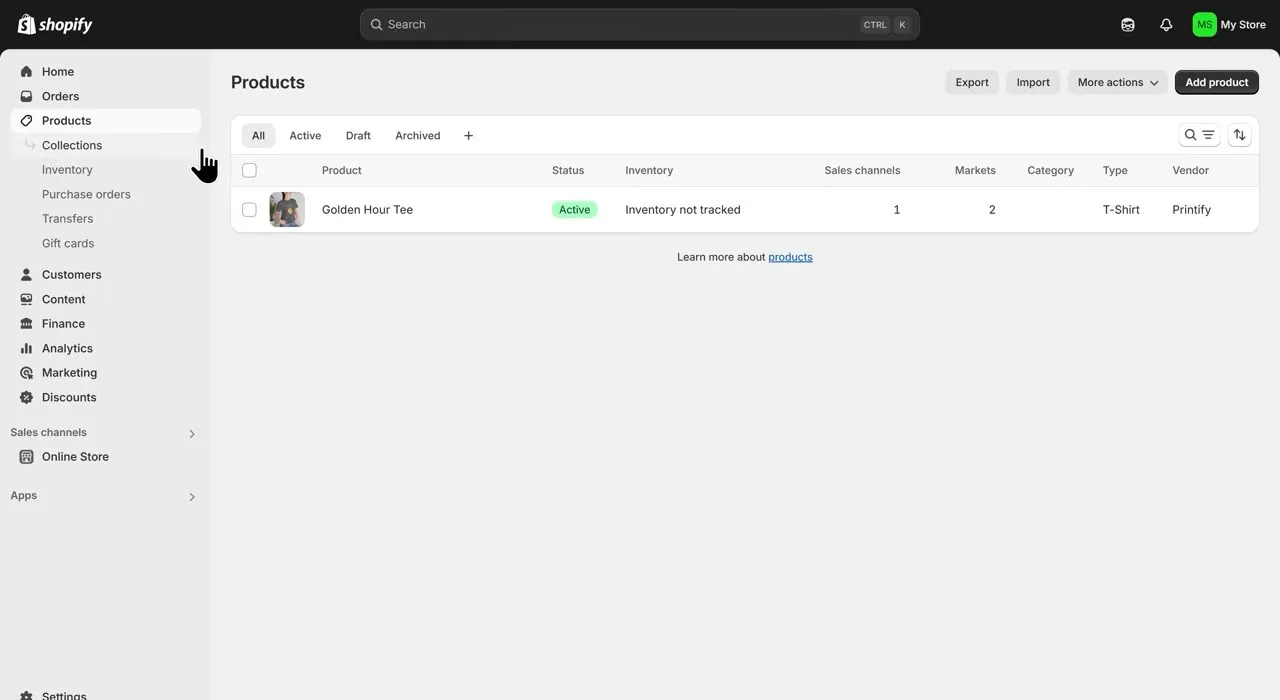
Shopify's Products list showing a published Printify shirt, March 2025, from Metics Media's video.
Before you list a shirt for real, order a sample of the exact shirt from the exact print company you plan to sell with. Every source on this page agrees on that one point. Printful's Shopify listing gives 20% off samples on the Free plan, and Printful's pricing page gives 25% off on Growth (checked October 17, 2026).
What does one Bella+Canvas 3001 shirt cost from each maker?
Here is what each maker's own page showed on October 17, 2026 for one Bella+Canvas 3001 shirt with one front print, shipped to a US address. The links go to Printful's and Printify's store pages for that exact shirt. These prices move with size, color, print company and day, so read them as "from" prices.
| Line | Printful | Printify |
|---|---|---|
| Base cost, Free plan, standard size | $11.92 on the Printful 3001 page, one print included | From $11.29 on the Printify 3001 page, using Printify Choice |
| Base cost with the paid plan | Not shown to visitors who aren't logged in | From $9.04 with Printify Premium |
| Shipping for one shirt to the US | $4.95, then $2.20 for each extra item, per Printful's shipping page | From $3.99 with Economy, Standard or Express options, depending on the print company |
| Time to make and ship | Fulfillment averages 2 to 5 business days. Standard US shipping then takes 3 to 4 business days. | 1.4 days average production with Printify Choice. Delivery time depends on the print company. |
A few notes on those numbers:
- Printify's Premium base cost on its own catalog page read $8.95 a few minutes before the product page read $9.04. So prices wobble by cents, and I use the product page.
- Printify lists the Gildan 5000 shirt from $8.55 and the Gildan 64000 from $8.11 on its T-shirt catalog page, which is a store page. The Comfort Colors 1717 shirt is in that same catalog. Those blanks are cheaper than the 3001, and I use the 3001 for the math because both makers sell it.
- Printful's shipping for kids and youth tees is $4.69 for the first item and $2.00 for each extra one. That is a different line on Printful's shipping page.
- Plus sizes cost more. A March 2025 Printify screen showed $11.42 for S to XL, $13.96 for 2XL and $16.27 for 3XL from one print company. Printful's October 2025 screen showed $11.69 to $15.69 across S to 3XL. Those are old, so read your own sizes live in each app.
How much do I keep from one $24.99 shirt, line by line?
Here is the math. Every assumption is written out so you can redo it with your own numbers. None of it is a forecast, and $24.99 isn't a price I'm recommending.
The assumptions: a US customer buys one Bella+Canvas 3001 in a standard size (S to XL) with a front print. The price is $24.99 and shipping is free to the customer, so you pay the print company's shipping. The customer pays by card through Shopify Payments on Shopify's Basic plan. There is no sales tax, no ad cost, no return, no sample and no app fee in the math.
Shopify's standard online card rate on Basic is 2.9% plus 30 cents (checked October 17, 2026). Shopify's pricing page lists a higher 3.5% plus 30 cents rate for premium cards, and the math assumes a standard card. So $24.99 times 0.029 is $0.72, and adding $0.30 makes $1.02 after rounding. Printful and Printify aren't payment companies, so Shopify's extra fee for outside payment providers doesn't apply to them.
| Line | Printful, Free plan | Printify, Free plan, lowest listed prices | Printify, Free plan, one print company's March 2025 prices |
|---|---|---|---|
| 1. Customer pays | $24.99 | $24.99 | $24.99 |
| 2. Shopify card fee (2.9% + 30 cents) | minus $1.02 | minus $1.02 | minus $1.02 |
| 3. Shirt and print | minus $11.92 | minus $11.29 | minus $11.42 |
| 4. Shipping to the customer | minus $4.95 | minus $3.99 | minus $4.75 |
| 5. What you keep | $7.10 | $8.69 | $7.80 |
To redo it by hand, here is the math. Printful: $24.99 minus $1.02 is $23.97. Then $23.97 minus $11.92 is $12.05, and $12.05 minus $4.95 is $7.10.
Printify at the lowest listed prices: $23.97 minus $11.29 is $12.68, and $12.68 minus $3.99 is $8.69. Printify at the March 2025 prices: $23.97 minus $11.42 is $12.55, and $12.55 minus $4.75 is $7.80.
Keep in mind that the Printify columns depend on which print company you pick. The lowest-price column mixes the cheapest listed shirt with the cheapest listed shipping, and a real order may not get both. The third column shows a real example, where Printify's result was $7.80 and not $8.69.
Why does the app show a bigger profit than this math?
So both apps show you a profit number when you set a price, and both leave out some costs. Printify's screen above showed a $19.99 retail price, a production cost of $11.42 and a profit of $8.57. That is $19.99 minus $11.42, with Shopify's card fee and the shipping left out. Printful's screen has an "Include shipping costs in calculation" box, and with it unticked, shipping isn't subtracted. Tick that box, and subtract Shopify's card fee yourself.
Should I charge the customer for shipping instead?
So charging for shipping doesn't add profit. If you charge $4.95 for shipping to cover Printful's $4.95, Shopify's 2.9% also comes out of that money, which is about 14 cents. The 30 cent part is charged once per order, so it doesn't change. So you keep a little less than you collect. Charging for shipping only lets you show a lower shirt price. Neither Printful's nor Printify's pages say whether charging for shipping or offering free shipping earns more.
When does a paid print plan pay for itself?
Basically, a paid print plan like Printify Premium or Printful Growth lowers your base cost on every shirt. That plan only pays off if you sell enough shirts to cover its monthly price. Here is the math for Printify Premium on the same shirt, using the lowest listed prices from the table above (checked October 17, 2026).
- Printify's Premium base cost for the 3001 is $9.04, and the Free plan's is $11.29. So Premium saves $2.25 on each shirt.
- On monthly billing, Premium costs $39. That's $39 divided by $2.25, which is 17.3, so you need 18 shirts a month to break even.
- On yearly billing, Premium costs $24.99 a month. That's $24.99 divided by $2.25, which is 11.1, so you need 12 shirts a month.
- Below those shirt counts, Printify Premium costs you more than it saves. At 40 shirts a month, the extra profit before the plan cost is 40 times $2.25, which is $90.00.
Printful's Growth plan costs $24.99 a month, and Printful says Growth is free once you reach $12,000 a year in sales. Printful's public 3001 page doesn't show the Growth price to visitors who aren't logged in (checked October 17, 2026). So the only Growth price for this shirt here comes from Printful's own October 2025 video screen. That screen showed $9.59 on Growth against $11.69, a saving of $2.10. On a saving of $2.10, $24.99 divided by $2.10 is 11.9, so about 12 shirts a month. Treat that as a rough guide, because it rests on an old screen.
And how many shirts before Shopify's plan itself is covered? Using the profit per shirt above, before any ads and before a print plan:
- Shopify Basic at $29 a month paid yearly: $29 divided by $7.10 is 4.08, so 5 Printful shirts. $29 divided by $8.69 is 3.34, so 4 Printify shirts.
- Shopify Basic at $39 a month paid monthly: $39 divided by $7.10 is 5.49, so 6 Printful shirts. $39 divided by $8.69 is 4.49, so 5 Printify shirts.
So Shopify's plan alone is a small cost. The harder part is getting buyers, and no maker's page says how long that takes or how many shirts a new store sells. My how long until your first sale page covers what's known about that wait.
What is left at $1,000, $3,000 and $5,000 of shirt sales a month?
Here is the table. These are calculations, not predictions, and nobody should take them as what a store will sell. The assumptions: every order is one $24.99 shirt, with no ads, no returns, no samples and no apps. The store is on Shopify's Basic plan paid yearly at $29 a month. The Premium column pays Printify Premium monthly at $39 a month. Order counts are the sales target divided by $24.99, rounded down.
- $1,000 divided by $24.99 is 40.02, so 40 orders, which is $999.60.
- $3,000 divided by $24.99 is 120.05, so 120 orders, which is $2,998.80.
- $5,000 divided by $24.99 is 200.08, so 200 orders, which is $4,998.00.
The per shirt amounts come from the table above: $7.10 for Printful and $8.69 for Printify's lowest prices. For Premium, it is $23.97 minus $9.04 minus $3.99, which is $10.94 a shirt.
| Monthly sales | Orders | Printful Free: $7.10 times orders minus $29 | Printify Free: $8.69 times orders minus $29 | Printify Premium monthly: $10.94 times orders minus $39 minus $29 |
|---|---|---|---|---|
| About $1,000 | 40 | $284.00 minus $29 is $255.00 | $347.60 minus $29 is $318.60 | $437.60 minus $68 is $369.60 |
| About $3,000 | 120 | $852.00 minus $29 is $823.00 | $1,042.80 minus $29 is $1,013.80 | $1,312.80 minus $68 is $1,244.80 |
| About $5,000 | 200 | $1,420.00 minus $29 is $1,391.00 | $1,738.00 minus $29 is $1,709.00 | $2,188.00 minus $68 is $2,120.00 |
Keep in mind what the table leaves out: ads, apps, returns, samples, your time and the taxes on your own income. The Printify columns use the cheapest listed shirt and shipping. Orders to far states or from another print company can come in lower, and the March 2025 example gave $7.80 where the table uses $8.69. The table has no Printful Growth column, because Printful doesn't show the Growth price for this shirt to visitors who aren't logged in.
Printful or Printify: which should I pick?
So it comes down to whether you want one company handling every shirt, or more choice on price. Here are the points that decide it, each from the makers' pages (checked October 17, 2026).
- Printful: One company makes everything, so you deal with one set of rules. Its base cost for the 3001 was $11.92 against Printify's from $11.29, and its shipping was $4.95 against from $3.99. Printful also publishes the share of orders it has to reship, which is in the quality section below.
- Printify: You choose from many print companies, and you can see price, ranking and speed before you choose. The lowest prices are lower, but the result depends on who you pick. Printify's Free plan allows 5 stores per account, and Premium allows 10.
- If you want the fewest decisions, I'd look at Printful first.
- If your profit per shirt matters most, I'd look at Printify, and I'd order a sample from the print company you pick before listing anything.
Which one prints better shirts?
So no independent, dated, hands-on quality test of the two turns up. In other words, no published test has someone ordering the same design from both and comparing the shirts with photos or measurements. What exists is each maker's own figures and reviewers' opinions, and I label each one.
- Printful, its own figure: Printful's quality page says "only 0.24% of orders reshipped" (checked October 17, 2026). A reshipment means Printful had to send an order again.
- Printify, its own words: Printify's pricing page says "Every Print Provider is vetted and ranked on print quality, speed, and shipping" (checked October 17, 2026). Printify's pricing page doesn't give a reshipment figure to match Printful's.
- Opinion: Merch Titans (April 1, 2026) says Printful's quality is consistently good and Printify's ranges from excellent to disappointing depending on the print provider. Style Factory's comparison (updated July 22, 2026) says finished products from both are strong and Printful has fewer quality complaints. It carries affiliate links to both makers. Neither page says the writer ordered samples.
- Opinion from a seller: Daniel Clark sells with both, and in a January 2024 video he says both have great quality. He also says Printify varies by print company and Printful is more consistent. The video is old, so I use it only for its advice to order samples.
- Shopify ratings: Printful has 4.8 from 3,950 reviews and Printify has 4.7 from 4,355 (checked October 17, 2026). These rate the whole app, not the print quality.
All the sources agree on one thing. Order a sample of your exact design from the exact print company before you sell it.
Why do the numbers online disagree with each other?
Here are the places where the makers' own pages, or the sources about them, don't match. I checked each one on October 17, 2026.
- Printful's free trial: Printful's pricing page says "Start a 14-day trial" for the Growth plan. Printful's Shopify listing says "Exclusive 90-day free trial" for the same $24.99 plan. Printful wrote both pages, and neither says which one is current. I'd plan on 14 days until you see the real screen.
- Printful's shipping price: Printful's shipping table says $4.95 for one shirt to the US. A question and answer on the same page says one t-shirt to the US costs $3.99. I use the table.
- Printify's shirt cost: Printify's product page says from $11.29 for the 3001. Printify's custom t-shirt page lists the 3001 at a cost of $10.98, and the calculator on its pricing page uses $8.77 for a unisex jersey tee. The shirt costs different amounts because the price depends on which print company makes it.
- Printful's reshipment rate: Printful's quality page says 0.24% of orders are reshipped. The Style Factory review above says Printful reports about 0.19% of orders coming back over quality problems. Neither page says when its figure was measured.
- Printify Premium's price: $39 and $24.99 are both right. One is monthly billing and the other is yearly billing, as explained above.
- Shopify Basic's price: $29 and $39 are both right. $29 a month is paid yearly and $39 is paid monthly (checked October 17, 2026).
When is print on demand the wrong choice?
- If you want to hold your own stock and control packing, print on demand won't give you that. My dropshipping against print on demand against your own products page compares all three.
- If you are choosing between selling on your own store and on a marketplace, my Shopify against Etsy page and my how to start an Etsy shop page cover that. Then starting a store with no money covers the cheapest ways to begin.
- If you want to compare print on demand with buying products from a supplier, my dropshipping setup page and is dropshipping worth it page cover that route.
- If you want to know every Shopify cost, not just the print company's, see Shopify's real monthly cost and Shopify's plans explained.
Which videos show the Printful and Printify setup screens?
So these are the two videos the screens above come from. You can play each one here, and YouTube's usual controls work, including skipping ahead, changing the speed and going full screen. Under each is a summary of what it covers. Don't use any price you see in a video, because those prices were true on the day of recording.
Printful walks through its own Shopify setup on a real screen recording.
- Setup: They create the accounts, install the app from Shopify and turn on international markets.
- The product: They go through My Products, Create product, the Bella Canvas unisex staple t-shirt and the Design Maker, using DTG printing.
- Mockups, pricing and publishing: They choose mockups, set the pricing and markup, and fill in the details.
- Shipping: They cover shipping profiles and say live shipping rates need Shopify's Advanced or Plus plan.
- Billing: They show the billing methods and the Printful wallet.
Caleb from Metics Media builds a whole Printify and Shopify store on screen. The video's description has affiliate links, which I don't repeat here.
- Shopify and the app: They sign up for Shopify with the $1 offer, install the Printify app, set the store name and add a way to pay Printify.
- The catalog and print companies: They go through the catalog and how to choose a print company.
- Design and mockups: They use the design editor, pick variants and trim the mockup library.
- Listing and publishing: They write the title and tags, choose shipping and pricing, and publish.
Buddy's take
So ultimately, a print on demand shirt store on Shopify costs you Shopify's plan and nothing to install, and the print company is paid only when a shirt sells. On one $24.99 shirt the math leaves about $7.10 with Printful and about $8.69 at Printify's lowest listed prices, and that's before ads.
For me personally, two things are worth doing first. Order a sample from the exact print company you pick, and redo the profit math with your own price and your own sizes. And keep in mind that you pay the print company from your own card or balance, not from the customer's payment.
If it fits your budget, start on each maker's free plan, and only pay for Printify Premium or Printful Growth once your monthly shirt count passes the break-even numbers above.
This page is general information about Shopify's, Printful's and Printify's own rules and prices as they are printed on their pages. It makes no promise about sales or income, and the sales figures above are only calculations.
Have a question about “How do I start a print on demand store on Shopify with Printful or Printify, and what do I actually keep from each shirt?”?
Ask it here. Every question comes to me first. I answer as many as I can, and each answered question goes on this page with my answer so other people starting a store can see it too. I don't ask for your email, so check back on this page for the answer.
More shopify guides
How do I set up a Shopify dropshipping store from scratch, and what does the first month cost?
The exact clicks with the DSers app, a first-month cost table where every line is sourced or marked as a guess, and the money timing nobody warns you about.
Is Shopify's $1 for 3 months offer real, and how do you avoid being charged?
A walk through the real signup screens, the exact fine print, the price after the $1 months, and the cancel steps.
How to start a Shopify store, step by step, if you've never sold online
Every screen from signup to launch, in the order you'll see it, with what each one asks for and what you can skip.
Is Shopify worth it in 2026? What it costs, what sellers complain about, and who it fits
A straight answer for someone who has never sold online, with the fee math shown so you can redo it.
Will Shopify hold my money, and how do payouts work for a new store?
How Shopify Payments pays you, what a hold or a reserve is, what Shopify says causes them, and what to do on day one.
Shopify plans explained: Basic vs Grow vs Advanced, and which one a beginner should pick
Start on Basic. Here is what Grow and Advanced add, what each costs, and the sales level where paying more actually saves money.
Shopify suspended my store before I even launched: why it happens, how to appeal, and how verification works
What Shopify's rules say about closing a store, the appeal steps Shopify prints, the documents Shopify asks for in the US, and what sellers have posted.
- Shopify, pricing page (Basic plan, $1 offer, 2.9% plus 30 cents standard online card rate, 3.5% plus 30 cents premium card rate), checked October 17, 2026.
- Printful, pricing, shipping and quality pages, and the Unisex Staple T-Shirt, Bella + Canvas 3001 page, checked October 17, 2026.
- Printful Help Center, How does Printful charge for Shopify orders, checked October 17, 2026.
- Printify, pricing page, Bella+Canvas 3001 page, T-shirt catalog and custom t-shirt page, checked October 17, 2026.
- Printify Help Center, When will I be charged for my Printify order and What happens when an order comes in, checked October 17, 2026.
- Shopify App Store listings, checked October 17, 2026: Printful: Print on Demand and Printify: Print on Demand. Blank maker: Bella+Canvas.
- Opinion pieces, checked October 17, 2026: Merch Titans, April 1, 2026, and Style Factory, updated July 22, 2026, which carries affiliate links to both makers.
- Videos, YouTube: Printful Custom Printing, Printful + Shopify Integration: Full Setup Guide, October 31, 2025, the source of the Printful screens. Metics Media, Print on Demand Shopify Tutorial: Full Printify + Shopify Store Setup, March 5, 2025, the source of the Printify screens. Daniel Clark, Printify vs. Printful honest review, January 25, 2024.
Online Store Buddy is an independent site. We're not affiliated with or endorsed by Shopify, Etsy, Amazon, WooCommerce, Wix or Squarespace. Those names are trademarks of their owners.