
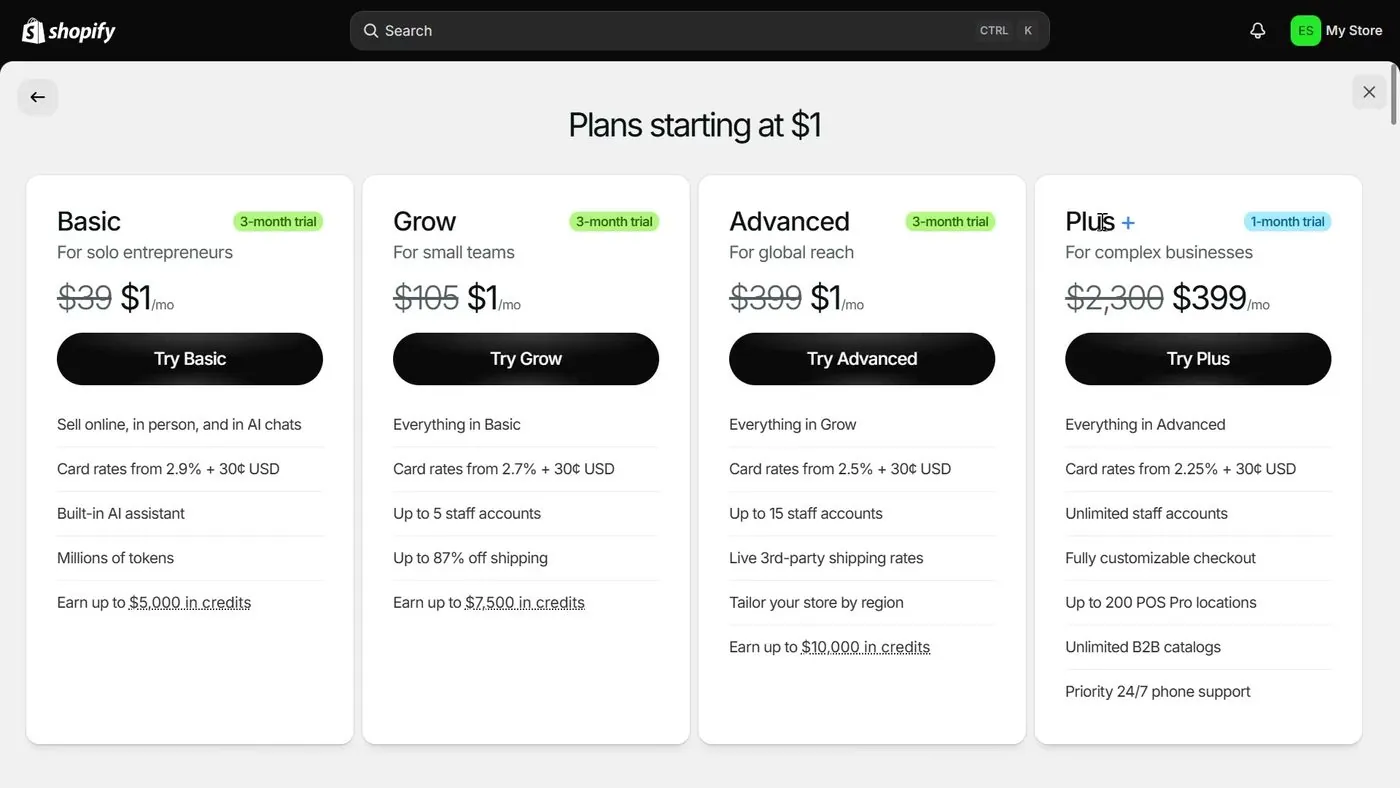
Now a quick note on money figures. Prices on this subject change several times a year, so check the linked Shopify page before you pay anything. We recheck these figures every month. The only prices on this page are for a US store, checked October 17, 2026 on Shopify's pricing page. Shopify's trial is 3 days free, then $1 a month for 3 months. That $1 a month offer is a promotion. After the third month, the regular Basic plan price starts, which is $39 a month paid monthly or $29 a month paid yearly. I cover the details in my free trial and $1 offer guide.
Quick picks
Is there a measured time for a first Shopify sale?
So no. No survey or study has measured how long a new online store usually takes to get its first sale. Shopify hasn't published a number either. Numbers on blogs don't come with a study behind them, so any single number you see is a guess.
Here is what Shopify does say. Its article on making your first sale, published and updated September 1, 2026, says some stores make a first sale within days, while others take several weeks or months. That is Shopify's statement, and the article gives no data behind it. Basically, it tells you the answer is anywhere in a wide range.
And something to note is that sellers who are still waiting for a first sale are the ones who post questions. So the stories you read online lean toward the slow ones. Keep that in mind with the next section.
What did 12 Shopify sellers report about waiting for a first sale?
Now these are real reports, but they're examples and not a typical time. Each one is a post on the Shopify Community forum from a person who had no sale yet when they posted. There are 12 threads from 2024 to 2026, checked October 17, 2026. Nobody was verified, and each person described their own store. This table shows what waiting looks like. It doesn't show what is typical.
| Date posted | What the seller reported | Thread |
|---|---|---|
| Apr 1, 2024 | 3 months of posting on social media, no sales. | Community thread |
| May 30, 2024 | Over 1 month, Facebook and Instagram ads, about 450 sessions, and no "organic" sale yet, in the seller's words. | Community thread |
| Jun 5, 2024 | 1 month, Google Ads at 25 pounds a day, no sale. | Community thread |
| Jul 11, 2024 | Just over 1 month, just over 1,000 sessions, ads and organic posts, no sale. | Community thread |
| Oct 9, 2024 | About 5 weeks, search engine optimization, a Facebook campaign, blogs and videos, no sale. | Community thread |
| Mar 27, 2025 | About 100 sessions a day, no sale yet. The post didn't say how long the store had been live. | Community thread |
| Jun 29, 2025 | 4 months, dropshipping, tried several offers, no sale. | Community thread |
| Nov 26, 2025 | 4 weeks, paid Instagram ads, no sale. | Community thread |
| Jan 6, 2026 | Live with products and almost no traffic. Later the seller said the only buyers so far were people who already supported them. Social posts, Google Search Console and a free-product offer had not worked. The post didn't say how long the store had been live. | Community thread |
| Apr 4, 2026 | Launched a couple of days earlier, ads running, 350 sessions, 7 reached checkout, 0 bought. | Community thread |
| Jul 11, 2026 | 3 months, zero online sales. | Community thread |
| Aug 26, 2026 | About 376 sessions in 30 days, no sale, and said it had been like that for a couple of months. | Community thread |
Here is the count, from the table above. Four sellers said about 2 to 4 months. Five said about 1 month or a little more. One said only a couple of days. Two gave their traffic but not how long the store had been live.
Only two posts in these threads gave a time to a first sale that had actually happened. In a thread from April 1, 2024, one seller replied that their fashion store, with a social following, took around 4 to 5 months. In a thread from September 12, 2026, a seller said they opened about a month earlier, had about 3,000 sessions and made 3 sales. Two reports are far too few to call a typical time.
And here is the pattern I see in the table. The waits came with very different traffic, from about 100 sessions a day down to almost none. So waiting longer didn't bring a sale on its own. What seemed to matter was getting visitors who actually wanted the product. That is my reading, and it is an opinion.
If you want to see how the forum talks about this in more detail, my guide on whether Shopify is worth it quotes three of these threads.
Where do visitors to a new Shopify store come from?
So Shopify builds your store and takes your payments, but Shopify doesn't send shoppers to your store. You have to bring in every visitor yourself. In its first-sale article, Shopify lists these ways to bring people in. This is Shopify's advice and not a promise of results.
- Free routes: Shopify suggests telling your personal network and putting the store in your social media bios. It also suggests joining online communities like forums and Facebook groups, offering discount codes, and writing a blog or making videos that show up in search.
- Paid ads: Shopify names ads on Facebook, Instagram, Google Shopping, Google Ads, YouTube, Pinterest and TikTok. Shopify suggests starting with $5 to $10 a day on one ad platform.
- Partnerships: Shopify suggests working with bloggers, reviewers and influencers. It also suggests local word of mouth like flyers, pop-up shops and QR codes, and asking your first buyers for reviews.
- Fixes for visitors who leave: Shopify suggests making your pages load faster and adding trust signals, which are things like clear policies and reviews. It also suggests a simpler checkout and emails that remind shoppers about a full cart.
Now Google is one more route, and it is slow to start. Google's own page on getting on Google, checked October 17, 2026, says it can take a few weeks for Google to notice a new site. Google suggests typing site: followed by your store's web address into Google to see whether Google has found your store, and adding the site to Google Search Console. Google's page is about being noticed. It doesn't say how long a new store takes to show up when shoppers search.

The part of Google's page on getting on Google that says it can take a few weeks for Google to notice a new site, captured October 17, 2026.
And one more difference to keep in mind. Marketplaces like Etsy and Amazon show your products to shoppers who are already searching on their site. Shopify doesn't. I cover those two in my Etsy shop guide and my Amazon selling guide.
Zero sales: how do you check that your Shopify store is open for orders?
So before you worry about visitors, rule out a store that can't take an order. Unless I say it's my own advice, everything in this section comes from Shopify's help pages, checked October 17, 2026. Go through the steps in order.
Step 1: Is Private mode on, or is checkout inactive?
Basically, a new Shopify store starts closed. Shopify's free trial help page says a new store starts in private mode or with its checkout inactive. Customers can only buy once you turn off private mode, or turn on checkout by choosing a paid plan. Private mode is a setting that shows visitors a password page instead of your store. Checkout is the page where a shopper enters their address and pays.
- Checkout turns on when you choose a paid plan. Shopify's free trial help page says that after you choose a paid plan, your store's checkout is activated.
- The trial ends without a plan. If your free trial ends before you pick a paid plan, the free trial help page says your store is paused until you choose one. My free trial and $1 offer guide shows what happens at that point.
- Where Private mode lives. Shopify's preferences help page puts the setting under Online Store, then Preferences, in the Store access section. The preferences help page says that while Private mode is on, visitors see a page with a password box, and search engines are blocked. Shopify's help pages don't give a step-by-step for switching Private mode off. So check the setting in your Shopify admin, which is the dashboard where you run your store, and use that help page as your guide.
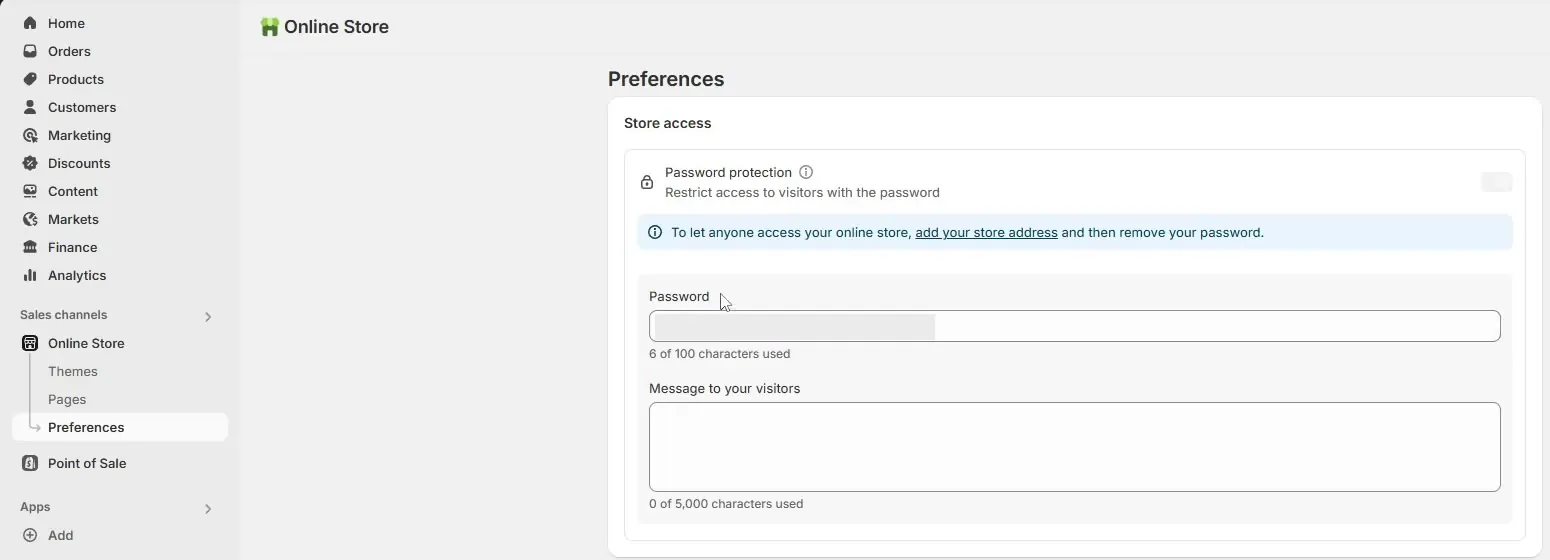
The Store access box on the Online Store Preferences page in a July 2025 video, from Guides by Dan's video. This older screen labels the setting Password protection, and the password is blurred.
Here is a simple test that is my own advice, not Shopify's. Open your store's web address in a private or incognito browser window on your phone, where you are not logged in. If you see a password box, nobody else can buy from you either, and Google can't find the store.
Step 2: Is a payment provider set up?
A payment provider is the company that takes the shopper's card and sends the money to you. Shopify Payments is Shopify's own provider. The free trial help page says you need a payment provider set up to sell and take orders during the trial. You can set up Shopify Payments or an outside provider that Shopify supports.
Something to note is that Shopify's setup page says Shopify Payments needs two-step authentication on your account first. Basically, that means a second check, like a code, each time you sign in. Shopify's help pages don't say what a shopper sees at checkout when no provider is active, so the test order in Step 4 is the way to find out.
And if you're wondering when the money from a first sale reaches your bank, I cover that in my Shopify Payments and payout holds guide.
Step 3: Did you leave a payment provider in test mode?
Test mode is a setting that lets you place pretend orders to check your checkout. Test mode left on is easy to miss. Shopify's test mode help page says customers can't place live credit card orders while your payment providers are in test mode. After your test, Shopify says to turn test mode off so live orders work again.
Shopify Payments has its own Test mode setting under Settings, then Payments, then Manage. Shopify's test mode help page covers turning test mode on, and doesn't give separate steps for turning test mode off. So open that same screen, look at the Test mode setting, and make sure it is off.
Step 4: Can you place a test order?
Shopify's test orders help page says you can test a payment gateway only after you've chosen a paid plan. A payment gateway is the part of checkout that sends the card details to the provider. So during Shopify's free trial, before you pick a paid plan, you may not be able to run a test. Shopify describes three ways to test.
- Shopify Payments test mode. Go to Settings, then Payments, open Manage under Shopify Payments, turn on Test mode and save. At checkout, use Shopify's test card, such as Visa 4242 4242 4242 4242, a name of at least two words, a future expiry date and any 3-digit security code.
- The Test payment gateway. Under Settings, then Payments, deactivate any active credit card provider, open the list of all providers, choose Test payment gateway and activate it. At checkout, enter 1 as the card number for an approved payment, 2 for a declined one and 3 for a gateway failure. A gateway failure is a payment that fails because of a technical error. The test purchase must be above the equivalent of $1.
- A real order you cancel. Place an order with a real card, then cancel and refund it. Shopify warns that your payment provider might charge you fees for that order.
Test orders don't show up in your payouts, which are the deposits Shopify sends to your bank, or in your reports. And when you finish, turn test mode off (Step 3), or deactivate the Test payment gateway and reactivate your live provider.
Step 5: Did anyone actually visit? Read the Acquisition reports
If Steps 1 to 4 are fine, the next question is whether any visitors arrived. Shopify's Acquisition reports help page shows where to look. On a computer, go to Analytics, then Reports, and filter Category to Acquisition. In the Shopify app, open the menu, then Analytics, then Reports, tap the filter icon, then Category, then Acquisition.
- Sessions by referrer shows whether visitors came directly, from search or from a link on another site. A session is a visit to your store, and Shopify's report pages don't spell out exactly how Shopify counts sessions.
- Sessions over time and Visitors over time show how many visits and visitors you had over a time range. Visitors over time shows the last 7 days by default, compared with the 7 days before.
- Sessions by location shows the countries, regions and cities your visitors came from.
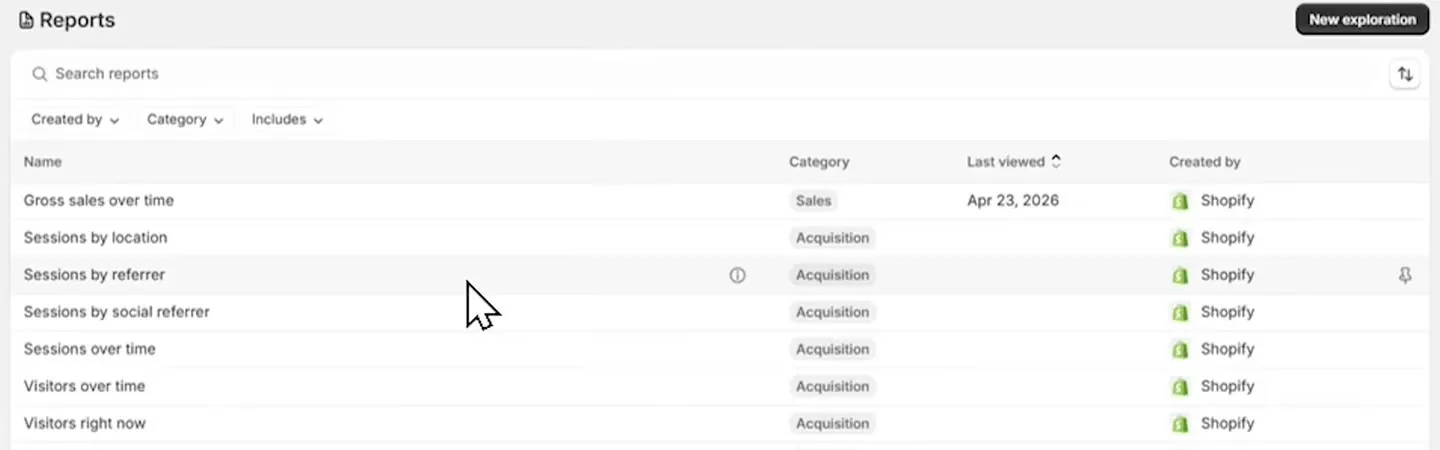
The Reports list in a June 2026 video, with the Acquisition reports from the list above, from Speak About Digital's video. The presenter's store shows a different currency.
These reports cover your Online Store sales channel only, which is your Shopify website. You can also filter out bot traffic, which is automated visits that aren't people. Shopify's help pages don't say which Shopify plans include which reports. Shopify's behavior reports help page also lists a Conversion rate breakdown report. It shows the path your visitors take through your store and checkout, and how many drop off at each step.
Step 6: What do the numbers suggest?
So here is how I'd read the reports. This is my own advice and not Shopify's.
- If sessions are near zero, your checkout isn't the reason yet, because nobody has found the store. Go back to the ways to bring in visitors above.
- If sessions are in the hundreds and none reach checkout, look at your product pages, prices and trust signals. Then open the store on your phone and add a product to the cart yourself.
- If many sessions reach checkout and nobody buys, run the test order again and check your payment settings, shipping rates and taxes at checkout.
A real example of that last case is in a forum thread from April 4, 2026. The seller reported 350 sessions, 7 reaching checkout and 0 buying. A conversion rate is the share of visitors who buy. I don't give a conversion rate to aim for, because no published study backs a number.
One more quick check: make sure the web address you shared actually goes to your store.
When is waiting on Shopify the wrong plan?
So if you don't have a way to bring in visitors, and you can't spend on ads or time on posting, Shopify may be a hard place to start. A marketplace like Etsy or Amazon already has shoppers searching on its own site, and Shopify doesn't. Shopify's monthly plan price also keeps running while you wait, and I add up Shopify's monthly costs in my real monthly cost guide.
And if you're deciding with very little money, my no-money store guide goes through your options. If you're thinking about dropshipping, where a supplier ships orders for you, my dropshipping guide covers that. For the full setup order, see my guide to starting a Shopify store.
This page is general information. Shopify's help pages and settings change, so check your own admin for the current screens.
Videos about a store with no sales
If you want to watch someone do this, here are two videos. You can play each one on this page, and YouTube's usual controls work. Under each video is a short summary so you can decide if it's worth your time.
A presenter named Joel goes through seven reasons a store has no sales and a four-step check.
- Reasons: Nobody knows the store exists, traffic that is not targeted, a weak product page, the wrong price, missing trust signals, a checkout with extra steps, and too little time or traffic.
- The check: Look at traffic, look at the product page on a phone, check trust signals such as a professional email, an About page, a refund policy and reviews, then test a promotion.
- Worth knowing: The presenter says a store with under 100 visitors a week has a traffic problem, and that stores convert at 2 to 3 percent. Those are his numbers. This page gives no conversion rate to aim for, because no published study backs one.
A presenter clicks through Shopify Analytics, the Reports list and the Live View.
- Where to click: Analytics in the left menu, then Reports for the list of ready-made reports.
- The Reports list: The presenter says it has a search bar, filters for who created a report and its category, and columns for name, category, last viewed and created by.
- Live View: The presenter says it shows visitors on the store right now, sales and orders as they come in, and where current visitors are.
- Worth knowing: The video also pitches the presenter's Shopify course, and his store shows a different currency. Shopify's own Acquisition reports page, linked above, is the guide for this page.
Buddy's take
So ultimately, nobody can tell you how long your first sale will take, because no one has measured it. Shopify itself says days, weeks or months.
But keep in mind that a store with zero sales might simply be closed for orders. So check for Private mode, no paid plan, no payment provider, or test mode left on. Then check the Acquisition reports to see whether anyone visited.
For me personally, if sessions are near zero, I'd put my effort into getting people to the store before changing anything else. And if you can't bring in visitors, I'd look at a marketplace like Etsy or Amazon.
So hopefully this helps you tell a broken store from a quiet one.
Have a question about “How long until your first Shopify sale, and what does zero sales after launch mean?”?
Ask it here. Every question comes to me first. I answer as many as I can, and each answered question goes on this page with my answer so other people starting a store can see it too. I don't ask for your email, so check back on this page for the answer.
More starting out guides
Is dropshipping still worth it in 2026, and how do you check a dropshipping course before paying?
So dropshipping is cheap to try, but nobody can honestly promise you'll make money from it. Below I show you the math on one order, the real costs and the FTC's own checklist for courses.
Do you need an LLC or an EIN before you start a Shopify store?
A plain answer from someone who doesn't sell LLC filing, with the government and Shopify pages behind each point.
Can you start a Shopify store with no money and no products?
You can build a store for $0 and list things you never bought. You can't take a real order for $0. Here is the smallest real number, and what each way of selling without stock costs.
- Shopify blog, How to make your first sale, published and updated September 1, 2026, read October 17, 2026.
- Shopify Help Center, checked October 17, 2026: free trial, online store preferences and Private mode, Shopify Payments setup, test orders, payments test mode, Acquisition reports and behavior reports.
- Shopify pricing page, checked October 17, 2026, for the trial offer and Basic plan prices (US).
- Google Search Central, Get your website on Google, checked October 17, 2026, and Google Search Console.
- Shopify Community forum threads, read October 17, 2026, and treated as unverified seller reports: 310347, 327242, 328993, 338593, 365060, 403528, 421561, 577232, 582077, 600677, 647276, 672700 and 680629.
- Etsy and Amazon, named only as marketplaces. Ad platforms named in Shopify's first-sale article, linked to their own advertising pages, checked October 17, 2026.
- Photos and videos, checked October 17, 2026: Speak About Digital, Shopify Analytics Tutorial (June 2026), Guides by Dan, Shopify storefront password protection (July 2025), Ecom Mastery, Why Most Shopify Stores Never Get Their First Sale (September 2026), and a screenshot of Google's getting on Google page.
Online Store Buddy is an independent site. We're not affiliated with or endorsed by Shopify, Etsy, Amazon, WooCommerce, Wix or Squarespace. Those names are trademarks of their owners.